HI
Just wish to know if there is any way to clear unwanted/dead viewed links form the viewed links list
Hi everyone!
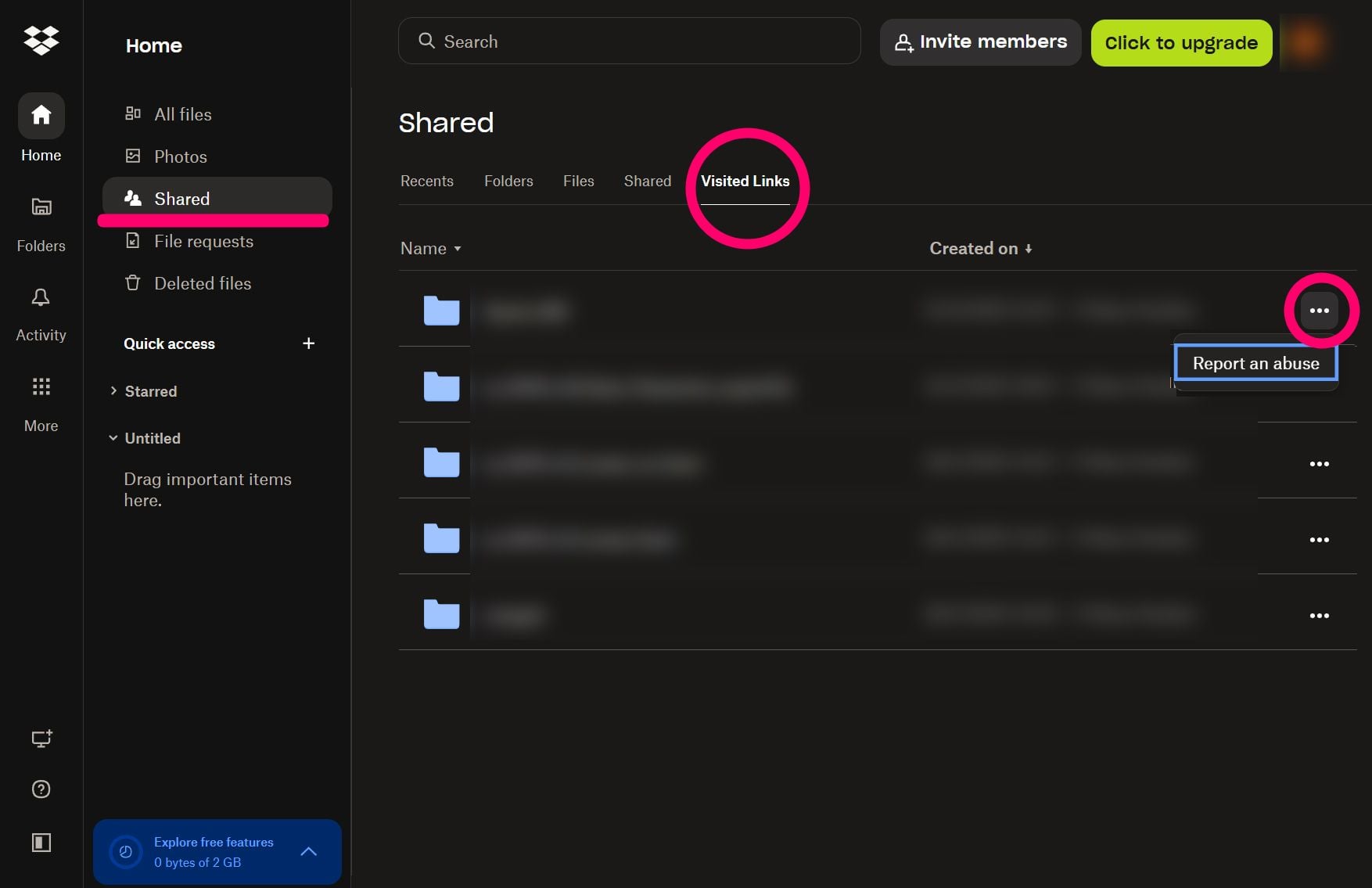
I just wanted to comment here and let you all know that we have now delivered functionality to remove access from visited links via the shared page.
I'll share further documentation outlining this precess when it's ready but I just wanted to update you all in the meantime.
Thanks you all for your patience and support for this idea!
If you mean https://www.dropbox.com/share/visited-links then no, sorry, there isnt.
To request that is added as a feature you can add it to this forum.
You can`t delete viewed links but you can hide / remove the viewed links section so nothing shows on the home page 😎
I think this is a big issue, concerning.
Somebody is able to tell me if business account administrator is able to see my visited links? If this is the case .. **bleep**.. that's not good at all.
Dropbox Plan(Business Plus - im not using that account for writing this Discussion)Are you a Team Member or Admin?(Team Member - im not using that account for writing this Discussion)Do you have access to the email linked to the account?(Yes)Are there any devices connected to your Dropbox account?(Workstation - Mobile Android)
Hi everyone,I’d like to report a potential privacy issue related to Dropbox’s Visited Links section.
I’ve noticed that whenever I open a Dropbox link for example, a shared link or a private file , it’s automatically added to the Visited Links list of the logged-in account (without even alerting or notifyin the user). The issue is that there doesn’t seem to be any option to delete or clear these links.
This becomes a real privacy problem in certain scenarios. For instance, when using a business account as part of a team, if I open a personal or confidential Dropbox link (even by mistake), that link remains permanently visible in the Visited Links section, with no way to remove it.
For that reason, I’m writing this post from my personal account, since this exact situation happened to me. I opened a few personal Dropbox links while being logged into my business account, and I don’t want to involve or alert the team admin about it, but now those links are permanently stored under “Visited Links.”
Before posting here, I did some research and also voted for an existing feature (idea) request on this topic. I’ve noticed that several users have already reported the same issue, and, if I’m not mistaken, the earliest posts date back around three years (and closed as solved). (many others are also on reddit)If that’s really the case, I’m a bit concerned that something which seems to be a privacy problem is still being treated as a feature request, rather than an issue that needs to be addressed.
So I’d like to ask:
Having control over visited links would be important for maintaining privacy and compliance with company policies.
here the link to the "idea" : Viewed Links Folder - Link Removal | The Dropbox Community
meantime thank you very much for your attention and future dedication on this matter.
P.s. Sorry folks if ive posted in a wrong section,ive searched (maybe wrong) for something privacy related without success.
dropce wrote: If that’s really the case, I’m a bit concerned that something which seems to be a privacy problem is still being treated as a feature request, rather than an issue that needs to be addressed.
If that’s really the case, I’m a bit concerned that something which seems to be a privacy problem is still being treated as a feature request, rather than an issue that needs to be addressed.
I dont think they can view it, BUT, as an Admin they can log in as you if they wished. However, chances of them doing so are, I imagine, slim. I suppose though its no different to whatever you do on a work device: https://help.dropbox.com/account-access/view-activity
Its worth noting that actually for a business they probably also want to control and know what you've accessed - I know my whole internet history is stored at work (and everything monitored).
Thanks for your reply Mark, really appreciated ❤️.I would like to know (if possible) whether or not they can see that list of links.its worth mention peraphs that there are specific scenarios where "work environment" is remote, i am freelancer who collabs with different clients/environment and if im logged in (browser) with the business account and i accidentally forget that and click on a (private/personal/nsfw/joke ) dropbox link which is outside that business account environment, that link will be permanently stored inside visited-link folder of the account youre logged in.Everyone can make mistakes... give me a chance to make up for my carelessness.
Hey @dropce! Can you clarify what kind of team your business Dropbox account is part of? You can double check this by logging in to it and going to this page.
As Mark mentioned above, it may be possible for your team admin to sign in to your Dropbox team account as a user, but this feature is only available to specific types of Dropbox teams (as mentioned in this Help Center article).
Other than that, I'm afraid that it’s not currently possible to remove those links from the "Viewed links" list. I’ve made sure to pass your feedback though to our team, as I can understand your concern.
dropce wrote: I would like to know (if possible) whether or not they can see that list of links.
I would like to know (if possible) whether or not they can see that list of links.
Yes it is, but, I believe only if they logged in to the account.
dropce wrote: Everyone can make mistakes... give me a chance to make up for my carelessness.
Everyone can make mistakes... give me a chance to make up for my carelessness.
Oh I get it - been there, done that, got the t-shirt (from when we could use Dropbox client on work machines....!
However, I also get the work side of it and think its going to be stuck there.
As a workaround (if it's possible—and I may be clutching at straws here), if the link itself was deleted, then even if they logged on as you and clicked it, it wouldn't work. So, if you can ask whoever shared said link with you to delete it.
its a Business Plus (so yep.. the admin can sign in to my account).Thanks for your attention to this @Nancy , and im glad you can understand my concern.
Hi @dropce,
Thanks for sharing your concerns, I completely get where you're coming from as this has the potential to cause a lot of needless hassle.
This issue has popped up a few times and I've reached out to the relevant parties within Dropbox to review this.
As soon as I have any updates to share, I'll let you know!
Hello @Neal ,
Thank you, for your prompt response and for understanding the concern. I truly appreciate that you are taking the time to bring this issue to the relevant parties within Dropbox.I can imagine how complex these matters can be, and your attention and proactive approach means a lot. (❤️)
"To be completely honest, I’m feeling quite anxious about this situation."
Looking forward to hearing from you, and I sincerely hope that the issue can be resolved soon.
Update? When are we going to be able to remove these links from our accounts? I would personally like to never have them saved in the first place.
Thanks for the nudge here, @rossis.
Once there's an update from the team, there will be an update on the relevant idea, so keep an eye out for that.
wow, thats a good news. totally made my day. thanks to @Neal and @Hannah for escalating this and make it happen.