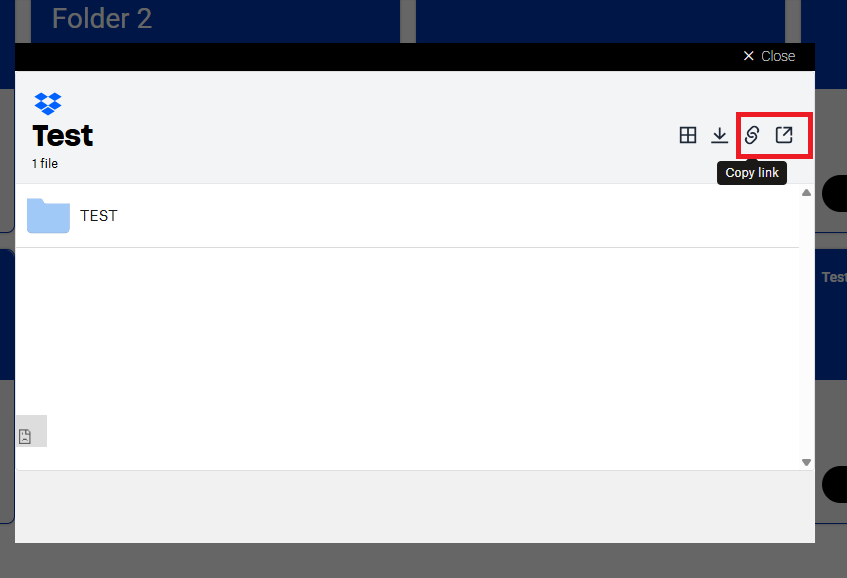
Hi all,
I have a problem with a specific Dropbox setting. I know that what I want to do should be possible, but unfortunately, I can't figure it out. That's why I need your help. It's about the following: I want to share files with clients using Dropbox. I don't want these clients to have to install Dropbox themselves, because we don't want to drive up extra costs for the clients. But I want to prevent the folder links from being made public or shared with people who aren't supposed to have access.
How did I set this up?
- Inside Dropbox, I created a client folder
- Within this client folder are several subfolders
- In the LINK FOR VIEWING settings of the client folder and in the subfolders, I selected 'ANYONE WITH LINK' under 'Who can access', because the clients are not added as members in Dropbox.

- We don't send the links directly to the client, but we copy and paste the shared link into Webflow, where we have created a client page. The link refers to a specific folder on the client page

- The client has access to the client page. Logins are handled via Memberstack.
Using the above, clients can log in to the client page and have access to their files. But what is the issue now? The client can copy the link from the folder and forward this link to someone who is not logged in to the client page.

This other person can then use the link to gain access to the Dropbox folder. And that last part is exactly what we want to prevent. How can I prevent this?
I have a Dropbox Business Plan and I am the admin.
I hope anyone can help me out.