Hi,
I have already activated selective sync and selected only 150GB worth of memory to be stored locally. However, my hard drive is still full with the same Dropbox files that I selected to be online-only. What can I do?
Hi @pietrovalelongo, thanks for bringing this to our attention.
Just to be certain, as you mentioned both of them, are you referring to the selective sync feature, which deletes entire folders from your local Dropbox folder, or are you marking files as available online-only, which is a different feature?
This will help me to assist further!
Hi, Jay!
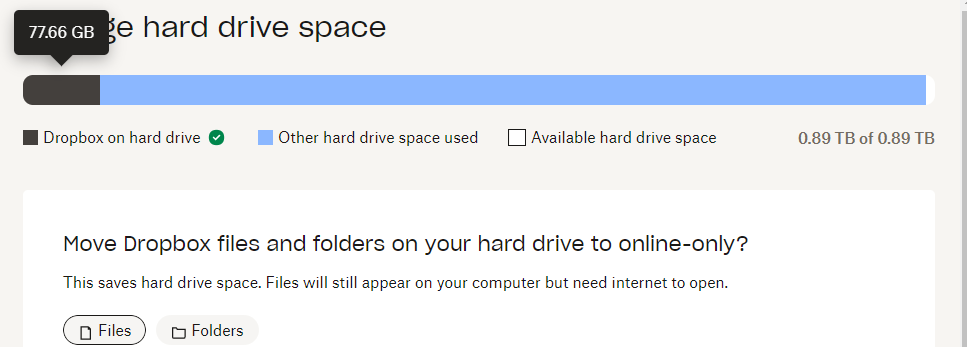
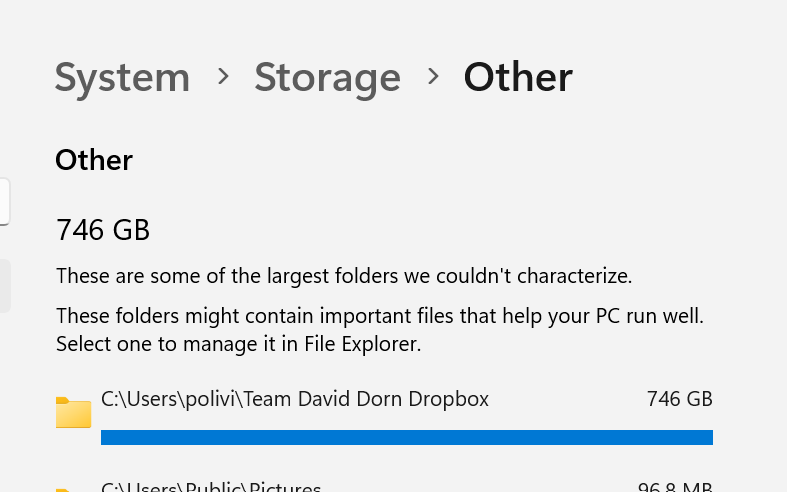
I tried both of them... indeed files are not visible anymore, but my hard drive is still full. An interesting thing is that dropbox itself report an usage of 77GB (image 1) while Windows report Dropbox-related files to be taking up 746 GB
Could you try deleting the Dropbox cache folder to see if this helps with freeing up the space?
Is it possible that you have any hidden files inside the folder that are taking up disk space?