This error has been happening for weeks, and tech support has unfortunately been totally unable to help me. Thought I'd pitch this here.
I am on several shared folders with other groups. Whenever someone else on one of these shared folders attempts to save or change a file, I get a popup message that looks like this:
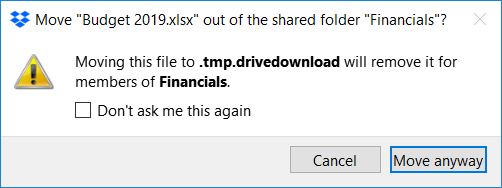
Again, I'm not actually taking any action at all - this happens totally without any interaction on my part. It happens for any file, not just the one seen in the example. Clicking the checkbox stops it from happening again for that particular file, but only for one instance. Anytime a new file is touched, the popup appears again for that next file.
The scary part is that what appears to happen is that the files seem to get dumped into trash or recycling on OTHER PEOPLE'S COMPUTERS - horrifying! I asked others to check, this and that's the only way we found out that files were getting nuked. I'm very worried that we will later discover that crucial files have gone missing, and only when it causes a crisis.
Tech support has told me over and over again to simply uncheck the box, despite my explanation that would stop it for that file, but this happens again for the next file - I want it to stop happening for new files. This has been extremely frustrating. It makes it clear that they are simply not reading my responses.
I have Googled enough to discover that this has to do with some sort of conflict with Google Drive syncing, but can't get any info about how to stop files from being deleted, let alone stop the error from happening.
Ideas? Thoughts? Things I can test? Please, any help will be gratefully accepted! In the meantime, I've stopped all file syncing in both GDrive and Dropbox, for fear of this accidentally leading to deletion of valuable project or client files.
Signed,
Frustrated








