I somehow uploaded several hundred photos from my iphone to dropbox. Not sure how I did it, but now I see a lot of duplicate photos in dropbox (carousel).
Hey everyone,
You can use Dropbox’s Find duplicates option on dropbox.com to quickly locate duplicate files (including photos) and delete them in bulk: https://help.dropbox.com/organize/find-duplicate-files.
If your photos are only “similar” rather than identical copies, you may need to sort and remove them manually.
It's getting even worse now. Today, duplicating photos where uploaded up to 5 times !
For me, dropbox is done, will definitely Not continue my subscription.
For me I think this problem started when I started using iCloud sync. I'm not positive but I used Dropbox Camera Uploads for *years* with zero issues and in the last year it has become unusable. I have a workflow where my the Dropbox photo automatically dumps into Lightroom but I have had to disable it and am now investigating alternatives, none of which seem as good of a solution as Dropbox Camera Uploads was for a long time.
Manually deleting dupes or even using an app is not a solution. It's a band aid and a time consuming exercise in frustration. I need a sync/backup solution that doesn't upload dupes in the first place.
Meghan, I totally agree. I think you've nailed the root of the problem.
I am finding this issue extremely frustrating as well. I have used dropbox for probably around 5 years. Until this month, I have never had any issue with dropbox uploading the same files over and over. I go to clear everything out and then a couple days later the same files are uploading again. I do not understand what is going on with this app on my phone. I am a very technically inclined person and I have yet to find a solution to this annoying problem!!!! I wish there was some actual support from dropbox on this. I am ready to get rid of it if this keeps happening.
The fact that this issue has gone on so long with no formal response from Dropbox Support proves they are doing this by design to force people off the free/basic plans to generate more revenue. They just don't care about this known defect for over 1 year now, or else we would get a "thanks for reporting it, we are working on a fix". Fortunately for us there are dozens of alternate competitors out there that don't have this issue.
I don't think that's the case to be honest Costa. I pay £99 per year and it's happening to me. I've switched off auto upload and put a reminder in my diary to upload at the end of each day. It's a poor show to be honest.
I also pay $12/month for Dropbox. And still I have duplicates.
Thank you, Hap. But I am sorry, there is no way to do this rather you have to do it manually. But in windows pc you can use DuplicateFilesDeleter. it is very simple to use. But make it sure to keep the important files in back up.
Thanks all dropbox users for your valuable times.
I think we have 2 separate but related issues here.
1. Duplicates that already exist in Dropbox - I think everyone would like a solution to this integrated into dropbox rather than having to rely on the semi effective, rather spammy apps that do half a job and then constantly pressure you to leave 5 * ratings on the app store.
2. Duplicates created by auto upload, which appear to have started as a result of auto upload being unable to handle changes in the way iOS deals with photos. This, to me is the more pressing issue as it renders auto upload useless - worse than useless - and means that workarounds have to be found which rely on the user remembering to upload the day's photos or stringing together a workflow using a third party app.
I like dropbox and I want to continue using it, but at the moment I can't use it the way I want to. That means that when a working solution is provided by another service, I am more likely to spend my $99 per year with them.
Yeah I think the main issue is not that we need a dupe remover (though that is a side effect of the main problem) but that Dropbox keeps making duplicates.
I used to be amazed that the Camera Upload mechanism recognized already uploaded photos. Now, as mentioned, there is no recognition that some photos have already been uploaded.
Well I'm just p!ssed off with it. I'm on Android. Easy to run out of space. I don't need this. Uninstall is looking likely....
I want to know when I do a system clean on my android including the large files will it delete the same files that are in my Dropbox
I have the same issue with tons of duplicates getting created, and I'm 100% sure it started when I got rid of Carousel and upgraded to a version of the Dropbox app (on iPhone) that does the uploads. I did both of those things today and I went from no duplicates to hundreds of duplicates.
I'm sitting here watching notifications pop into my window showing dozens of duplicate photos being added. As several of you have recently said, the problem is not how to remove the duplicates but how to prevent them in the first place. I use an Android smartphone and a MacBook Pro and these duplicates have been showing up for over six months now. It is frustrating, a huge waste of storage space, and totally preventable. Has anyone else noticed that there are no official comments, replies or suggestions other than the ridiculous 8-step removal process?? Come on Dropbox, get your act together! You have a basically great product so please listen to your users and fix this problem!
Yes. It's exceptionally frustrating that there is no response. All well and good to say, "See ya, I'm dropping you Dropbox" but it is integrated and working perfectly with a bunch of other my other apps.
Make this work again! It used to work and I can't imagine it's an intractable problem. Dropbox please let us know you are working on this!
I've looked into Google Photos and it doesn't work the same way. I don't want 800 virtual low res copies spread around the cloud. I want one reliable full res copy of each of my phone pictures until I can't add the thing to Lightroom and my photo back-up scheme.
I just filled out this Dropbox Forum survey. Maybe if a bunch of us fill it out and complain about the lack of response someone might at least let us know if there is a fix in the works.
https://dropbox.az1.qualtrics.com/SE/?SID=SV_4HFdMjdHWsKtQ8Z
I emailed with Dropbox support and this is the latest reply I've had:
If you are seeing (1) added to a file name, this means you added a file in a folder that already had the same type of file with the same file name. This usually happens with a copy.
If you see a file with -1 in the file name, this happens when a third party app changes your photo slightly. Dropbox sees this as a new photo and uploads it again. When it does, the file is renamed with a -1.jpg at the end. To stop this from happening, you will need to turn off camera uploads, uninstall any syncing or third party apps that could be editing your photos, and then turn camera uploads back on.
After this take a single photo. Is this photo duplicated? If not, you have uninstalled the application that is doing this.
I will try this later, but I don't think I have any other app syncing with Dropbox so I don't expect it to work.
An update from Dropbox support - I got this mail this afternoon:
Thanks for reaching out about this! We apologize for the hassle and we appreciate your patience.
We're aware of this bug and working to fix it. When we have a fix in place, we'll release an update via the App Store, so make sure to stay up to date with the latest Dropbox releases.
Again, thanks for letting us know and thanks for using Dropbox!
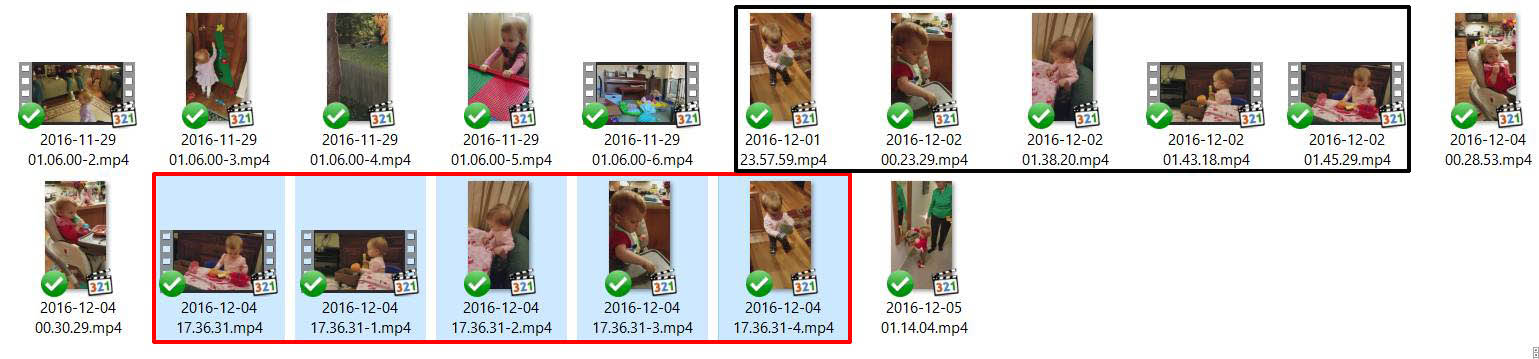
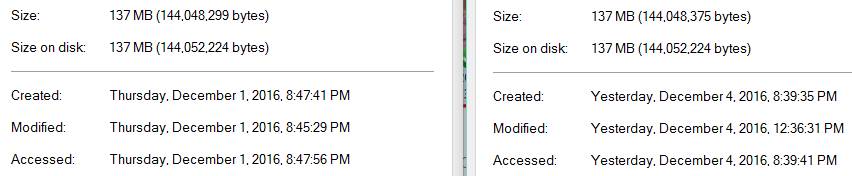
It's early December 2016 and this is still happening. I took 5 videos on 12/1 and 12/2. On 12/4 at 5:36pm, something caused copies of these 5 videos to be uploaded to Dropbox in reverse order. That's 317mb of extra data.
These are undetectable by duplicate file checking software, because they are changed in some small way -- the file size is slightly larger (by 76 bytes!):
This started happening when I got a new Samsung S7 a few months ago. Something on the phone (that was not on my last phone) is changing these files, and finding what is doing it is the best way to fix this. I looked at my Google Photos and there is nothing there. I can't find any Samsung Cloud or Sync enabled on my phone. What other things might be responsible?
Dropbox is just doing what it's supposed to, so on one hand it's not to blame, but as long as it keeps happening they're going to have an increasing number of unhappy users, so it's in their interest to help find the culprit.
Simon E.11 sums up my own feelings too.
As a result of this serious upload issue, plus the announced discontinuation of the Public folder, and above all the apparent indifference of Dropbox Support to user complaints, I'm going to investigate Google Drive and iCloud and save myself £99 per year.
Terry, UK
I got iPhone and camera upload two folders with same pictures. The only difference is Camera upload has difference file names (data and time) whereas iPhone folders has the same name what I see in my Phone IMG...
Can't sort out this issue, thousands of images and videos in dulicate. If I stop camera upload then iPhone folders also becomes blank.
I use DuplicateFilesDeleter. It works like a charm, always!
I have been dealing with this for a long time. another issue is that I take a lot of pictures and then make edits (also on my other phones) mos tly for posting items I want to sell. But when I go to post the final edited image, all of them are there and I have no idea which is the one I decided to use. I also have the problem of having as many as 10 duplicates of the same picture, sometimesI want to keep randomly within the same folder, as well as in many other folders. I never get a message that there already one and which one do I want to keep. And they all have different image sizes and I need to look at them both to see which I want keep choose. want to move all my pictures off dropbox folders and Dropbox.com. I can't even just move them to a flash drive, I can only copy. So i create a new folder on laptop, move dropbox folders to that new forlder ad delete them on dropbox.There has got to be a better way! If I cancel my dropbox account, I will lose everything. So many are from places (other old external drives or otherwise unable to acess, etc) I do like that feature on Dropbox, because I have photos as old as 2003. but they'll be gone. I am not very experienced on windows or Android. I bought a new 256GB laptop and it has no more space it's all from Dropbox. It's very frustrating and confusing this way, Especially since there are so many duplicates in so many folders. I want to move them all to Google Photos. (which is a whole! separate thing I have'nt learned bout). I don't know if I move the entire folders from Dropbox folder and delete the now-empty folders from Dropbox in Windows on my laptop. will Dropbox create a new folder again or will it not upload if there is no longer that folder in dropbox folder. I have 50,000 pictures in so may places in so many different folders so manually deleting all the duplicates is not an option. I just don't know what to do. Bottom line I guess is I want to keep everything on dropbox.com as well as my laptop Dropbox folder. I've paused syncing on Dropbox untill I can deal with this issue first, Of course, I imagine I will have the same problems if I turn on sync dropbox again. And then closing my account while still havsing all the photos -minus all the duplicates- I now have on my phone and not uploaded anywhere yet. If anyone can make sense out of any of this post and help me out, Thank you. Again, I am sorry for the long, confusing post. Oh, and I can't move the new folder created for all my files copied from Dropbox in order get everthing on a flash drive and then delete my Dropbox folder because there is not enough space on my flash drive. I don't know which files will fit without finding out how big every file is and move that many to flash drive. As you can see, I HAVE ABSOLUTELY no idea what I'm doing and I don't have anyone who can help me. The last time I had a computer company tech come help me. I ended up with so many files not copied, and gone forever....