I used the Dropbox API to export file metadata, including titles, paths, created dates, and Dropbox links, into an Excel sheet for my employer.
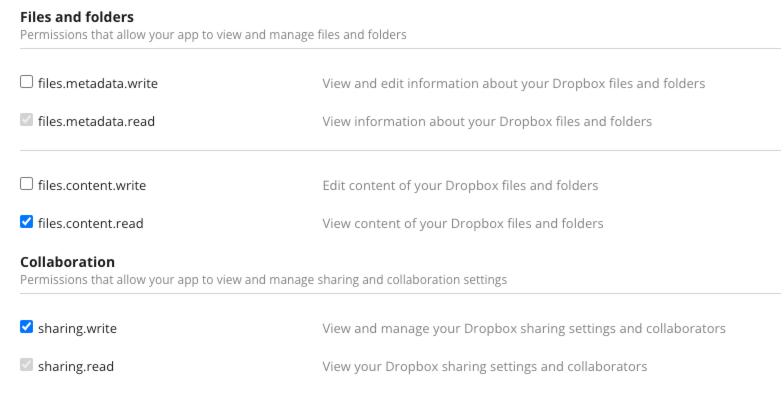
In my script, I enabled the "file.metadata.read", "sharing.write" and a few other .read permissions. However, the extracted links are "null" all the time.
Below is my script generated by ChatGPT. Could someone help me identify if there’s an issue with it? Alternatively, does Dropbox restrict sharing links to temporary ones because I’m using an employee account?
#!/bin/bash

ACCESS_TOKEN="#my_access_token"

TARGET_FOLDER="/Sales Material/Customer-facing Tools"
OUTPUT_FILE=~/Desktop/customer_facing_tools_metadata.csv

# Create the CSV file and write the header
echo "Document Name,Path,Dropbox Link,Type,Created Date" > "$OUTPUT_FILE"

# Iterate over files in the local directory
find "/Sales Material/Customer-facing Tools" -type f | while read -r FILE_PATH; do
  # Extract the file name
  FILE_NAME=$(basename "$FILE_PATH")

  # Construct the relative path for Dropbox
  RELATIVE_PATH=${FILE_PATH#"/Sales Material/Customer-facing Tools/"}

  # Clean the constructed Dropbox path
  DROPBOX_PATH="$TARGET_FOLDER/$RELATIVE_PATH"
  DROPBOX_PATH=$(echo "$DROPBOX_PATH" | sed 's#//*#/#g')  # Remove duplicate slashes

  # Debugging: Print paths
  echo "FILE_PATH: $FILE_PATH"
  echo "RELATIVE_PATH: $RELATIVE_PATH"
  echo "CLEANED DROPBOX PATH: $DROPBOX_PATH"

  # Determine the file type based on the extension
  EXTENSION="${FILE_NAME##*.}"
  case "$EXTENSION" in
    jpg|jpeg|png|gif|bmp|webp|tif|tiff)
      FILE_TYPE="Image"
      ;;
    pdf)
      FILE_TYPE="PDF"
      ;;
    doc|docx|txt)
      FILE_TYPE="Document"
      ;;
    xls|xlsx|csv)
      FILE_TYPE="Spreadsheet"
      ;;
    *)
      FILE_TYPE="Other"
      ;;
  esac

  # Fetch the permanent Dropbox link
  DROPBOX_RESPONSE=$(curl -s -X POST https://api.dropboxapi.com/2/sharing/create_shared_link_with_settings \
    --header "Authorization: Bearer $ACCESS_TOKEN" \
    --header "Content-Type: application/json" \
    --data "{\"path\": \"$DROPBOX_PATH\", \"settings\": {\"requested_visibility\": \"public\"}}")

  # Debugging: Log the full response
  echo "Dropbox Response: $DROPBOX_RESPONSE"

  # Extract the link from the response
  if echo "$DROPBOX_RESPONSE" | jq empty > /dev/null 2>&1; then
    DROPBOX_LINK=$(echo "$DROPBOX_RESPONSE" | jq -r '.url')
    # Adjust the Dropbox link to force direct download
    DROPBOX_LINK=$(echo "$DROPBOX_LINK" | sed 's#\?dl=0#?dl=1#g')
  else
    DROPBOX_LINK="Error fetching link"
    echo "Dropbox Response Error: $DROPBOX_RESPONSE"
  fi

  # Fetch the metadata for created date
  METADATA_RESPONSE=$(curl -s -X POST https://api.dropboxapi.com/2/files/get_metadata \
    --header "Authorization: Bearer $ACCESS_TOKEN" \
    --header "Content-Type: application/json" \
    --data "{\"path\": \"$DROPBOX_PATH\"}")

  # Debugging: Log the full metadata response
  echo "Metadata Response: $METADATA_RESPONSE"

  # Extract the created date
  if echo "$METADATA_RESPONSE" | jq empty > /dev/null 2>&1; then
    CREATED_DATE=$(echo "$METADATA_RESPONSE" | jq -r '.server_modified')
  else
    CREATED_DATE="Error fetching date"
    echo "Metadata Response Error: $METADATA_RESPONSE"
  fi

  # Debugging: Log results
  echo "Extracted Dropbox Link: $DROPBOX_LINK"
  echo "Extracted Created Date: $CREATED_DATE"

  # Append the data to the CSV file
  echo "\"$FILE_NAME\",\"$RELATIVE_PATH\",\"$DROPBOX_LINK\",\"$FILE_TYPE\",\"$CREATED_DATE\"" >> "$OUTPUT_FILE"
done