Something recently has changed with the UI for sharing links on the browser version. It now no longer first brings up the dialogue window (see image below) that shows the option to change the link to one that is set to view/edit (whatever is not the default, the default starts on edit but I've changed it to view).
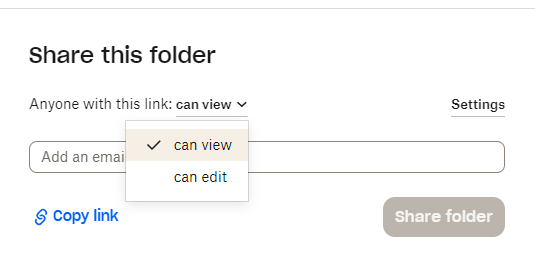
The only way I've found to access this original dialogue menu to be able to change between edit/view is to click settings or manage (depending on which share button I pressed), this opens a new dialogue menu, go to the tab with the share type I want, change a setting, change the same setting back, then click save, and then finally the original dialogue that allows you to actually select which type of share will appear again. This doesn't always work, either.
Why was this changed, and why is this option so ridiculously hidden now?

