Download
Auto-updates: In progress
Ehoo...
New BUG!!!
Where has move Dropbox folder button gone?
Fix it! Please!
PS: Seems on second try everything is back. But there is something wrong. Why ever (dis)appear initially?
Still here for me.
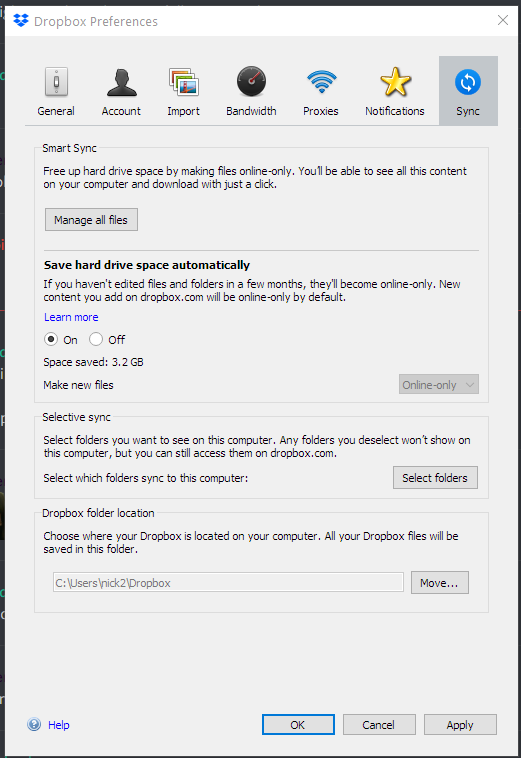
That's interesting because I have got the "Smart Sync" / "Selective sync" / "Dropbox folder location" like Typpi, except that I don't have the "Save hard drive space" subsection in Smart Sync. But I do have a checkbox for "Let my admin manage this setting".
Assume DB are testing some different options with different users?
Mine updated and is stuck "Syncing" on PC. All the files show up with the blue sync Icon, been hours and nothing has changed to a green check mark. Dropbox works fine still on my second computer a macbookpro. Anyone else having this issue? Attempted to uninstall and reinstall, unlink/link, no avail. First time this has happened.
Same issue here;
I'd be happy to leave it to sync "only" all 140 GB, but
1) What casue it to resync (and will it happen again.. and again ...)
2) the rest of the myu users (the gamers and netflix watchers) are getting very annoyed at the network hog (yes, I've restrcited the bandwidth, but I currently don'yt have muuch faith ...)
hth
Same here - full resync been running ever since I rebooted my machine about 3.5 hours ago.
Continually-runing resync... A 'chat' with support highlighted that my problem seemed to be a sync that was stuck - the systray icon showed no info but the progress info in the GUI showed 1,688 files being synced. Then that'd change to 1687 then back to 1688 then 1677 then 1688, occasionally a few more then back to 1687/1688.
I also noticed ffrom 'Process Hacker' (a sort of super-Task Manager) app that the DB client application had apparently read 1.8 TB of data since starting some hours ago... but there's only 130 GB of files in my DB. I don't know how much data you'd expect a reindex to read, but as hardly any of my files had changed since shutting down the machine last night and the reboot this morning after which the reindex etc started, I thought that that increasing read total, and the resync file count not decreasing meant that DB was perhaps reading and trying to sync one file over and over again. The #files count would go up occasionally when something else in my DB got saved (eg my notes on what I was doing) then come back to the same sticking point.
I'd also noticed (through a monitoring process I have here) that I'd gained a "conflicted" file (a notes file that had been updated shortly after I rebooted this morning). It's the first "conflicted" file I've had in several years, a symptom of the reindex/resync problem rather than a conflict between two machines accessing the same file.
Anyway, I shutdown the DB client, then manually sorted out the diffs between the conflicted file and the genuine one, then restarted the DB client. And the high cpu use etc has gone away. The client now seems to be behaving again.
Same problem.In windows 10 v1909, dropbox client v88.4.172 constantly sync forever...(about 2 days).MacOS client still working fine.
Same issue here. All files started on blue circle/syncing, with slow progress. I shut down and rebooted, and now nothing is syncing, the dropbox icon in the menu bar is stuck in "started..." with no progress whatever.
Once this "resync" completed, it appears to havbe settled down and only synchronisng changes.
Dropbox clients on two of my computers also seem to be doing a mass-resync. Possibly related to this release. Files and folders that haven't changed in years suddenly are getting the blue spinny icon. This is happening on two of my computers. Looking around Dropbox in Finder also seems like it's making the problem worse and causing more things to turn blue.
Also the 4 "Dropbox Finder Extension" processes (Dropbox.app/Contents/PlugIns/garcon.appex/Contents/MacOS/garcon) are each taking up ~10% CPU even though I'm not using Finder and have relaunched it. Though that issue has been a regular one that's been around before this update.
Here's a screenshot that'll work when Dropbox gets around to syncing it: https://www.dropbox.com/s/6iu4vo337a3vndz/Screen%20Shot%202020-01-14%20at%203.08.29%20AM.png?raw=1
Can someone please tell me if ANY of the latest builds fixes the zero-day vulnerability reported to Dropbox September 2019 for a local Windows 10 privilege escalation flaw??
I can't believe Dropbox is not dealing with it for so long regardless of how "low risk" the attack surface is. It is reported by every media outlet such as Forbes. I need to have faith Dropbox is actually taking this seriously. I have yet to see 1 single reference to a potential fix on Dropbox's site.
Thank you
@theshidoshi wrote: Can someone please tell me if ANY of the latest builds fixes the zero-day vulnerability reported to Dropbox September 2019 for a local Windows 10 privilege escalation flaw??I can't believe Dropbox is not dealing with it for so long regardless of how "low risk" the attack surface is. It is reported by every media outlet such as Forbes. I need to have faith Dropbox is actually taking this seriously. I have yet to see 1 single reference to a potential fix on Dropbox's site. Thank you
I would LOVE to know this as well. Been trying to check articles for any updates. This seems to be the only place to find changelog notes from the Dropbox team.
I'm also stuck in constant sync. Whole day at work and there nothing advanced. Now at home it's stuck on "performing one time update" thingy. All folders and files have the blue sync icon and nothing seems to advance anywhere. So DB is bonked on two separate computers.
"Stable" is not what I'd describe this update...
Out of my 3 pc's, one is still stuck, as described by others. Tying reinstall , right now downloading offline installer...
still nothing... un-reinstalled and still the app is running, everything is "blue" but task manager shows 0 activ.
funny thing, that same happened to my laptop, but it "unstuck" at some poit by itself! not sure whether to be happy or more frustrated!
fingers crossed
I am stuck in sync for hours. Support is a joke.
To continue from above: Left my 1 faulty pc open, it seems that it "re-iventoried" everything. Result after one night: some 15-20 folders "semi"duplicated (having few files of the original folder) and everything back to syncing order. my nr of files in dropbox are ~177k in ~10k folders, ~350GB total size
Same here. On both my win 10 machines, on hovering the Dropbox client icon, I see a message like
"Dropbox 88.4.172Indexing 1 file...Uploading 24,856 files (0,0 KB/sec, 6 hrs)...Downloading 32,504 files..."
And it didn't change for more than 24 hours now. Please help!
My Windows 10 Dropbox clients are also stuck "Syncing..." with no further info.
Version 88.4.172
Same problem here on a headless Ubuntu 18.04 server.. I have 1 TB of dropbox data and since the most recent update the Dropbox client eats 100% CPU (one core) and never finishes syncing no matter what I try.
Hi @Matt F.16,
You can check which files exactly are 'guilty' and investigate further, what's wrong using something like:
dropbox filestatus $(IFS=$'\n';base_path="";for i in `ls -R -1 ~/Dropbox`; do if [[ "$i" =~ ":" ]]; then base_path=`echo "$i" | sed "y/:/\//"`; elif [[ "m$i" != "m" ]]; then echo -n " $base_path$i"; fi; done) | grep -vi "up to date"
Note that "dropbox" command is a script, so processing is relatively slow. You would get "******" output if some file name (for directory, even more, all content) contain space! That's Dropbox BUG! Check and see what's the state for particular files. Something like:
ls -l ~/Dropbox/Troublesome/file.ext
Good luck.
I said above that my problems went away after stopping and starting Dropbox, but also after manually finding a conflicted file (ie a file where Dropbox cannot tell which of two versions of that file are correct, so keeps both, but renames one with 'conflict' in its name and added date & time details). Why a conflicted file got created in the first place is a mystery to me, but maybe I edited the file at just the wrong moment as teh dropbox client updated to the latest software version.
The way to find these, if you use Windows, is to open a command window (google for that for your version of Windows if you don't know how to) and then search for files with 'conflict' in their name. I use the command:
dir /b /s "C:\Dropbox\*conflict*"
The asterisks and the double-quote characters are required.
I issue this command every day automatically and can tell if the search works because I have a few innocent test files scattered through my dropbox with 'conflict' in their names... and those should always be found. And, for example, a file that is part of LibreOffice also does, so I always see
C:\Dropbox\PortableApps\PortableApps\LibreOfficePortable\App\libreoffice\share\config\soffice.cfg\modules\scalc\ui\conflictsdialog.ui
as one of the results.
For more info on conflicted files see eg: https://help.dropbox.com/files-folders/share/conflicted-copy
I should add: I understand how conflicted files can occur, when multiple people edit files at the same time etc, but there's only me using my machine, and only one machine using my DB account. The conflicted file I did find was date/time stamped more or less exactly at the time, soon after booting my machine, when I noticed that DB had a problem.
Now my Windows 10 Dropbox client is stuck "uploading 1 file" and "downloading 2 files" even after restarts. Frustrating, since there is seemingly no way to find out which.
This seems to have happend after upgrading to this version.
Same problem on Windows 10. My MacOS is OK.3 days syncing and no progress.
This was the problem for me:
Several years ago, a Linux client (WSL) had created two files with the same name (differing only in capitalization). After upgrading to 88.4.172, this caused the syncing to never finish.
Hello,
I am on the 20$ a month dropbox plan so IDK if that makes a difference,
but I've had that option for over 2 months now I'd say.
-Typpi