-
Just for the record.
After being instructed by @maddison I installed the enterprise installer link
https://client.dropbox.com/desktop/desktop-dropbox/requestdownload?install_type=enterprise_install&platform=win&arch=x86_64&build=240.4.8493
and now I can use Dropbox. Everything came back and synced🤗.
Just for the file: I work on W10, have the windows defender firewall and antivirus, no VPN nor proxy.
Thank you so much.
Hi there, @Abrahamconstruction, thanks for posting your question here!
I'm going to need to gather a few more pieces of info and get closer into what is happening.
As a first step, can you clarify your device's exact OS, and the app's current version that you're using? You can find the version by hovering your mouse over the little Dropbox icon in your task/menu bar next to your WiFi.
Is it possible that you have any antivirus or other security applications running, that could be affecting this? If so, can you try disabling them temporarily while you try to access our app?Also, I'm guessing that since you were able to access our Community you can also access http://www.dropbox.com without an issue, right?
If you could also send me a screenshot of the error message you are receiving, that'd be great.
Let me know more, and we'll take it from there!
Having the same problem (Windows 10): I changed my Google password, the Dropbox desktop app automatically signed out and now won't let me in again.
Hey @shawnedrei!
Can you confirm whether you can access the Dropbox website without any issues too?
If that's the case, then I'll be happy to reach out via email in order for us to have a closer look into this.
Thanks a bunch!
@Megan I can access the website without issue, yes.
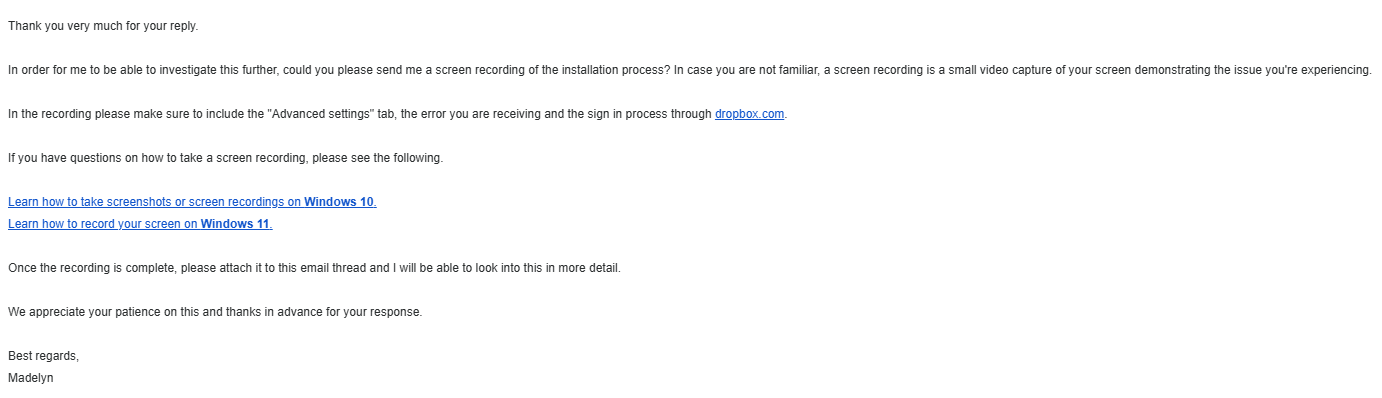
Hi @shawnedrei, I just sent you an email.
Please reply back to me, and we'll take it from there. Thanks!
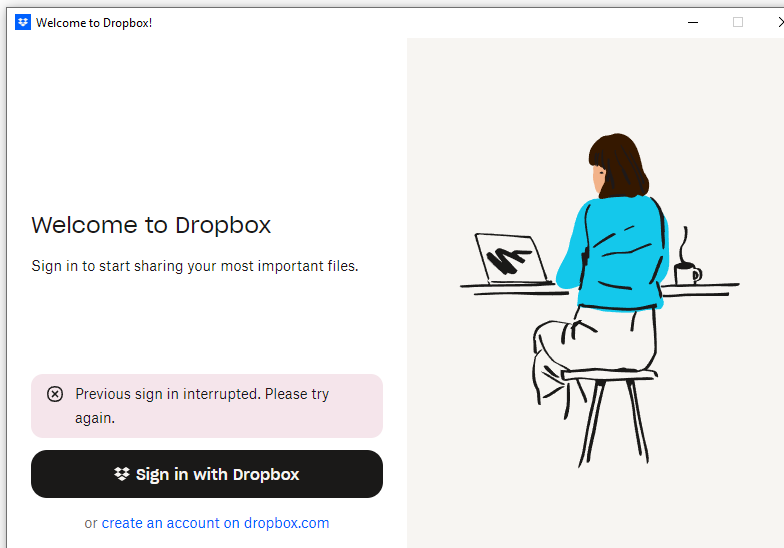
Sorry for the delay. Just as shawnedrei posted, I have the same issue with the same screenshot. OS is windows 10. I signed out of google with one account and when I tried to sign back in, it says the error message “previous sign in was interrupted “.
I have tried uninstalling and reinstalling. I have website access and phone access, but am unable to get desktop app signed in. I can access Dropbox on the website
Support stopped replying to me and it's been silence for the past two days, so... 🤷♂️
Hey @Abrahamconstruction!
I went ahead and opened a ticket on my end for you this past Friday. I just checked and it seems you haven't replied back to me. Can you confirm that you've received it, and respond back to me?
Hey @shawnedrei, I just saw your email, and I'll reply to you as soon as possible.
Thanks for your patience!
I am having the same problem on a windows 10 . This is personal account of Dropbox. Please note that my phone version is working. I can also sign in on my chrome browser.
I have spent nearly 6 hours with the support bot. I have Norton360 and have reviewed and changed the Smart Firewall settings and have deleted and reloaded Drop box with the offline installer 3 times. Routers rebooted and refreshed, desktop powered down and up and down and up for a time
I was having the desktop app tell me that “net::ERROR_NAME_NOT_RESOLVED.” which has gone away with the change in the firewall settings and replaced with crickets.
I am about to move to another product as this is crazy
I reviewed other comments and noted that Duck Duck Go was found to be some problem. SO I dropped it and no joy.
I have replied to Megan on the email and it keeps coming back. I have replied to her here and she says I have yet to reply. Idk what else to do. It is so glitchy, even trying to reply on here is giving me fits.
Thanks for reporting this here, @MikeDyr, and I’m sorry to hear about your experience.
Can you clarify what settings you changed exactly on your Smart Firewall? Can you try disabling it for a little bit, in case you haven't already, and restarting your device then?
If that doesn't help either, I'd like a screenshot of the crickets you're seeing now.
I’ll be able to further assist this way.
Hey @Abrahamconstruction, I just checked your ticket and I can’t see your reply to Megan either.
Can you please clarify what you mean when saying that it’s coming back, or send me a screenshot of what you see instead after responding to her via email? Just make sure your email address isn’t visible in your screenshot.
Don't get your hopes up, Support just transferred me to some bot that keeps asking me to repeat steps I've already taken. I don't think we're going to get any real help here.
Hey @shawnedrei, thanks for your feedback here.
From what I can see, your case was sent to our specialists.
If you have any concerns or need further assistance, please make sure to continue working on the issue with the agent you're in contact with.
They'll be able to provide additional troubleshooting steps and info for you and hopefully your issue will get resolved really soon!
We appreciate your feedback, though, and I'll make sure to pass your comments along to our team.
@Hannah The "agent" I'm in contact with has now twice asked me to repeat steps I've already attempted to address the problem, despite my literally providing a complete list of everything I've tried both here and in the e-mail chain - and there are two other people on this thread with the exact same problem that Support hasn't been able to help. Either I'm talking to Clippy or your specialists need to wake up.
I shutoff the Norton firewall rebooted and tried to link desktop Dropbox but it failed in the same loop as below. Then I went in and made sure that all Dropbox related service were set to ALLOW. Saved, then rebooted. Tried again to link desktop Drop Box with the same failure.
Loop
The screen displays Welcome and sign it. Press sign in with Dropbox . Then the "Login successful" screen shows for a second followed by third screen appears stating "Previous sign in interrupted". If you try again it just loop back to the this screen.
If you try to exit you are informed you should try again. If you do you loop back though all three screens.
I checked the post 17600 17603 are open and Norton is no blocking them
DropBox is using Port 17500 which is for LAN.
I set traps on all the dropbox port activity
INTERNET OUT using a TCP/UTC protocol with no ports/address/ICMP assigned is working - trap verified successful
INTERNET IN using a TCP/UTC protocol with port 17500 is not trapping neither success or fail
The DEFAULT RULE is both in and out and it is not trapping
Given what I understand the problem is likely in the assignment of Ports
Hi @MikeDyr, thanks for the details. I think it would be best to contact the support team since they have more tools and steps available to troubleshoot this matter for you.You can submit a ticket to the team via this link while logged into your Dropbox account.
although I am pretty rusty at troubleshooting problems like this, It looks like Dropbox and Dropbox Update are not configured with viable internet IN ports. That is beyond my grey cells and would appreciate some help. I'll check back tomorrow.
Thanks Jay I have some tasks to perform and will do that later today or tomorrow.
I got the same trouble as above described by members. I was using Dropbox for many years on the free level, my account space is only 20% full. My laptop dropbox files do not sync, lost the dropbox icon in my taskbar. Tried to load again the dropbox app in the laptop but when installation finishes I get again the sign in box with the message "previous sign in interrupted" . Nevertheless I have access to my dropbox.com/home, find all my files that can normally be synced only with the smartphone android app. When I open avatar>settings>security I see my laptop in "devices have been unlinked from your personal Dropbox account", though I never unlinked it. Please give me a solution.
I was using Dropbox the free option for years. I have the Dropbox app in my smartphone (android) and synced everything with Dropbox app in my laptop, no problem. Suddenly I realise that my laptop dropbox files do not sync, lost the dropbox icon in my taskbar. Tried many times to load again the dropbox app in the laptop but when installation finishes I get again the sign in box with the message "previous sign in interrupted" . Using Chrome browser, but also Explorer failed. ( I have no access to the desktop app to find Dropbox icon, avatar, preferences...) Nevertheless I have access to my dropbox.com/home, find all my files that can normally be synced only with the smartphone android app. When I open avatar>settings>security I see my laptop in "devices have been unlinked from your personal Dropbox account", though I never unlinked it.
The bot is looping (this is its third reply).
@Megan, I am asking you to please find an actual human being to talk to about this problem.
Yes, this is ********bleep**. we're talking to AI bots. I can't reply to any of the emails. They keep coming back. This all worked when I had the free account. Once I subscribed, that's when all this started. I wouldn't recommend paying for this..
Hey @rosakis, if you check your email address, you should be able to see a new message from me.
Can you please reply back, so that we can investigate this further?
Thanks for your response. I replied to your email including the above information on my nproblem. I hope to get an answer soon.