Hiya!
New drop box user and I am looking to edit the icon that my video has to something more flattering than a pause of my face. lol.
Any help i would appreciate.
Thanks
@willowwellness wrote: New drop box user and I am looking to edit the icon that my video has to something more flattering than a pause of my face.
New drop box user and I am looking to edit the icon that my video has to something more flattering than a pause of my face.
There is no option to do that. The thumbnail is generated from a frame at the 0:08 second mark in the video. The only way to change it would be to edit your video and add an intro screen lasting at least 8 seconds.
So rather than giving us the option to select or supply a thumbnail frame you've chosen 8 seconds randomly which is often a wierd facial expression . And no way of changing it ? Please can your tech teeam look into this sharing professional videos with odd looking thumbnails os not very flattering. and my titles are usualy 5 seconds maximum and I aint changing that!
Plus googling change thumbnail on dropbox video comes up with instructions on how to do it on the "Share" page. But I don't find it.
@vjh4290 wrote: Plus googling change thumbnail on dropbox video comes up with instructions on how to do it on the "Share" page. But I don't find it.
Thats when you export to other services such as WeView - you are changing the thumbnail on that service, not Dropbox links
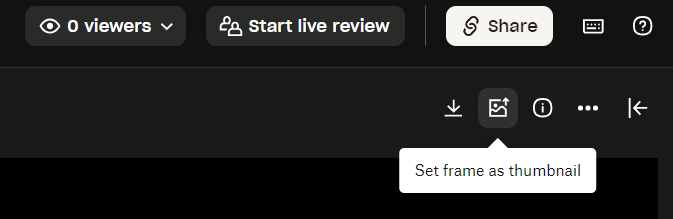
Not sure if you're still looking, but I have the solution. There's an icon in the upper right wen you're viewing your video. Pause at the frame you want, then selection that icon to set frame for your file image.
Just came here with the same issue. It seems that the "Set frame as thumbnail" option appears only when the video is sent into "Replay" for live review, not on the standard Dropbox preview link. It seems like choosing a poster frame should be an option in any Dropbox video preview.