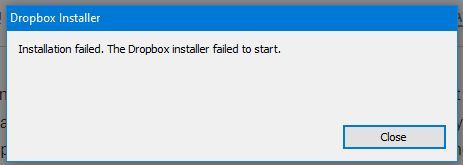
When I was Installation on my PC (windows 7) i'm getting notification "Installation failed. the dropbox installer failed to start".
Please help me! Thank you
Hey there @widhialasamahu, sorry to hear you're having issues with this.
May I ask if you have the security update KB3033929 installed on your computer?
Can you maybe send us a screenshot of the exact error you're getting so that we can have a visual too?
Also, if you happen to be running an antivirus, VPN or firewall on the affected machine, could you temporarily disable them and try the offline installer from this page?
Let me know of any updates!
I had an issue where Dropbox (2TB plan) was stuck on "Connecting" and never progressed from there. In desperation, I uninstalled and reinstalled afresh but the installation failed with "The installer did not complete. Installation has been aborted". A link is provided to "Show me help for this issue", but it's pretty unhelpful and completely unspecific to the issue.
I then performed an uninstall with Revo followed by a scan-and-nuke, and then tried again but same result.
I despair sometimes. "The installer did not complete. Installation has been aborted" tells me that the installer returns a boolean value -i.e. It worked/It failed, with no better granularity than that. An error code/stack trace/log file would be nice. Getting the code finished in a hurry seems to have taken precedence over helping customers with problems.
Where do I go from here?
Thanks for letting us know about this, @rossmcm.
Do you perhaps have any security apps like an antivirus, VPN, firewall etc. installed on the computer, that might be affecting the Dropbox app?
If so, try to temporarily disable them, to see if that helps.
Keep me posted.
Hello,
I have the same issue. I turned off my firewalls/anti-virus, etc, and still get the error, "The dropbox installer failed to start". Now, this is my own fault for being dumb and trying to uninstall dropbox. I attempted to go through my control panel/task manager but no matter how many times I ended the task, it came back up and so the uninstallation wouldn't work-- I got impatient and tried to manually delete the program. The error looks like this:
I can't see the app in my settings: apps, it's not listed as a program. Not sure how to fix this blunder of mine!
I've tried the regular and offline installer, both generate the same error.
Hi @Trella, have you tried the advanced reinstallation steps to see if you're able to uninstall the program fully?
Good morning Jay,
I fixed it! I deleted some system registry values and that cleared things up. There was another thread in the Dropbox community that had instructions for this.
Thank you!
We're glad to hear it's sorted now and thanks for keeping us in the loop too @Trella - most appreciated.
Could you maybe link the thread you mentioned for future reference as it might help other users too?
Sure thing!
It is this one:
https://www.dropboxforum.com/t5/Apps-and-Installations/quot-The-Dropbox-installer-failed-to-start-quot/m-p/197775
Cheers,
-Trella
Thanks so much for this @Trella
Take care and see you around the Community!