Hello all!
I installed Dropbox on my Windows 10 PC many years ago. The install location was the L: drive.
Two years ago I did a fresh install of Windows 10. I had to reinstall Dropbox. This time it was installed on my C: drive.
For the last two years, I have had 2 Dropbox folders on my system. The original L: drive - a zombie folder that doesn't sync and the C: drive install - this is the active folder that syncs.
My C: drive is substantially smaller than my L: drive and I want to move the active folder back to L:
Step 1 was to follow instructions for a move: https://help.dropbox.com/installs-integrations/desktop/move-dropbox-folder
This gave an error that a Dropbox folder already exists on L:
Step 2 was to delete the old zombie folder on L:
Everything was deleted except 5 folders that are shared with me (I am not the owner of these files).
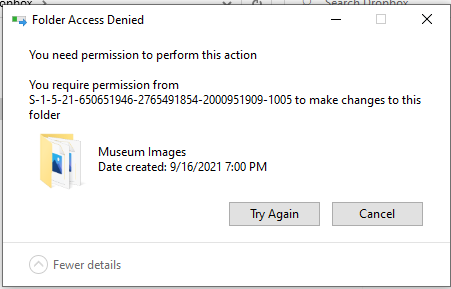
I read through the community and some Dropbox help files for guidance. I've changed the permissions of the desktop files so that I have full permissions.
Using the online Dropbox interface, I removed myself from these 5 shared folders. Because this old L: install doesn't sync with my account, this removal was not noticed on the desktop files. My removal was noted on the desktop files in the actively syncing C: install.
Any ideas of how to remove this old install are greatly appreciated.
TL;DR: Installed Dropbox on drive L: Updated PC and reinstalled Dropbox which created a new install on C: Can't remove the old L: install because the PC seems to remember that I am not the owner of these files even though this old Dropbox Desktop folder no longer syncs.






