I used to use Dropbox for years, had all the archive of my work on it, and the main thing that I loved was how easily I could keep track of what was/wasn't synced on my laptop. I had to move to iCloud for a while for budgeting reasons, but now that all of that is in order, I've re-subscribed and trying to move the bulk of my archive back. However, I seem to be having some trouble with the sync symbols, which is bumming me out.
I'm on a Macbook Pro (Ventura 13.0.1 / M1 Pro)
At first none of the sync symbols were showing up. I followed some guides from other posts suggesting either to relaunch Finder, or to toggle the tick in Finder Extensions on and off, but I've only managed to get the green tick to show for files that are synced. All the rest of the symbols aren't showing up... in fact, when something is online only I'm getting the iCloud symbol instead. (see screenshot attached)
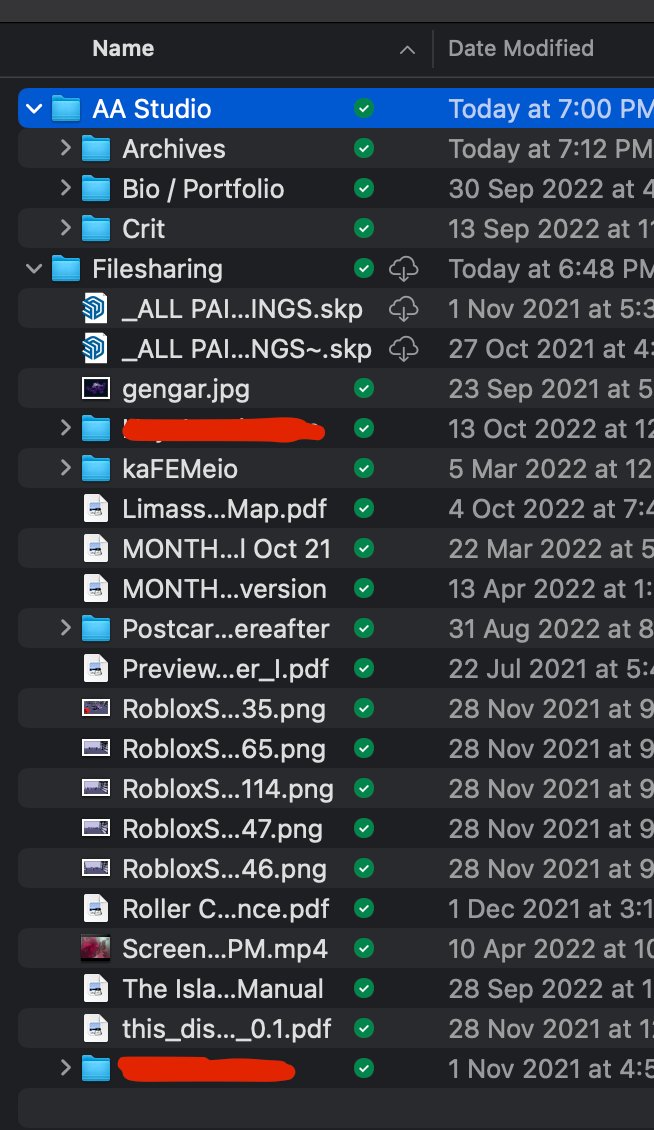
Is there anything you can suggest I do? Thanks in advance.






