I have a "ghost" folder which keeps re-appearing no matter how many times it is deleted. Any clues?
Hey, is the folder you are trying to delete empty or does it contain any files? Usually this happens because a piece of software on a computer that the folder is shared on is trying to access it, and is recreating it when someone else deletes it.If there is a file in there, looking at the 'previous versions' will tell you which machine the culprit is. If you don't have a file in there, add a test one, delete the folder again and when it reappears, you'll be able to solve the mystery! Deleting the folder on the rogue machine will fix it permanently.
Thanks Jane, I looked at the Version History.
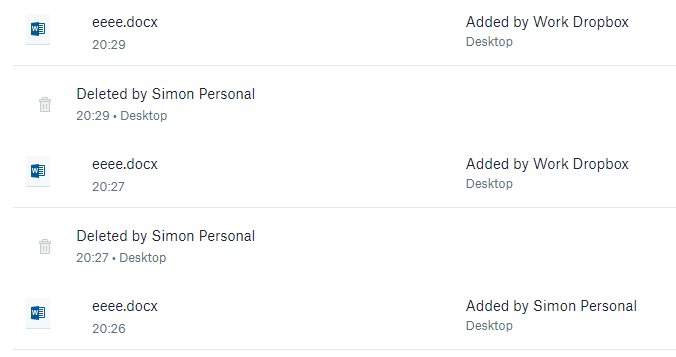
I saw that the file was created by me.
I saw that I deleted the file.
I saw that "Corporate Laptop" 'added' the file back.
I read your comments about some other process maybe locking the file preventing it from being deleted - how do I track this down? Because I had no applications open.
I tried deleting the files whilst the "Corporate laptop" was turned off, but they came right back when I booted it back up and logged in.
I have no idea what else to try - what could be locking these?
By the way, my Dropbox is on my C: drive, not a network share.
Here is a screenshot of my version history for a ****** file I created to test:
I have a new problem:
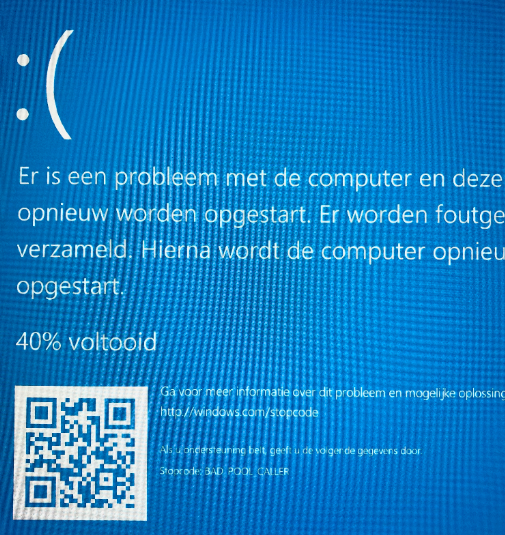
I edited an existing word document on my home computer (in the shared dropbox folder) and as soon as I clicked save my corporate laptop got a 'blue screen of death' and it happens every time I login again.
We had to put the computer into airplane mode and uninstall dropbox !!!
We uninstalled and reinstalled, and deleted the dropbox folder but it keeps happening.
Not good.
Any suggestions?
It says BAD_POOL_CALLER
Thanks for circling back to me on this matter @sncooper!
I can see that you’ve now chatted in to my coworker regrading the BSOD & this case has been escalated. We’ve also have an open ticket together as a follow-up to our discussion here.
We can shift our attention on the re-appearing files on our ticket & I’d happily further investigate the matter once you get back in touch with me there. Could you ping me back on the ticket when you have a minute?
Thanks again for keeping in touch!
I think I have the same issue, so not starting a new thread, here it is.
Only, in my case this is what it says:
By accident when installing Dropbox I put "sync with desktop". Which I do NOT want to do. I couldn't find any way to delete this. Tried to delete the Dropbox app and reinstall it, but it didn't change this. I don't want this to be a feature, how to solve this?
Hi @frus; thanks for joining our discussion here and sorry to hear you're having issues with this.
It looks like you've somehow enabled the new, beta computer backup feature so I'd suggest starting from the relevant Help |Center article in this case:
I hope this helps to some extent!
Thanks @walter for the quick response. I managed in the meantime to completely remove the app from the computer and install it again, and in the new installation I changed that preference. So far it seems that it isn't syncing the desktop anymore. But it was hidden in "advanced" preferences which is not very nice, since it is a major change.