I have a "ghost" folder which keeps re-appearing no matter how many times it is deleted. Any clues?
Hey, is the folder you are trying to delete empty or does it contain any files? Usually this happens because a piece of software on a computer that the folder is shared on is trying to access it, and is recreating it when someone else deletes it.If there is a file in there, looking at the 'previous versions' will tell you which machine the culprit is. If you don't have a file in there, add a test one, delete the folder again and when it reappears, you'll be able to solve the mystery! Deleting the folder on the rogue machine will fix it permanently.
@AK47 wrote: Oh and yes. The "ghost" folders, for lack of a better term, are still there. I delete and they reappear. I guess the issue isn't actually resolved
Oh and yes. The "ghost" folders, for lack of a better term, are still there. I delete and they reappear. I guess the issue isn't actually resolved
I'll follow up with you via email to resolve this for you. You should have my email shortly.
Many thanks.
This happened to me as well -- several very old folders reappeared with their contents intact. I found this forum, and read through the postings and replies. I am extremely put off by this -- and the official response. Obviously, we've been LIED to. Our deleted files have been hanging out on their servers due to a metadata error, and they just now, seven years later figured that out? Files that should have been permanently deleted 30 - 60 days "after the initial deletion." I don't buy that. Shady.
This is a big deal. You've just lost a lot of trust. How do we know that this is the extent of it? How can we know Dropbox is safe? Or takes our privacy seriously? Huge fail, Dropbox. You can no longer be trusted.
Hi All, On the 18th Jan. approx 11:40 local time (Turkey), I had loads of old long-deleted files from 2011 mysteriously reappear in my Dropbox. Also, some updated files seem to have reverted to older versions of themselves. Does anyone know what's happening? I've since changed my password but this seems more like some strange system error. There are no devices with these older versions that I know of and I use a Mac at home and a PC at work.
JasonW wrote: Does anyone know what's happening?
Does anyone know what's happening?
Yes. The explanation has been posted in the very thread that you replied to. Read the entire thing and you'll have your answer.
I'm glad it's fixed, but.... this explanation sounds like these files were kept in quarantine for 5 years while you worked on this bug. That doesn't make me feel warm and fuzzy about the "60 days" you listed below.
Ross, thanks for this. One thing, its unclear how to identify all those files that have reappeared. There are obvious top level folders that have reappeared, but how do I find files that may have reappeared somewhere inside a valid top level folder (that is a folders that was correctly in my dropbox just before the bug) if I have 100Ks of valid files and folders in my dropbox?
Can you give some more guidance on how to identify them? Or does this bug only put these reappearing files and folders at the top level of my dropbox?
A similar thing happened to me: An old (maybe in the past shared?, created 2011-12-18 ) folder created reapeared recently with 4 pictures inside. Original file names but 0 Bytes.
Were in your case the files fully restored or only "empty" 0-Byte files?
@ Dropboxers: Is this part of the same issue or do I have to worry about the intgrity/validity of my account and files? I am not sure wether something is missing. I only noticed this very old folder reappearing and am slightly shocked. :-(
Just happend the same with me. 5 or 6 folders from 2011 suddenly ressurected on my dropbox. This also happend on my office's accont with folders from 2012. This makes me wonder if there is a global issue here.
The problem now is quite simple: HOW CAN WE TRUST DROPBOX EVER AGAIN?
It just made my server uploud 4Gb of unnecessary/obsolete files for no reason.
Honestly dissapointed.
Uhhh, this is really weird. When I went into my dropbox today, I noticed a folder named 21 with a .png file named clue21.png which is just a picture of a blue square. If I remember this was a clue from the dropquest a bunch of years back. Why is this folder\file suddently reapearing?? It said this file was made on 1/18/2017 at 6:00 AM.
Joe C.13 wrote: I noticed a folder named 21 with a .png file named clue21.png which is just a picture of a blue square. If I remember this was a clue from the dropquest a bunch of years back.
I noticed a folder named 21 with a .png file named clue21.png which is just a picture of a blue square. If I remember this was a clue from the dropquest a bunch of years back.
Merging your post with the other thread that is already discussing this issue.
Thanks everyone for your patience while we worked on a way to clean up the inadvertently restored files and folders. We've built a fix that will automatically return this content to the way it should be: deleted and out of your Dropbox. This will only impact the inadvertently restored files and folders, and only if you haven’t updated them. We’ll begin rolling out the fix to affected users’ accounts later today. We’re giving you a heads up here so you’re aware of why there may be changes to your Dropbox. Here’s a bit more information about the fix.
Will this affect my other files?The fix will only impact the inadvertently restored files and folders. If you have edited the files or folders—by moving them or updating the content inside—they will stay in your Dropbox. You can still manually delete these files and folders if you don’t want them.
What if I don’t want these files or folders removed?While the fix will automatically take effect later today, you can contact our support team (dropbox.com/support) within 30 days and we’ll restore the files and folders for you. You won’t be able to restore on your own using the events page.
Do I need to do anything?We will automatically roll out the fix, you don’t need to do a thing. If you have questions or concerns, please write our support team at http://bit.ly/cm-support so that we can investigate your specific case. Your ticket will be prioritized by the team.
Thanks again for your patience, and we’re sorry for any inconvenience and confusion we’ve caused.
I suppose at some point the ToS potentially gave Dropbox the OK to keep backups of all users files for ...ever, however such incidents only add to the confusion of the conundrum that Dropbox as well as other online backup [services] have become as of late..
thanar wrote:Dropbox is supposed to be erasing forever deleted files that's older than 30 days on a few account. Where did all this data come from?
That has already been addressed in this thread. On this very page, in fact...
I am still seeing them - not sure how long the fix will take to be implemented?
Ross,
I have the same question asked by:
This happened to me too. All of a sudden a really old (at that time shared with another account) folder reappeared. From 2011 circa. Several gigabytes.
On Jan 17 some old files spontaneously appeared in my recents folder. These were audio files. We have shared access with my husband. None of us opened these files for the last two years. How is it possible? I have checked the security and events log. Looks like we were not hacked. Today another surprise. We found two videos recorded years ago in the recents folder again. None of us opened these files again. Does this have anything to do with this bug fix that restored deleted files?
**bleep** .. You keep files for an extra 60 day after deletion!
Did the NSA ask you to do that?
Same here. I am seeing some old folders and cannot delete them.
Moreover, if I use the API's list_folder endpoint with the include_deleted option I see a lot of files and folders that have been permanently delete years ago.
Why are they still there? I can't believe that so many files and folders have metadata inconsistencies.
Thanks Ross,
We are glad Dropbox patched this problem. I have two short queries and hoping that you can reply.
I am sure some serious users may be having these questions on their minds too.
The second question is more relevant since we have maybe worked on many files over the months & years and updated them with newer versions. Just because dropbox managed to revert all the zombie additions isnt enough. We have to be certain that the versions were right and/or they didn't delete legit file entirely from the folder index because it was affected i.e files missing because they were affected by the bug.
When we have several thousand files totalling to several GB's it is very hard to go and check them individually. We can't be even sure if the bug has been entirely quashed. Your response (even if bit technical) can help restore some faith in the bugfix.
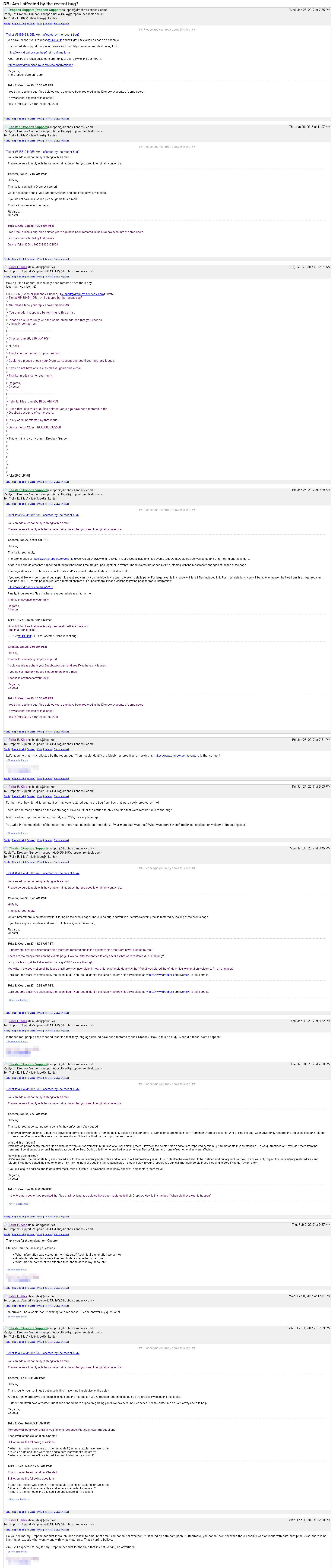
See screenshot below – I got in contact with support concerning the issue. Yesterday’s response, after waiting for about a week: “At the current moment we are not able to disclose the information you requested regarding the bug as we are still investigating this issue.”
Can anyone here tell me when files and folders have mysteriously reappeared?
I would like to compare old backups to see whether my account is affected.
Hi there,
Appologies for that, the information there is not correct, this bug is infact resolved, as I mentioned in my previous post. We'll reach back out to you by email and clarify any further questions you have.