Hello,
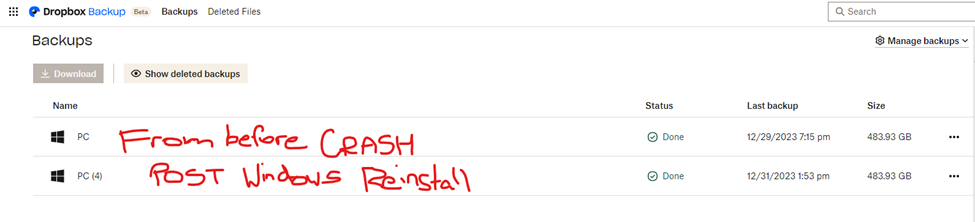
My laptop crashed yesterday and I ended up having to reinstall Windows 11. The laptop is up and running again and I am in the painful stage of having to reload all files and programs. First step was I tried to restore my backed up Dropbox files to my laptop. As far as I can tell, all the restore has done is create a DUPLICATE of my backup ONLINE.
So it’s essentially doubled my storage use (for the same backup files) and I don’t have any of the files on my laptop. See screenshot below.
Am I to understand that I will need to MANUALLY download all these files to my laptop? I tried to do that and have already run into the “Attempted to zip too many files” error and have figured out that if I need to download them manually, I will have to do so in pieces. I have used Carbonite as a backup program previously and I did not have to manually restore files to a new computer. I had assumed Dropbox Backup Restore was an automatic process as well. Am I missing something?
Thanks,
Janette