Hi,
I noticed a strange issue with Dropbox Fax preview when sending a PDF form.
I uploaded a filled IRS form. The original PDF displays correctly in Adobe Acrobat, Edge, and Chrome, including all table lines, labels, and layout.
When I upload the document to Dropbox Fax, the preview looks completely normal. The form layout, table lines, and labels are all visible.
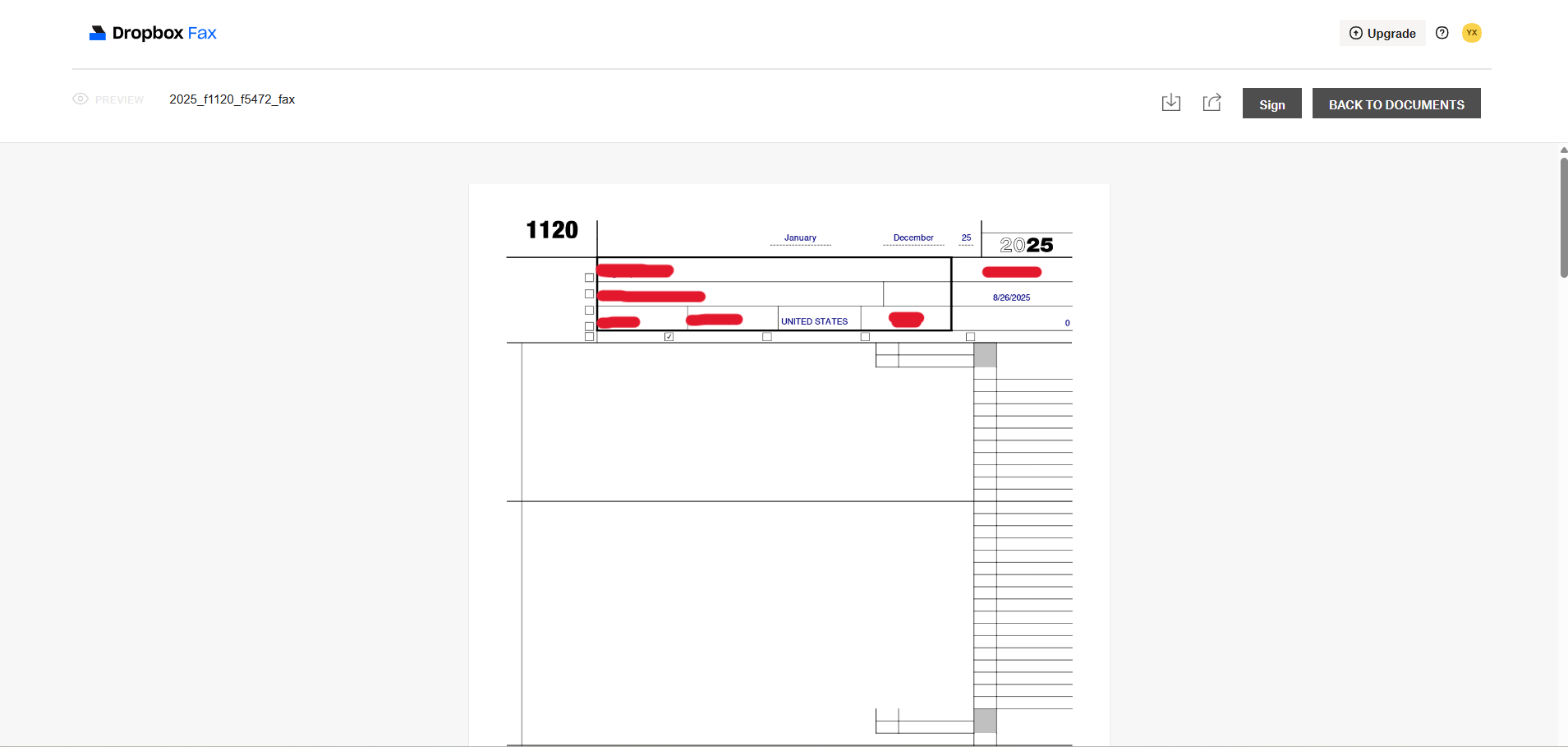
However, after the fax is sent and I view the document again in the "Sent" preview, most of the form layout disappears and only the text fields I filled remain visible. It looks like the background form layer or table lines are not rendered anymore.
Additional details:
- The original PDF renders correctly in Acrobat and browsers.
- The preview before sending looks correct.
- The issue only appears in the preview after the fax is sent.
- I also tried flattening the PDF before uploading, but the sent preview still shows the same behavior.
- If I download the document from the preview and open it locally, the layout appears normal again.
My question is: does the fax transmission use the original PDF rendering, or does it rely on the preview rendering shown after sending?
I just want to confirm whether the recipient will receive the full document layout (tables and labels), or if they will only see the text fields.
Thanks!