Device
ASUS ROG Strix G712LV-BS71-CB laptop
Operating System/Browser (if using the web)
Windows 11
Dropbox App Version/Browser Version
237.4.5655
Question or Issue
I'm supporting a user that I installed Dropbox for and since I in
stalled it the user can't access it's download folder. This is the message (pardon the French) that appears:
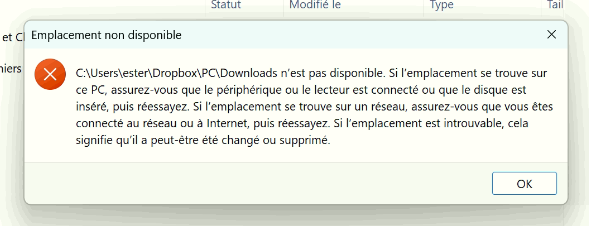
Which basically says that the folder is not available. All downloads from the browser fails unless I redirect the default download location to somewhere else, like the desktop.
When inspecting the properties of the folder, the link for the folder location is blank.
It's been a reccuring problem for him and I can't find anyone online experiencing the same issue.
I tried replicating it on my computer but can't seem to be able to.
It's been happening for a couple of weeks now and the workaround I found was to restart the computer so because Dropbox didn't launch at startup, the download folder was available. Upon opening the Dropbox app, the download folder is not acessible until a restart.
That was for the last couple of weeks, but now even a restart doesn't temporarily solve the issue.
Steps taken:
- Restarting the PC.
- Reinstalling Dropbox
- Making sure there is no backup settings targetting the user's document folder.
- Changing Dropbox's location on the computer by putting it directly on a Folder in the C:\ drive, not in the user's document folder.
I'm at a loss here. Does anyone know where the issue might come from?

