I would like to have the CHOICE to disable the "Dropbox Almost Full" notification.
As a temporary solution, I have chose to not start Dropbox on system boot and close it, but I would like to know how can I disable this message with Dropbox open.
Hi there @funkup!
Sounds like you’re receiving a notification about your Dropbox account running out of space. You can check how much space you’ve got left by navigating to your Plan tab on your Settings.
Although this notification cannot be disabled, it will not appear once your Dropbox account isn’t close to or over its storage limit. To do this, you can either make space by removing unwanted content (including shared folder and files) or earn free space.
I hope this helped. Let me know if you have any more questions!
SOLUTION:
In windows 10 after the annoying notification, click on the speach bubble icon on the lower right of your screen, this brings up the notifictaion/ action area, right click on the dropbox notification above then " Disable notifications for this group."
That should stop you being pestered.
-dk
It seems that you're close to your account's quota limit, in which case it would be normal and expected to receive an email notification to let you know about it @Calion
This is a ********bleep** answer. If DropBox wants to notify me ONCE about my account being nearly full, fine. But I get this notification many times a day! It is flipping annoying. I'm cancelling my DropBox account just to get rid of this notification!
This intrusive gray Dropbox pop-up causes games to minimize/freeze or at least blocks part of the screen while playing - couple times every day. Recently I decided I definetly need a lot more space for a proper backup solution and this single malicious feature changed my mind from "maybe I should just buy Dropbox premium, since I already use Dropbox for many years" to "I will NEVER pay Dropbox a single $, I won't reward such a malicious comapny with my money".
Dropbox keeps sending me bogus messages that my dropbox is full and that my files will soon stop syncing.
My dropbox is NOT full, and I resent receiving all these bogus messages. I'm afraid this is a dirty tactic by DropBox to blackmail me into upgrading, and that they will soon stop synching my files in order to escalate this blackmailing tactic.
How do I get them to STOP sending me these bogus email messages, leave me alone, and maintain my free account without fear of losing my files? I will NOT be blackmailed by ANYONE, including Dropbox!
@andreasfmpro wrote: How do I get them to STOP sending me these bogus email messages, leave me alone, and maintain my free account without fear of losing my files? I will NOT be blackmailed by ANYONE, including Dropbox!
You're not being blackmailed, you won't lose your files, and the only thing that will happen is you won't be able to sync if you go over your quota. If you no longer want to receive the low space message, just turn it off.
Rich,
Are you a DropBox employee? Is this an official reply from Dropbox?
If not, while I thank you for your reply, it does not instill any confidence in me that DropBox isn't going to do exactly what they have been warning me about, in several messages over the last few months, that is, prevent my files from syncing.
DropBox has been unreliable in their policies in the past. I am very much concerned that they will carry out their threats and disable my account even though I am not over my quota.
@andreasfmpro wrote: I am very much concerned that they will carry out their threats and disable my account even though I am not over my quota.
I am very much concerned that they will carry out their threats and disable my account even though I am not over my quota.
Dropbox does not, and never has, done that.
Hi @andreasfmpro, wishing you a happy Monday!
Is it possible that you have two Dropbox accounts? Have you checked that the email address you received the storage emails to, is the same one you're using for your Dropbox account?
As Rich said, please be aware that if your Dropbox folder becomes over quota, all that should happen is that syncing stops. Dropbox will only sync until you hit your quota, so if you are over your quota, all that should happen is that Dropbox will not sync any new files.
If you have any questions, let me know.
I only have one DropBox account.
BTW, is there a way to precisely ascertain via a Dropbox feature/utility the size of my Dropbox account, instead of relying on the mac Finder?
Hi @andreasfmpro, hope it’s OK if l jump in here.
If you wish to check the storage of your Dropbox account, you can do so via the Plan tab of your account settings.
In case you have further questions, I’d be glad to help!
Thank you, Nancy,
This conforms that I have more than 3GB available, but Dropbox keeps sending me these ominous, bogus messages that my box is almost full.
Hi @andreasfmpro, you should have an option to unsubscribe from the emails at the bottom of those emails in order to stop receiving them.
Just so you're aware, unsubscribing from emails means that you might miss other important notifications or communications from Dropbox.
Exactly. So ****** if I do, ****** if I don't unsubscribe.
Why on earth would Dropbox bombard me with these bogus emails? Why don't they just stop?
Same issue, my Dropbox isn't going to be full anytime soon, this needs to STOP!
Dropbox keeps sending me emails and notifications about my storage space reaching its capacity, as if I've got 100 megabytes of it left or something. It says that if I won't buy another plan then I'm risking losing my files, and a dozen of variations of the same message.
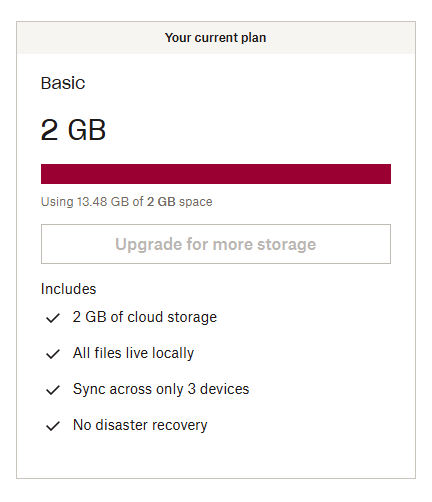
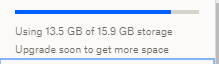
I've been using Dropbox since 2010 and I've got a basic free plan of 2 gigs, but I've increased my storage space by inviting friends and doing "challenges", so now I have around 16 gigs of space and 13.5 of them are used. That is not "critically low on space" by any means, but I keep receiving so many spam notifications that it's starting to look threatening.
Either Dropbox has a bug in calculation how much space I have occupied by comparing it to the basic plan instead of actual space, or it's doing it on purpose to force me to pay. Also I cannot contact live support since I have a free plan.
I'm thankful to Dropbox for the service it provides but I'm pretty sure this is not how a service should treat its long-term customers. If this is a bug then I sincerely hope that it will be fixed as soon as possible.
Hi @BenJah, thanks for bringing this to our attention.
Generally, these emails are sent out if a Dropbox account reaches a certain level of quota usage based on the total quota, just to keep users informed.
Regarding the first image, are you seeing this on the site or the mobile app?
This will help me to assist further!
Hi @Jay, thanks for the response!
Yes, I'm seeing this on the website.
Thanks for the info, we appreciate this feedback on how to improve the info provided to our users.
We take all comments into consideration, and if you have any further suggestions, we'd be happy to hear them!
Received an alarming email this morning about how my files are about to stop syncing if I add even one more file and knowing that I still have a good amount of space yet, I thought it might be spam or a phishing attack. Nope, turns out it's from Dropbox proper and I was taken to a page saying that I had used 15.52 GB of my 2GB of space. And this was further alarming b/c I should have about ~18 GB after my years of recommendations to new users. Lo and behold, checking my actual account, I do indeed have ~18 GB of space in my account.
So, is this Dropbox demonstrating an inability to correctly count GB, which is pretty alarming for a service that's entirely based around storing data, or is it a malicious phase of marketing that we're in and I should just plan on finding an alternative to dropbox?
I realize this is an older post, but it's 2023 and I'm also having this issue, so it's something that Dropbox seems unwilling to address. And importantly, the piece that I believe you're over looking is that the notification alerts are for when "I'm running out of space" but having multiple GB's of space left isn't really 'running out' and it's also not helpful that the email threatens you with account de-stabilization and shows you that you're _already out of space_. So we're left with either the idea that Dropbox is maliciously advertising or they're not adept at counting bytes. Neither of which does much to install confidence in the user base.
Yeah I'm really sick of those emails too. I really don't need to be reminded constantly that I only have about 20% left. I already removed loads of unnecessary stuff. What's in there needs to be in there and I'm not planning on adding anything else 🙃
I have been getting email messages from Dropbox about my storage space being full. Yes, I know my space is full and can be deleted. The price for plans is too expensive. I have other cloud backup that is much less expensive. Can anybody please stop these annoying emails. It appears there are no online support chats to submit this request to. Dropbox came as a free trial with my HP laptop. Worst decision I ever made. My email address is [Removed as per Community Guidelines]
Gary
Hi @Gary21, thanks for messaging the Community.
Currently, it wouldn't be possible to prevent these specific notifications, as they're important notifications regarding the quota on your account.
The email notifications that can be disabled are visible on this page.
If you have any further queries, feel free to message back.
Hi Jay,
Thank you for the reply to my inquiry. I understand that I am over my quota, which I no longer need. The Dropbox software was only a trial with my HP laptop. I don't need any of those saved files. I have my files backed up to other software. My Dropbox password doesn't work and my account can be deleted. Gary
@Gary21 wrote: My Dropbox password doesn't work and my account can be deleted.
My Dropbox password doesn't work and my account can be deleted.
They won't (and can't) delete your account. You need to do that yourself, or leave the account idle for more than a year and it will be deleted automatically. If you're unable to sign in to the account to delete it yourself because your password doesn't work, you can reset your password.
Hi Gary!
I am getting extremely tired of getting "You're running out of space!" notifications. I'm not running out of space. I have more than 1GB free. If these don't stop, I think I'll just move everything to iCloud Drive and delete Dropbox.
There is no way to stop them on the desktop/website but you can disable the notifications via email here: https://www.dropbox.com/account/notifications
Well, thanks for letting me know, anyway.I got tons of free space when Dropbox was new, and so now it thinks I'm constantly out of space because I'm waaay over 2GB.
Calion wrote: I got tons of free space when Dropbox was new
I got tons of free space when Dropbox was new
Dropbox doesnt remove free space given unless its time limited (such as some of the promos with laptops etc.) so any space you got then you should still have now.
I do, which is why it's so annoying that I keep getting low-space notifications. But whenever the usage of above 2GB, it thinks I have no space, when I have plenty.