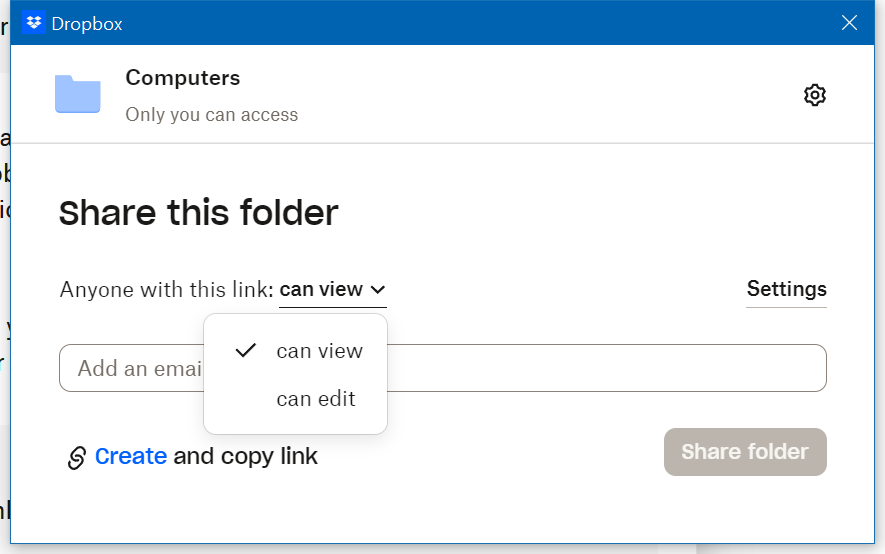
I often get lost when creating a link for sharing using the SHARE menu in the Windows context menu.
I want to create a link to share a folder in my Dropbox in view-only mode. I have been a long-time user of Dropbox Professional (almost 20 years).
Why lost?
There is only ONE WAY to create a link in Dropbox => SHARE menu in the Windows context menu.
That's the reason.
The link must be created first, then the setting should be changed.
No the other way.
If you hit the "setting" button before creating a link, you will be lost. At the setting menu, you cannot create a link. No link can be created, no link is copied in the clipboard.
You will need to start the link creation process from the SHARE menu, again.
Why can't I create the link within the settings tab?
It is reasonable to (1) adjust the setting and (2) create a link with the setting. But the SHARE context menu only allows to create a link first and then change the setting.
I often worry whether the link copied (which setting was changed after created) has the proper sharing option as I set. To be sure, I paste the created link into a browser and verify that the link setting is as I changed.
It's a waste of time.
Why is configuring the setting and then creating a link not allowed on the SHARE context menu?
I prefer to have a "Create a link" function in the Setting tab and the way (1) adjust share setting, and then (2) create a share link with the setting.