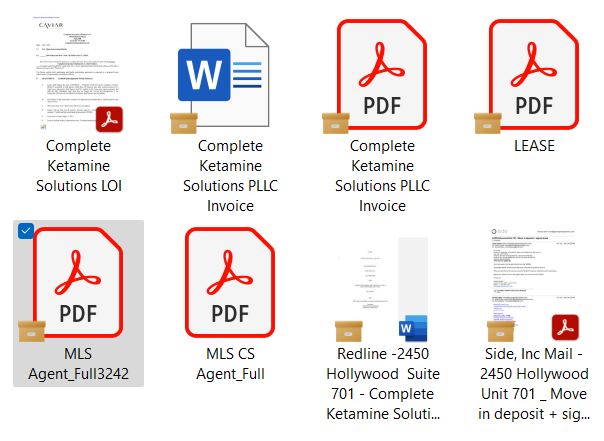
Does anyone know what these brown file box overlays are in Dropbox are supposed to mean? I can't find any official documentation about these icons. I only started seeing these recently, and now they are appearing more frequently.
Hey @V3 Admin, thanks for reaching out to us.
The brown box icons that you see on your files aren't from the Dropbox desktop app - you can find our syncing icons, here.
As such, you'll have to find the third party app that the icons in question are associated with and change the overlay permissions given from your OS.
Let me know how it goes, cheers!
Hey there, @Carola11, welcome to our Community!
Which platform do you use when trying to open your .pdfs? Do you use our website, desktop or mobile app?
Also, do you recall when this first started happening?
If you could also send over a screenshot of the message you mentioned, along with the icon you see next to your files, that'd be great.
Let me know more!
This just stared this morning, when I logged on. Yesterday it was fine. Here is a sceen shot:
I am on my laptop, and access Dropbox directly.
Any chance I could get some help fixing this issue? I really need to have access to my files.
Thank you
Hey @Carola11, thanks for the added info and visual!
The folder icon you're noticing there is not coming from Dropbox, but probably a third party app, most likely OneDrive. You can find our syncing icons here,
Also, if you're indeed running 3rd party apps that are monitoring, syncing or backing up your files, have you tried closing them one by one to see if it makes any difference?
Hi, it still is not working. You said it is not Dropbox, yet it only affects the PDF files in DropBox.
PLease help!
@Carola11 wrote:Hi, it still is not working. You said it is not Dropbox, yet it only affects the PDF files in DropBox.PLease help!
@Carola11 wrote:
It isnt a Dropbox issue. It is a OneDrive issue. That icon is from their software. It means THAT is what is linking to the files, not Dropbox.
You have almost certainly got both OneDrive and Dropbox syncing the same folders which isn't possible.
To sort you need to take off the OneDrive link, but, make sure everything has downloaded first.
I ma sorry, but I ma not that tech savi and do not know how to do that. Are there step by step instructions or a video I could watch to help me. I am 68 yrs old and still working in real estate. Now I need my files and I can not open them. Thank you.
HELLO! Can anybody help me get my files back??
@Carola11, since this is most likely related to OneDrive indeed, there’s not much guidance we can offer, I’m afraid. Only the Microsoft support would be able to do that.
@Carola11 wrote:I ma sorry, but I ma not that tech savi and do not know how to do that. Are there step by step instructions or a video I could watch to help me. I am 68 yrs old and still working in real estate. Now I need my files and I can not open them. Thank you.
You need to speak to OneDrive - its their icons, its their software its their program.
My guess is they need to be re-downloaded from OneDrive first as they are online only. However, that is something you need to ask them for.
I just started to get these brown boxes on my computer dropbox files. I could not open the files... so I tried quitting one drive... the brown icon stays on the file but now I can open the files. Does anyone know if there is a better fix as I use both one drive and dropbox due to clients using different share folder systems... I need both.
Its extraordinary that this issue i see from varios threads has been ongoing for 3 years without a solution, only sugestion is uninstall onedrive, Were told its becasue onedrive and dropbox are both syncing files, but my onedrive is not setup to sync the dropbox folders. I need onedrive more than i need dropbox, so as i have a choice i will uninstall dropbox. goodbuy 10 years ?, of dropbox use becasue no one can be arsed to solve the problem.
OldBuilders wrote: goodbuy 10 years ?, of dropbox use becasue no one can be arsed to solve the problem.
goodbuy 10 years ?, of dropbox use becasue no one can be arsed to solve the problem.
Dropbox cannot solve an issue with another product. Nobody, at all, would be happy if Dropbox (or any other app for that matter) suddenly started uninstalling other programs or apps.
If they have the brown box icon on them then OneDrive is syncing (or attempting to sync) the same things Dropbox is. The end user needs to stop that - Dropbox cannot. A possible issue is that the system has had Backups set on (Dropbox or OneDrive - or even both) and so they are 'competing' for the same directories.
I have searched the relevant help topics without finding an explanation on the "brown box" icon that appears on files in my Dropbox folder. See the attached file "Dropbox_Meaning of Icon_BrownBox.pdf" (below).
Hey @Jonas-78, thanks for posting to our Community!
This should be a OneDrive icon, so I'd also look into that if I were you.
It seems that many people got this problem, The OneDrive icons appearing on your Dropbox folders could be due to integration or conflicts between OneDrive and Dropbox. One common cause is that both services might be using the same folder for synchronization or backup.
This situation often happens if you have enabled OneDrive backup for the Desktop, Documents, or Pictures folders, which Dropbox might also be syncing.
Can you Check if OneDrive is backing up folders that Dropbox is also syncing? If so, disable backup for those folders in OneDrive.
Thanks to Hannah and to maher1982 for their replies!I am not using OneDrive at all, I rather look at it as a pest. But I will follow your advice and check what is the situation there.