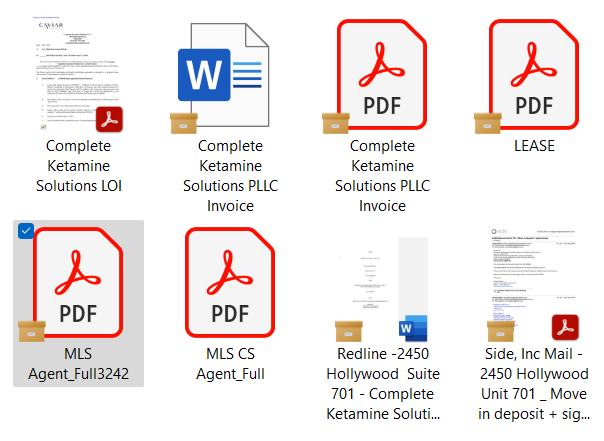
There is a small file box icon next to the PDF file. Never saw this before. None of my PDF files are opening.
The message is " the file cannot be accessed by the system". I am a real estate broker and I NEED these files. Please help!
Hey there, @Carola11, welcome to our Community!
Which platform do you use when trying to open your .pdfs? Do you use our website, desktop or mobile app?
Also, do you recall when this first started happening?
If you could also send over a screenshot of the message you mentioned, along with the icon you see next to your files, that'd be great.
Let me know more!
This just stared this morning, when I logged on. Yesterday it was fine. Here is a sceen shot:
I am on my laptop, and access Dropbox directly.
Any chance I could get some help fixing this issue? I really need to have access to my files.
Thank you
Hey @Carola11, thanks for the added info and visual!
The folder icon you're noticing there is not coming from Dropbox, but probably a third party app, most likely OneDrive. You can find our syncing icons here.
Also, if you're indeed running 3rd party apps that are monitoring, syncing or backing up your files, have you tried closing them one by one to see if it makes any difference?
Hi, it still is not working. You said it is not Dropbox, yet it only affects the PDF files in DropBox.
PLease help!
@Carola11 wrote: Hi, it still is not working. You said it is not Dropbox, yet it only affects the PDF files in DropBox. PLease help!
It isnt a Dropbox issue. It is a OneDrive issue. That icon is from their software. It means THAT is what is linking to the files, not Dropbox.
You have almost certainly got both OneDrive and Dropbox syncing the same folders which isn't possible.
To sort you need to take off the OneDrive link, but, make sure everything has downloaded first.
I ma sorry, but I ma not that tech savi and do not know how to do that. Are there step by step instructions or a video I could watch to help me. I am 68 yrs old and still working in real estate. Now I need my files and I can not open them. Thank you.
HELLO! Can anybody help me get my files back??
@Carola11, since this is most likely related to OneDrive indeed, there’s not much guidance we can offer, I’m afraid. Only the Microsoft support would be able to do that.
@Carola11 wrote: I ma sorry, but I ma not that tech savi and do not know how to do that. Are there step by step instructions or a video I could watch to help me. I am 68 yrs old and still working in real estate. Now I need my files and I can not open them. Thank you.
You need to speak to OneDrive - its their icons, its their software its their program.
My guess is they need to be re-downloaded from OneDrive first as they are online only. However, that is something you need to ask them for.