I have 18.25 gigs available that I got for free from several people signing up for a Dropbox account through me. I deleted 90% of everything…and permanently deleted…and it still shows maxed out and now I can’t upload anything else. Help?
@wamsender wrote: Can I delete my backup? That seems to be the problem...???
Can I delete my backup? That seems to be the problem...???
As mentioned on Saturday, you have the backup feature enabled. Refer to the following links to learn how to manage your backups.
@wamsender wrote:I deleted 90% of everything…and permanently deleted…and it still shows maxed out and now I can’t upload anything else.
Checked your Backups page? Also note that you don't need to permanently delete files. Simply deleting them is enough to recover space.
Hey @wamsender, let's jump right into this!
I'd love to have a visual of your plan page and what it reports in terms of your account's quota. Would you mind sending over a screenshot, please?
Keep us posted!
@Megan
Similar problem here: I have 4.75GB with Dropbox, and Dropbox (online) tells me I'm using 4.6GB (see screenshot).
However, when I check the space used on disk, I only see it at 2GB (see second screenshot of du -sh Dropbox at the commandline):
Why would Dropbox (app and online) consider my usage at 4.6GB when there are only 2GB of data in my Dropbox folder?
EDIT: no backups either:
Your shared files are using up the space as you can see on the graph.
Now its possible they are not syncing to the machine (Selective Sync in use or possibly set to Online Only?)
So, don't use the computer for size estimates - it isn't accurate at all (there is also a hidden cache).
Everything you see at www.dropbox.com/home uses space though
Thank you Mark for your response.
Without intending to be rude, I feel I need to correct you:
The solution for me was simply to ask my husband to remove the excessive data from the shared folder on the other device, which brought down the load on my account.
My issue is now resolved. Hopefully this post will help others with similar problems, and maybe the original poster on this thread!
@louvetemilie wrote: Without intending to be rude, I feel I need to correct you: The disk space usage as reported on the device is accurate and correct (2GB in my case) I'm not aware of myself or my husband using Selective Sync or Online Only, so I'm not sure why the files are not synced on my device
If the space usage on your device is accurate, then you weren't syncing all of the files from your account.
If the shared folder in your account had 4.6GB of data in it, and the folder was visible in your local Dropbox folder, then either some files were marked as Online-only or some folders within it were removed using Selective Sync (or there's something preventing them from syncing, such as a bad file name). Otherwise your local folder would have had 4.6GB of data in it.
There's almost nothing left in my folders. Some of them are empty. I deleted 90% of what was there. I got the extra gigs from people signing up with Dropbox through me several years ago. Do I need to disconnect devices, or something???
Hey @wamsender, thanks for the info!
It seems you accessed your account page on your mobile. However, in order to see a clearer breakdown of what's taking up space for your account, you might want to visit your plan page online as found here.
It could be an active Backup, or some shared folders even.
Would you mind giving this a go?
Perfect! Thank you!!!!!
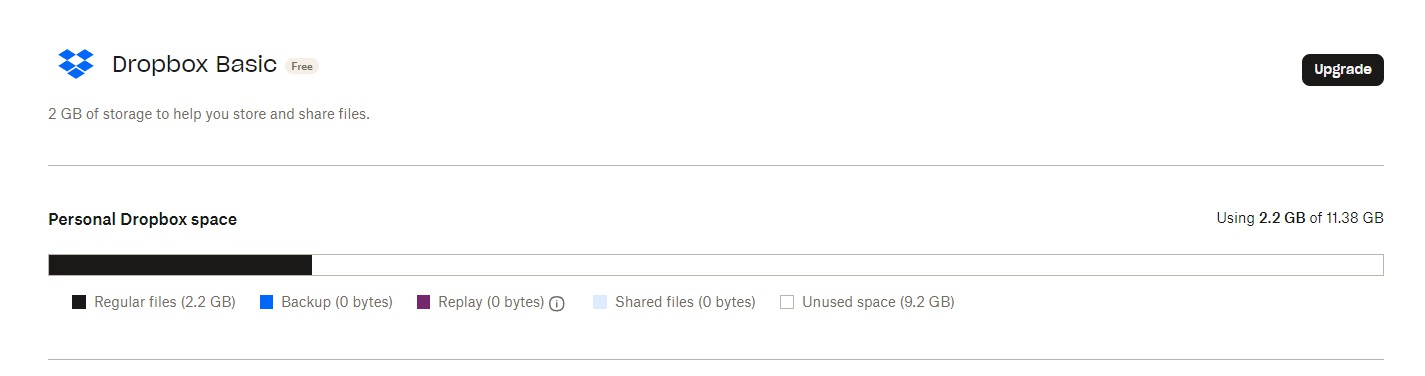
I have this issue as well. 2.2Gb used out of 11.38Gb. No, it's not auto backups - I don't have that enabled. If I go to backups, I see an empty screen.
Hey @ianshere - sorry to hear you're having issues with this.
Could you clarify what's shown in your plan page in regards to your quota exactly?
11.38Gb. 2.2Gb used. It's a basic plan but I did a lot of add-ons to get it to that.
So you're not near your account's quota limit then @ianshere?
Do you see any files taking up space on your homepage or the sharing tab by any chance?
Not even vaguely close to my limit - 2.22Gb of 11.38Gb Dropbox reports. I checked, and cleaned out, a bunch of files and folders from Shared and Home Page, but it didn't make a difference to the 2.22Gb that I was reported as using, and, when trying to copy a single small file - 3-400kb - it failed again.
Hey @ianshere. For some reason, I’m unable to see your screenshot. Can you try to upload it again by clicking on the button showing below?
@ianshere wrote: Not even vaguely close to my limit - 2.22Gb of 11.38Gb Dropbox reports.
Not even vaguely close to my limit - 2.22Gb of 11.38Gb Dropbox reports.
Where are you seeing a message about being out of space? Do you have a screenshot of that message?
... when trying to copy a single small file - 3-400kb - it failed again.
Do you have a screenshot of the exact error you're receiving?
Could you also let us know the steps you take that lead to this error @ianshere?
Are you getting this on the Dropbox app or on the website?
A client sent us a share link to her dropbox containing photos for her website. Trying to copy a folder or even, as in this case, a single image to our dropbox causes the error. We use the webpage not the app.
Is the link pointing to single files or a shared folder perhaps @ianshere?
If it's the latter, how large is the folder in question? Do you have enough quota on your account to accommodate the share?
As I have said, I first tried to copy them all which failed. Then I tried to copy a small image file (less than 1mb) and also failed so it's definitely not file size.
Hey @ianshere, have you tried to use the "download" button, to download the files to your computer and then upload them to your Dropbox manually?
Do you get the same error, when doing so?
Yes, I can download to my computer and upload to my account without issue.
Hey @ianshere, did the user send you the link directly, or you simply received an email asking you to add the folder to your Dropbox account?
If you try the same process while using a different browser, do you get the same results?
I got a link from them. I tried it in Edge and it worked. However, I never use Edge, only Chrome. So it seems like it's a Chrome issue.
It sounds indeed like a browser issue @ianshere.
You might want to clear the browser's cache, or even restore to its original settings. In any case, I'm happy it worked when you used a different browser.