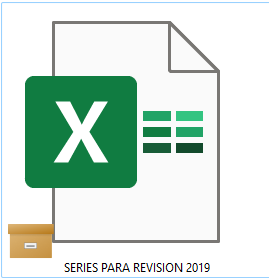
What does this orange box icon means? I'm on desktop, windows 11.
@rdb0122 wrote: So this isn't just an Excel issue, ... Dropbox needs to look into this though ...
So this isn't just an Excel issue, ... Dropbox needs to look into this though ...
It's not a Dropbox icon. It's from OneDrive. You likely have OneDrive and Dropbox trying to sync the same data, which will never work correctly.
@Nickelplate wrote: I've uninstalled OneDrive and the briefcase icons remain. I'm also not getting any Dropbox options when I right-click a folder or file. I'm unable to request files for keeping offline, and all other context menu options are missing.
I've uninstalled OneDrive and the briefcase icons remain. I'm also not getting any Dropbox options when I right-click a folder or file. I'm unable to request files for keeping offline, and all other context menu options are missing.
The icon is from OneDrive, so, if its still there its an issue with OneDrive's uninstall from the system.
In terms of context menus that USUALLY means Dropbox isn't installed OR it isn't running.
Try to redownload from www.dropbox.com/downloading