Hi Everyone,
I signed up for a 30 day Dropbox Plus trial. I already had Dropbox Desktop App (version 207.4.5821) installed on my Win Acer Nitro laptop on the C: drive with a Dropbox folder syncing with my online Dropbox account while on the Basic plan. The files in the Dropbox folder are still syncing fine with my online account.
I am not sure if the two problems are related, so I thought I should mention both in the one post.
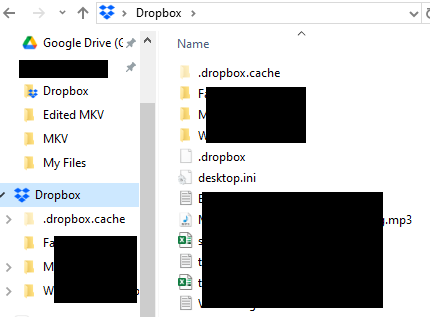
The first problem is the sync icons are missing in the Dropbox folder on the PC. I don't recall if they were visible under the Basic plan on this PC because I access Dropbox folder via my iPhone and Surface laptop instead, where the icons are visible on the latter. On my Acer I only access Dropbox files via links pinned to Word, Excel, etc so I never went into the Dropbox folder. See the following image:
The second problem is that I'm trying to use Dropbox Plus to backup (not sync) data on an external SSD, but Dropbox is not recognising/finding/seeing the SSD. This is what has happened, and what I've tried, so far:
The SSD was already connected to the computer as a D drive. All other applications can access it, write to it, etc. It shows up in File Explorer. The SSD is NTFS format (which Dropbox help says is compatible), and is a Sandisk Portable Extreme connected to a USB-C port on my laptop.
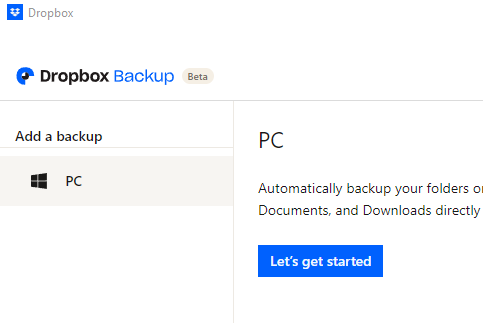
Once I started the trial, I went into the Dropbox Desktop App to find the SSD (under Preferences -> Manage Backups) to select folders to backup, but I could only see the PC (C:) under "Add a backup". See below:
I shutdown the laptop, disconnected the SSD, restarted the laptop and reinserted the SSD. Dropbox popped up with the notification asking if I want to backup the drive, and I selected Yes. I was then able to select the test folder I wanted to backup. The SSD showed up under "Add backup" when I went into Preferences -> Manage Backups, so I thought all was good.
Dropbox did nothing with the folder for about two hours. Under the "Backup" tab when you click on Dropbox in the taskbar, it kept saying 0% backed up and no activity showed at all. (I don't have an image of this.)
When I went into Preferences -> Manage Backups again, I noticed that the SSD had disappeared again from under the "Add backup".
Suddenly the backup started, but the SSD is still not shown. It is the same as the above image, as though the SSD is no longer visible to Dropbox.
These problems with Dropbox do not fill me with much confidence about paying for a plan if these basic aspects don't work reliably.
What should I do next to try to fix the problem? Should I uninstall Dropbox completely from the Acer, reinstall? I know this will delete the Dropbox folder on my Acer (I have a local backup and can copy the files back to reduce download time) and I will need to set up the SSD backup again. If I do that, will I need to delete the original SSD backup in the online Dropbox account and start again? Do the sync icon and SSD issues together suggest that my installation of Dropbox might be corrupted somehow, and that is why there are so many problems?
There are no problems with the SSD itself. As I say above, it works fine with all other applications. It is only Dropbox which cannot recognise/see it.
Many thanks for your help and suggestions.
Plutogenie




