What does the yellow square mean?
Can't find it anywhere
What does it mean?
@Berryth wrote: What does the yellow square mean?
That's not a Dropbox icon. I believe it's from OneDrive.
Hi,
I posted here because it is on almost all files and many folders within the dropbox folder.
Haven't seen it on any other syncing service like OneDrive or GDrive.
/Berry
I also got them - can anyone help? This is in Dropbox for sure!
Hey @Elsje Joubert, sorry to hear you're having issues with this.
I just wanted to clarify that these icons are not coming from Dropbox, but probably from One Drive.
You can have a look at this page for more information.
Hope this helps!
I have exactly the same question. The ikon only appears in the Dropbox and it disappear when I open the file!
Hi @Dallexx, do you have OneDrive installed on your machine? If you quit that app temporarily, do those yellow icons go away, or change to another icon?
I know this is an old thread and there is a lot of information about this out there but here is what I know. It maybe a "OneDrive" icon but it is only connected to Dropbox. I have Dropbox setup along with OneDrive. Dropbox is located in the root of my C drive so OneDrive is NOT syncing that path. OneDrive only syncs Docs, Desktop,Photos. When I click on a file with this icon I can actively see Dropbox syncing when the file opens. From my experience, if you can not open the file with this icon, make sure Dropbox is started and or log out and back in to the Dropbox app. This has fixed this issue with several of my users.
@Jhousefavitguy wrote: It maybe a "OneDrive" icon but it is only connected to Dropbox.
It maybe a "OneDrive" icon but it is only connected to Dropbox.
That icon has nothing to do with Dropbox. It is entirely a OneDrive or Windows 11 icon.
So why does Dropbox start to sync when I click on a file that has that icon but files without that icon don't cause that? I just had a user this morning that could not open a file in their Dropbox synced files with this icon. Closed Dropbox and reopened and was able to access. That file does not sync to OneDrive either. I understand it is not a Dropbox icon by why is it there if those files are not connected to OneDrive and the fix is closing/opening Dropbox?
That is a OneDrive icon. So they almost certainly have the files stored in two locations. Once in Dropbox and once in OneDrive.
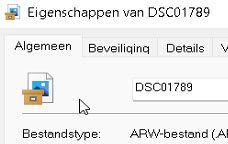 What does it mean?







