Hello everyone,
On 18 November Dropbox (v.187.4.5691) received a significant update to its folder structure.
For several hours it was doing the accounting update, with a bunch of constraints in between (do sign-out and sign-in again to synchronize 17TB again, disabling permissions to access folders that were as read-only, others).
At the end of Sunday, everything was synchronized, but now on the local disc there are two folders:
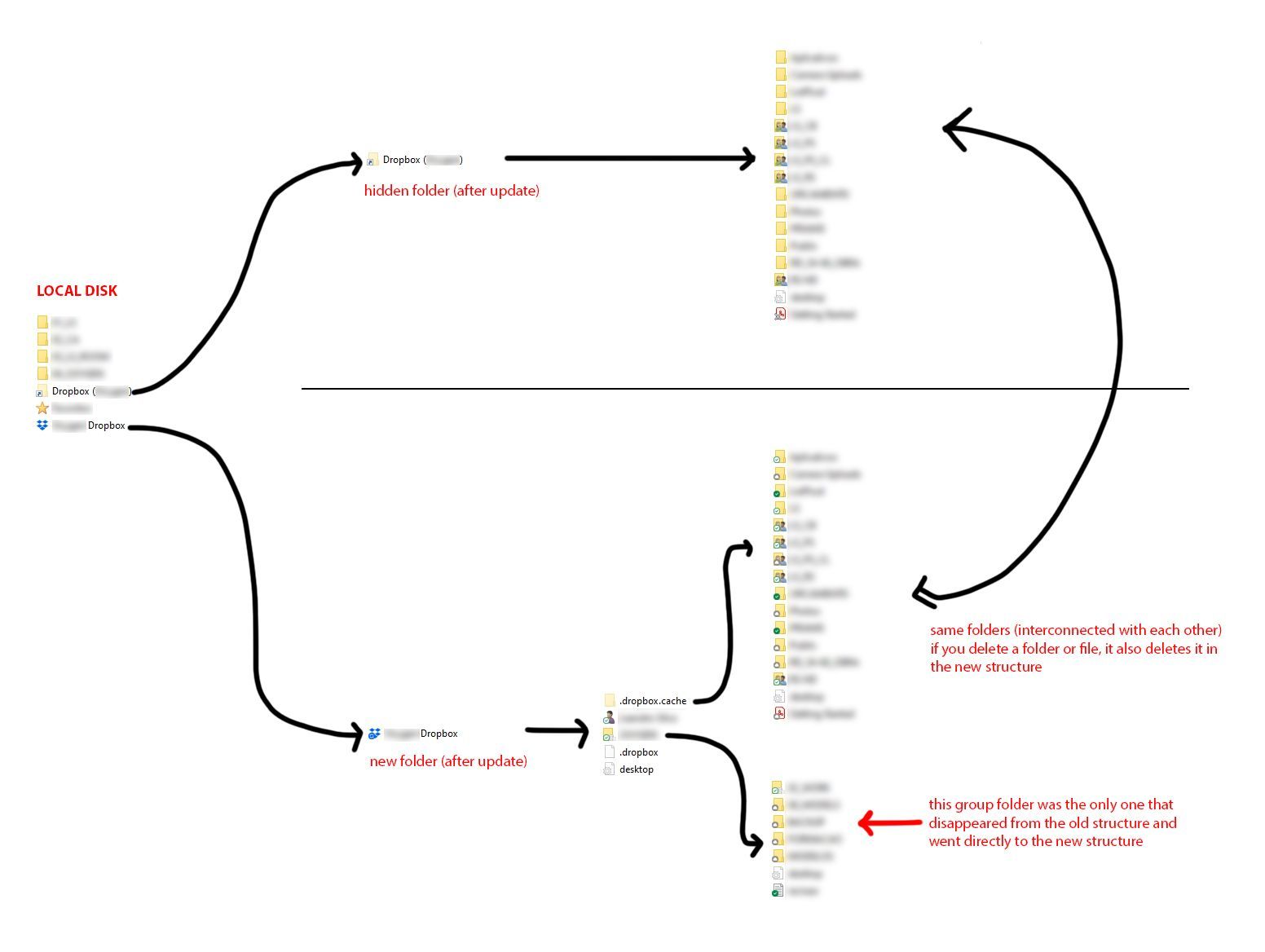
Folder 1: Dropbox (******) - old structure, hidden folder
Folder 2: ****** Dropbox - new structure
On the new structure, there are two folders:
- a new personal folder which includes the same folders and files that were in the previous structure.
- a group folder which was moved during the update from the inside of the old structure to the outside of the new structure.
Shouldn't the update have automatically deleted the old folder instead of leaving it hidden as a shortcut?
Will it be removed in a subsequent Dropbox update?
Because the files are interconnected in both folders, meaning that if you delete a file in the old structure, you delete it in the new one too.
It doesn't make sense to have those two folders... it's confusing and annoying.
Assuming that disabling the viewing of hidden folders in Windows isn't a a proper option, how do you solve this issue?
Thanks in advance.
Best regards,
Leandro Silva

