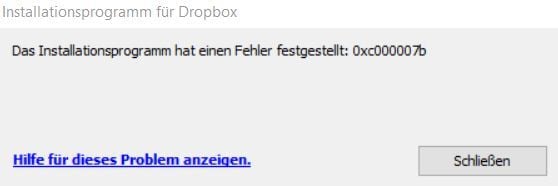
I can't get the app to install on my laptop. I keep getting the error message 0xc000007b and nothing suggested seems to work.
Am I destined to not have this app on my laptop?
Stacy
new version also works
https://www.dropbox.com/downloading?build=185.4.6054&plat=win&type=full&arch=x64
Hi @SBering, welcome to our Community!
It sounds like the error message you're getting is a Windows related one.
Could you temporarily disable any antivirus or firewalls you may have running on your computer and try again? If you still get the same results, please send us a screenshot so that we can have a visual too.
Also, have you tried to restart your device?
Keep me posted, and we'll take it from there!
same problem here ... just received my new PC and tried to install dropbox.Allready disabled all Firewall and Antivirus, still the same message. Fault message is in German.
Hey @Mirage81, thanks for posting here!
Have you tried to click on the blue hyperlink, on the bottom left to check solutions for this issue?
Keep me posted!
Hi Megan,sure, it just send you to a general help page.Dropbox installer failed to start - Dropbox HelpIn my case nothing helps. I have a blank/new Win 11 installation, no additional Firewall, Antivirus Software. Even disabled the Firewall and Windows Defender, same result.I tried the offline installer (even different versions), but same result.
Hi everyone, could you try the offline installer from this page for your version of Windows?
hello Jay,I still get the same error with build 176.4.5108Out of curiosity I took an older stable from January ... Stable Build 165.4.4286 ... this one worked, it installed without any progress bar, seemed to hang, but in the end Dropbox was installed. It syncs normaly at the moment, I hope it automatically updates to the latest version
Thanks for the update @Mirage81 - let us know if anything changes!
Dropbox version 174.4.5852 is the last version I can install. - Windows 10
newer Versions ==> error
Hey @TAnon, thanks for bringing this to our attention.
Can you give us a bit more info on the errors you're getting with the newer versions?
If you can even send us a screenshot, that would be really helpful.
Thanks in advance!
Thanks,
Thanks for the screenshot, @TAnon.
Did you take a look at the suggestions in the Help Center article, to see if they help?
If not, does our offline installer help?
of course, but found no help for this problem,
yes, even the offline installer does not help
same problem
Error message 0xc000007b upon installation. - Dropbox Community (dropboxforum.com)
Hi @TAnon, do you have any programs that could be affecting the Dropbox app or folder, and prevent it from updating?
Still receiving the same error message.
I'm starting to lose hope on this.
I don't think so,
firewall and antivirus I had disabled
there is only the information/error message already sent as a screenshot
Version Dropbox 174.4.5852 Offline Installer.x64
can be installed and works
Hi @SBering, @TAnon, in order to look into this matter in more detail, would it be possible to reach out to the email associated with your forum profile?
yes,
if it helps 🙂
@SBering
Have you checked this version,
runs with me:
https://www.dropbox.com/downloading?build=174.4.5852&plat=win&type=full&arch=x64
Hey @SLBering and @TAnon, there's actually a new version of the Dropbox app that just got released yesterday; can you try that and let us know if it works?
I have already tested the 179 version yesterday ==> same error
This is the last version which works;
Dropbox 174.4.5852 Offline Installer.x64
Just one last thing then, @TAnon, have you tried the more advanced reinstall of the app?
@TAnon
You are my hero!! This worked. I can't thank you enough, you've saved my sanity!!
Fantastic news @SBering!
If you need anything else, just give us a shout. We'll put our capes on, and come to the rescue! 😉
@TAnon & @SBering thanks for alerting us to this issue. We did make some changes to the security settings for our installers as part of Version 175 which seem to be causing issues with the security settings on your machines. The engineering team is currently looking into a fix, but there is a workaround you can try if you'd like to be able to install the latest version of Dropbox:
- From the Start menu, search for and open "Windows Security"
- Select App & Browser Control
- Select Exploit Protection Settings
- Reset "Force Randomization for images (Mandatory ASLR) back to the "Default (Off)" setting
- Reboot and try installing again
Here's a Capture showing the process: https://capture.dropbox.com/mWbJjWFzpXyafdZF
I'll update this thread once we have a long term fix for the issue and Mandatory ASLR can be turned back on
My dropbox on Win 11 somehow stopped auto updating. It's still 174.3.5762. I have another Win 10 PC and it's updated all right. I even tried to manually update but got error. How can I fix it?
@Mickey M.1 wrote: I even tried to manually update but got error.
I even tried to manually update but got error.
Which was?
First of all disable your antivirus software, sometimes Antivirus software can interfere with Dropbox updates if it fails, you can uninstall and reinstall Dropbox. I think these steps must work
Can't finish install and get an error message 0xc000007b.