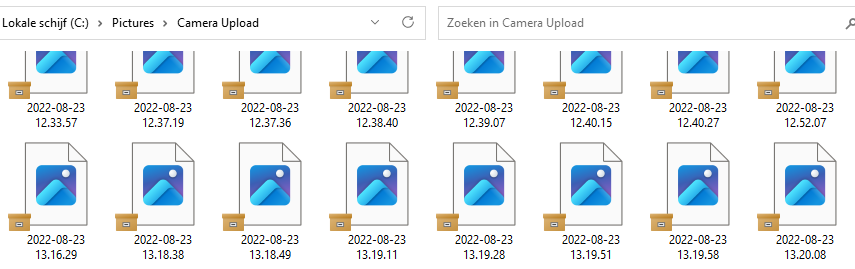
Does anyone know what these brown file box overlays are in Dropbox are supposed to mean? I can't find any official documentation about these icons. I only started seeing these recently, and now they are appearing more frequently.
Hey @V3 Admin, thanks for reaching out to us.
The brown box icons that you see on your files aren't from the Dropbox desktop app - you can find our syncing icons, here.
As such, you'll have to find the third party app that the icons in question are associated with and change the overlay permissions given from your OS.
Let me know how it goes, cheers!
I find the solution, but i don't know why this icon was
select a doc clik left on your mouse and choice "keep the doc offline" and all these icons deasaperd
Thanks for this solution.
I have quit myself from one drive first and then uninstalled OneDrive and restarted the computer. It resolved my issues.
I have been doing research for weeks now and I cannot find the answer. I know it happened before and I didn't think I would have to remember the fix, which clearly I do and I cannot for the life of me remember what the cause was. I may be completely wrong, but I am pretty sure it had something to do with one drive, which complicates things, as I have a personal one drive as well as a business version. I have NO idea why it would interfere and what the interference is, but I want to know how to preview the documents in my Dropbox in file explorer.
At the moment there is no preview available for ALL file times and it is due to this "brown box".....however there is no solution anywhere as to how to overcome this issue. Interesting, when I put the view as large icon, it comes up with a view in the icon, obviously too small to read...however, will not preview in preview pain, no matter what the file type. I have changed the preview pane to Details Pain, no idea what the significance of this is, but it basically shows the document in thumbprint size, similar to the below screenshots. When I change back to Preview Pain, it is completely blank.
I know this can be resolved....as I have resolved it before, but I cannot find the solution now and I am getting frustrated.
Hey @babyblues, sorry to see you'r'e having this issue.
If you disable OneDrive and restart your computer, does the issue persist?
@Hannah I need one drive though! I have dropbox for my personal things and I use onedrive for business, so I can't disable it! I did try and disabled it and I have lost all my files and I have to now download them all over again, so I am actually pretty annoyed that so many people have had or are having this issue and yet there is not a solution to the problem!
allways when I open the camera Upload map on my computer the pictures do not appear automaticly in the map and always i see a small box icon at the picturefile (which does not show me the picture).Picture thumnail appears only when i click on the file
any suggestion how to solve this issue
Hey @Bartbox, welcome to the Dropbox Community.
I moved your post to this relevant thread; can you take a look at the info posted here, to see if it helps in your case?
How to remove it. I'm told it is a onedrive issue
Hey @MAK1954, did you try the steps outlined in this article?
I read several of the entries, trying to get rid of the file box on all my dropbox files, because it's super annoying that you can't open your files unless you're online. I didn't see the solution, but I found one.
If the dropbox logo is in the bottom right corner near the time (Windows) right click it, then when the pop up comes up click on your initials in the top right corner, a drop down box will open and click on preferences. A new window will pop up for dropbox preferences, click on the sync tab. There is a section that says "save hard drive space automatically" yes or no. I had no checked, which is what you want, but then there is a drop down selection to the right that allows you to choose "available offline" or "online-only" choose available offline. I had online-only selected and as soon as I switched it to available offline all the little boxes went away.
There maybe another way to get to dropbox preferences, above is how I found it.
Hi,
I see that there already is a thread regarding "Orange box icon meaning". It seems OneDrive is conflicting with dropbox, blocking synchronisation (I cannot open the files with that orange box icon from my computer).
Problem is I do not use Onedrive and do not have it installed, which means I doubt uninstalling it will solve anything.
Is there another fix for this?
Hey @drac69!
Just to clarify, did you go to your device's Start menu, typed in "OneDrive" and nothing appears?
Yes!
Thanks. That was the problem. I do not know when it happened but it was set to available offline then switched to on line. My files are back now!
I also got them - can anyone help? This is in Dropbox for sure!
Hey @Elsje Joubert, sorry to hear you're having issues with this.
I just wanted to clarify that these icons are not coming from Dropbox, but probably from One Drive.
You can have a look at this page for more information.
Hope this helps!
Thank you for posting. This saved me a great deal of time. I was exceedingly frustrating to not being able to open the files. I disabled the computer from one-drive and everything seems to be working OK now.
I have one of these in the lower right corner of every file and I cannot open them or make this go away no matter how I set syncing. Any ideas?
Hey @mhuppertz - sorry to hear you're having issues with this.
This icon doesn't come from Dropbox, but OneDrive. I've merged your post into this discussion so that you can have a look for more information.
Let me know if you have any other questions.
One drive is not installed. Can't figure it out.
Hey @mhuppertz, can you try these steps here, to see if they help?
screen shott
Hi can anyone help me, the file with this box icon fails to open
Hey @1775468, thanks for reaching out to the Dropbox Community.
The icons on your files are not really Dropbox icons, but they come from OneDrive.
Can you try to disable OneDrive and let us know if that helps?
I have exactly the same question. The ikon only appears in the Dropbox and it disappear when I open the file!
Hi @Dallexx, do you have OneDrive installed on your machine? If you quit that app temporarily, do those yellow icons go away, or change to another icon?
I've been struggling with these orange boxes for months. Per this thread, I uninstalled OneDrive and restarted my computer. Problem persisted. If I copy a folder to my laptop, the icon disappears from any file in the foldere. If I put the folder back into Dropbox, the icon reappears and causes me to get an error message when trying to open the file. What next?
Hey @Kevin-54 - sorry to hear you're having issues with this.
This orange box icon comes from One Drive not Dropbox. Are you 100% sure you completely removed it from your computer?
Let us know more and we'll take it from there.
Definitely uninstalled OneDrive - I double checked this morning.
Thanks for the suggestions regarding checking my sync options but the options you mentioned do not show up in the drop down menu. I did check to see if any files were set to 'selective sync' and none were.