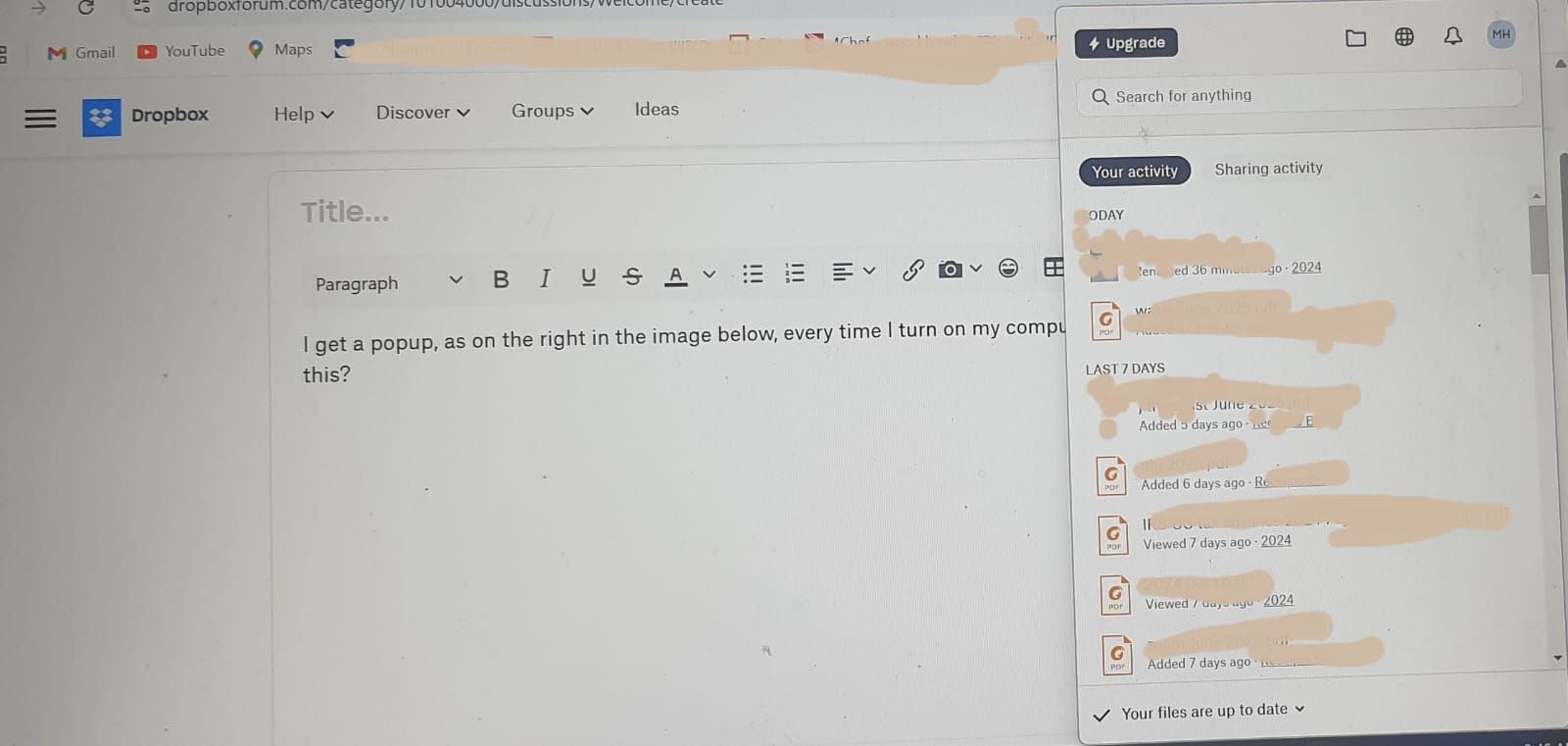
I get a popup, as on the right in the image below, every time I turn on my computer. How do I stop this?
Thanks for clarifying that for us @MH19
Since there's an updated version of the Dropbox desktop app, could you give it a go from this page directly and let us know if it improved matters at all?
Hey @MH19 - thanks for using Dropbox and happy Monday!
This is the Dropbox desktop app's interface, not a pop-up notification. If you'd like to, you can turn off the option that enables the app to start automatically whenever you boot your computer through the app's preferences, under the General tab.
I hope this helps and please let me know if you have any follow-up questions.
Thank you Walter!
So the only way to disable the appearance of this interface is by disconnecting dropbox from startup completely?
I've had dropbox connected to startup for years. It's only in the last couple months that this disruptive box appears.
Hey @MH19! If you follow Walter’s suggestion and turn the automatic startup Off and then On again, does the issue persist?
Thanks for your suggestion Nancy! Yes, I tried that and the problem does persist.
Hey @MH19, I hope it's okay for me to jump in here as well.
Does the system tray window remain open even if you click out of it?
Can you also hover over the small Dropbox icon in the system tray and let us know the Dropbox app version you're using?
Thanks Hannah! Yes, sure, all help is welcome.It's version 226.4.5094I can click out of it, but part of what makes it bothersome is there's no "X" button. To get out of it I have to take two or three steps. Not such a big problem given the state of the world these days, I know. But maybe one that I can find a solution to?
MH19 wrote: To get out of it I have to take two or three steps.
To get out of it I have to take two or three steps.
Usually you only need to click once anywhere outside of the window to close it. Does that not happen?
Thanks Rich!
No. I need to click somewhere to make the toolbar visible on top of it. And then click the dropbox icon to minimize the interface box.
Hi @MH19,
Thanks for reaching out on the Community. I've looked into this with the relevant team within Dropbox and they have informed me that this is possibly a bug and that they are fixing it as we speak.
As soon as there is an update, I will let you know!
I just wanted to touch base with you again and let you know the team is currently addressing this issue.
In the meantime are you still experiencing this behavior? I just want to double check. I'll be keeping an eye on this issue for any updates I can share with you.
Thanks Neal! Yes, it's still happening.
Thank you for confirming!
I just wanted to double check if there was any changes in behavior that I could pass on to the team. As I said, this is currently being worked on and I'll let you know of any updates as soon as I hear them.
Can you confirm if you're using the most up to date version of Dropbox? I believe a fix should be rolled out for this.
Yes, I've got 228.4.5567 installed
Thanks @MH19, and at the risk of sounding redundant, when was the last time you experienced this issue.I just want to make sure I have an accurate example when I let our team know so they can investigate properly.
It happens every time I open my computer. No need to ask me any more questions, you have all the info. Thanks.
Thanks. Sure I can do that. Why wouldn't my desktop app be updating automatically though?
The recent build is very fresh so it might be because you didn't reboot your computer and/or quit and relaunch the Dropbox desktop app @MH19
Let us know of any updates!
To the best of my knowledge, I've done these things. I closed dropbox as well as my computer multiple times. Is there any other reason it wouldn't be automatically updating?
Hey @MH19, the new stable version of the Dropbox app had just come out when Walter suggested that you update to it; perhaps we hadn't given it enough time to update by itself.
Did updating the app help at all with your issue?
@Hannah @Walter @Neal Thanks for your concern and good wishes! The new build seems to have solved the problem 🎉May all of the world's problems be solved just as fully 🙏 with no further ado
We're glad to hear you're back up and running and thanks for keeping us in the loop too @MH19
Let us know if anything else comes up and enjoy the rest of your week!
Great to hear @MH19!
I'm glad we got there in the end, have a great day!