When I try to follow these instructions, I don't have a Move option.
Windows: Manually move the Dropbox folder back to its default location
- Close any applications on your computer that may be using your Dropbox files and folders.
- Click the Dropbox icon in the taskbar.
- Click your avatar (profile picture or initials) in the top-right corner.
- Click Preferences.
- Click the Sync tab.
- Under Dropbox Folder Location, click Move.
- In the text box next to Folder:, type “$Home”.
- Click OK.
- You'll be asked to confirm if you wish to move your Dropbox folder location. Click OK.
- Log out and back in to the Dropbox desktop app to ensure that all of your preferences are moved as well.
In that place it says change location.
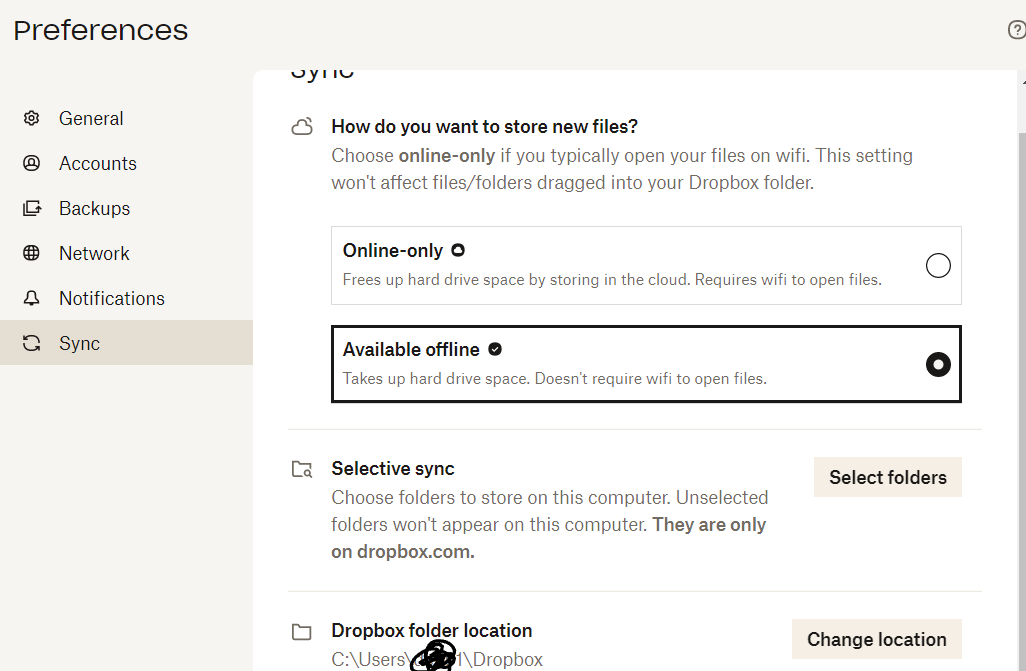
How do I move my files in this scenario? Can I simply create a Dropbox folder in my "D" drive and choose that location? I'm trying to make space on my "C" drive.


