Hi,
When I click this button to download files, nothing happens. How can I confidently make a backup on my hard drive of all files I have on dropbox?
Thanks,
Charlie
This fixed the problem. I think the limit of 10,000 files or 20 GB was limiting it. It is not good that no message of explanation came up. More importantly, downloading everything to a hard drive should be a simple single click.I was planning to drop dropbox, and I think this lack of functionality that seems obvious to me is making that more likely. I don't feel confident that I can get all my files out reliably.
Hey @carhogg - sorry to hear about this.
Could you try clearing your browser's cache or using another browser and let us know how it goes?
Thanks!
@carhogg wrote: When I click this button to download files, nothing happens. How can I confidently make a backup on my hard drive of all files I have on dropbox?
Select fewer files/folders and try again.
@joecill wrote: Hi there, I'm experiencing the same issue. Clicking the download button doesn't seem to initiate any action. It's crucial for me to make a backup of all my files on Dropbox. If anyone has a solution or workaround for this problem I would greatly appreciate your assistance. Thanks in advance!
Hi there, I'm experiencing the same issue. Clicking the download button doesn't seem to initiate any action. It's crucial for me to make a backup of all my files on Dropbox. If anyone has a solution or workaround for this problem I would greatly appreciate your assistance. Thanks in advance!
I am also facing this issue. Please provide assistance
Thanks for bringing this to our attention, @mncraftmod.
Can you give us some more info as to why you can't download them?
Are you getting any error messages? How large are the files you're trying to download?
Any additional details, would be really helpful.
Let me know more!
I have same problem. For last couple of months, download doesn't work. It's a disaster. I have 2 TB account and am using 100 MB so I'm not at any limits. This is pretty bad.
Hey @rbaltman, welcome to our Community!
Do you try to download a certain file/folder that lives in your account, or maybe content coming from a shared link?
Have you tried an entirely different browser than the one you're using at the moment? Just to clarify if this is browser-specific or not.
Let me know more, and we'll take it from there!
Thanks for your response. Any file I try to download doesn't work--these are all my files that I uploaded. It is not a shared link, it is a file that I put there and when I try to download, there is absolutely nothing happening in Safari (my preferred browser). I tried it on chrome and that worked (so I got my file), but I don't like to use Chrome. Don't you think it should work in Safari? Something changed (maybe Apple, but they are a kind of dominant browser so Dropbox should be compatible?). Or maybe I pressed a wrong button--I need help figuring out what button I pressed.
When I got to the dropbox toolbar app and drag the file to my desktop it works (but it takes it off Dropbox, so I need to make a copy and drag, which is a pain). But when I choose the little world sphere glyph and it goes to the dropbox website, that's when DOWNLOAD doesn't work.
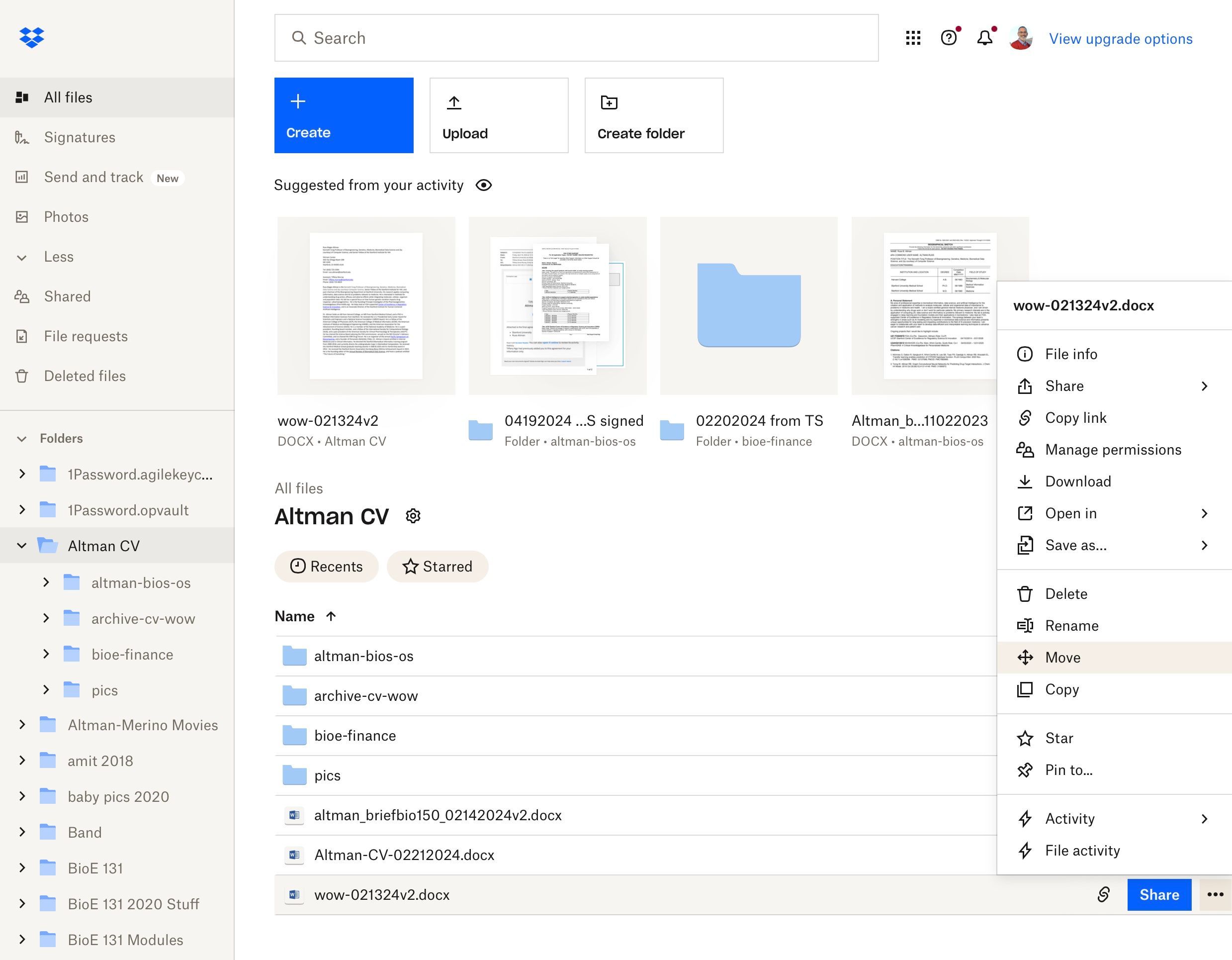
I attach a screenshot which shows what I am seeing and if want the file at the bottom wow-021... and choose "Download" from the "..." menu, it doesn't work.
Thanks,Russ
HI @rbaltman, could you try using Safari in private browsing mode, without any extensions running, to see if that could be causing the download issue?
I need to get home to try it, but I will when I get home tonight--it's my desktop that is acting up. On Safari at work, it works fine. But the home one is the problem, I think.
HI @pictoria-hall, could you clarify exactly what happens when you click the download button?
Could you try switching browsers to see if this helps?
Otherwise, you can try using incognito/private browsing mode without any extensions running, clearing your cache and even resetting your browser entirely.
When I try clicking the<a href="https://carparkingmultiplayer2.net/"rel="nofollow">download</a> button on the website, nothing happens at all. I really need to back up all my important files safely onto my hard drive but this issue is blocking me from doing that confidently.
Has anyone else faced this problem? It would be great to know if there’s a workaround or a fix.
Thanks for any help!
Hi,when I try to clicking download button on the [website](https://carparkingmultiplayer2.net/), nothing happens at all .I really need to backup all my important data in the files and drives Any one found a fix of this?