Hello everyone!
I am using Mac OS Monterey 12.6.2
I received a Dropbox prompted upgrade recently, which shifted the Dropbox folder to Cloud storage. It took few hours to sync files and worked okay. From this morning, Dropbox app is not opening.
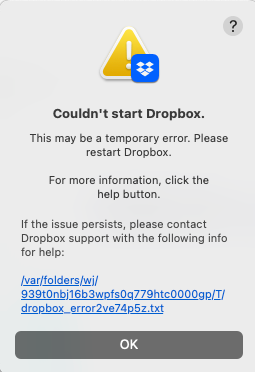
The error message says - (Screenshot attached) Couldn't start Dropbox. This may be a temporary error. Please restart Dropbox. For more information, click the help button. If the issue persists, please contact Dropbox support with the following info for help (This link opens a text file with the error code pasted below).
If anyone knows the solution, please help. I tried installing an old stable build, tried the most recent build, did not work.
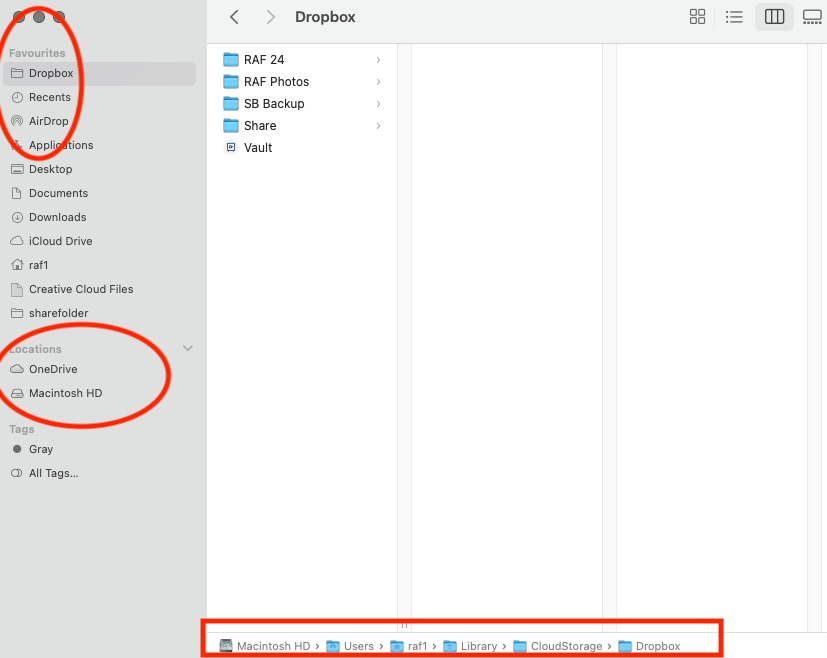
Also, the Dropbox folder although located in the "Cloud Storage" folder, does not show up on "Locations" anymore - which it did for the last 2-3 days after the upgrade.
Sincerely,
Sejuti
bn.BUILD_KEY: Dropbox
bn.VERSION: 166.3.2891
bn.constants.WINDOWS_SHELL_EXT_VERSION: 59
bn.is_frozen: True
machine_id: 026d4a6e-63a6-50b5-ba54-40a552b90f30
pid: 7411
ppid: 1
uid: 502
user_info: pwd.struct_passwd(pw_name='raf1', pw_passwd='********', pw_uid=502, pw_gid=20, pw_gecos='RAF24', pw_dir='/Users/raf1', pw_shell='/bin/bash')
effective_user_info: pwd.struct_passwd(pw_name='raf1', pw_passwd='********', pw_uid=502, pw_gid=20, pw_gecos='RAF24', pw_dir='/Users/raf1', pw_shell='/bin/bash')
euid: 502
gid: 20
egid: 20
group_info: grp.struct_group(gr_name='staff', gr_passwd='*', gr_gid=20, gr_mem=['root', 'raf1', '_nsurlstoraged', '_serialnumberd'])
effective_group_info: grp.struct_group(gr_name='staff', gr_passwd='*', gr_gid=20, gr_mem=['root', 'raf1', '_nsurlstoraged', '_serialnumberd'])
DYLD_LIBRARY_PATH: None
cwd: '/'
real_path='/'
mode=0o40755 uid=0 gid=0
parent mode=0o40755 uid=0 gid=0
HOME: '/Users/raf1'
appdata: '/Users/raf1/.dropbox/instance1'
real_path='/Users/raf1/.dropbox/instance1'
mode=0o40700 uid=502 gid=80
parent mode=0o40700 uid=502 gid=80
dropbox_path: '/Users/raf1/Library/CloudStorage/Dropbox'
real_path='/Users/raf1/Library/CloudStorage/Dropbox'
mode=0o40700 uid=502 gid=80
parent mode=0o40755 uid=502 gid=20
sys_executable: '/Applications/Dropbox.app/Contents/MacOS/Dropbox'
real_path='/Applications/Dropbox.app/Contents/MacOS/Dropbox'
mode=0o100755 uid=502 gid=20
parent mode=0o40755 uid=502 gid=20
trace.__file__: '/Applications/Dropbox.app/Contents/Resources/python-packages.zip/dropbox/client/ui/common/boot_error.pyc'
real_path='/Applications/Dropbox.app/Contents/Resources/python-packages.zip/dropbox/client/ui/common/boot_error.pyc'
not found
parent not found
tempdir: '/var/folders/wj/939t0nbj16b3wpfs0q779htc0000gp/T'
real_path='/private/var/folders/wj/939t0nbj16b3wpfs0q779htc0000gp/T'
mode=0o40700 uid=502 gid=20
parent mode=0o40755 uid=502 gid=20
Traceback (most recent call last):
File "dropbox/client/main.pyc", line 5154, in _setup_root_for_account
File "dropbox/sync_root/helpers.pyc", line 481, in get_root_for_account
File "dropbox/foundation/futures/basic.pyc", line 853, in result
File "dropbox/sync_root/handlers/macos/file_provider.pyc", line 121, in set_result_or_convert_exception
dropbox.mac.internal.MacError: [Errno -2001] Error Domain=NSFileProviderErrorDomain Code=-2001 "No valid file provider found with identifier com.getdropbox.dropbox.fileprovider/1a7b1213-4ffc-4b6b-8757-f4beb48082ee." UserInfo={NSLocalizedDescription=No valid file provider found with identifier com.getdropbox.dropbox.fileprovider/1a7b1213-4ffc-4b6b-8757-f4beb48082ee.}