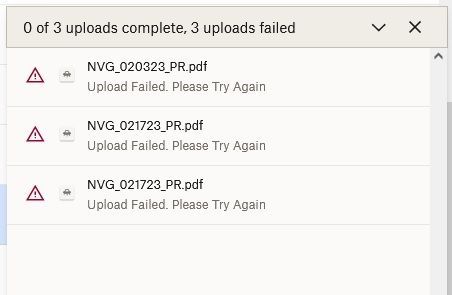
I am uploading simple PDFs and I am getting the same error every single time.
It will hang on finalizing and throw
Upload Failed. Please Try Again
@Noah808 wrote: I am uploading simple PDFs and I am getting the same error every single time.
Wait a little while and try again. Dropbox just had a brief interruption with some services.
I've been having this problem with all my upload attempts over SEVERAL days... different companies/accounts/shared folders.
Hey @shellynyc, sorry to hear about this.
If this persists after clearing your browser's cache or on another browser, could you send us a screenshot of the exact error you're getting so that we can have a visual too?
Attached are two docs.... I'm sending this to Marcus in support.... but the support reply..... DIDN'T UPLOAD. How do I send them to you ? I'm not seeing a way to attach email here.
Shelly Raffle
[email removed as per Community Guidelines]
This site indicates the upload problem has been solved. It has NOT been solved..... I have noticed other dropbox users are having the same problem.
Help!
Hi @shellynyc, you can attach your screenshots, by clicking the little camera icon when you try to respond back to us.
Also, you mentioned that you're trying to send the screenshots to Support. Could you share your ticket number reference with me, so I can locate it in the system? Thanks!
Hi I am unable to upload files in my drop box shared folder. The data I have on the shared folder is 750 Mb but when i tried to upload any files I get alert message ''storage full''.
Hi @Manjunathc, I'd be more than happy to help!
Could you let me know what your plan page reports? If you feel like it, you can also upload a screenshot.
Let me know more, and we'll take it from there!
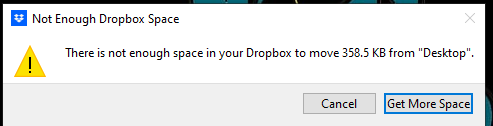
Attached files are images of the error I am facing while trying to share files to Drop Box. I have only used 750 Mb, but I still have up to 1.5 Gb of space. Please review and advise.
Hi @Manjunathc, thank you for the screenshots!
Based on the screenshots it seems you don't have enough Dropbox space to add the content to Dropbox.
Did you have the chance to access your plan page https://www.dropbox.com/account/plan ? What do you see there?
I have been having the exact same problem uploading anything from simple pdfs to large backup files or mp4 - for nearly a week now. It is only happening on my desktop. My laptop works fine, so it's not my internet. I have tried clearing my cache. I have not recently installed new software or had a software update. I have tried both Firefox and Edge.Same problem across platforms. HELP!! I can't get my work done!!
Hi @debangerman, welcome to our Community!
Odd behavior right there. If you try an incognito tab on any of your browsers, do you notice the same behavior?
Also, just to rule the possibility of your account not having enough space, could you check your plan page, and let me know what it reports?
Thanks a bunch!
same. and all im ever told as a solution is "your internet is slow" no its not. I have tried this on several different routers, several different computers. dropbox simply, just, doesn't, work.
Hey @Pdigilio - sorry to hear about this.
If you still get the same error after clearing your browser's cache or on another browser, could you send us a screenshot so that we can have a visual too?