Since updating to latest Window 11 (version: 22H2, OS build: 25227.1000), Dropbox icon at Taskbar cannot click.
I tried unstall & re-install the desktop app but it still cannot click.
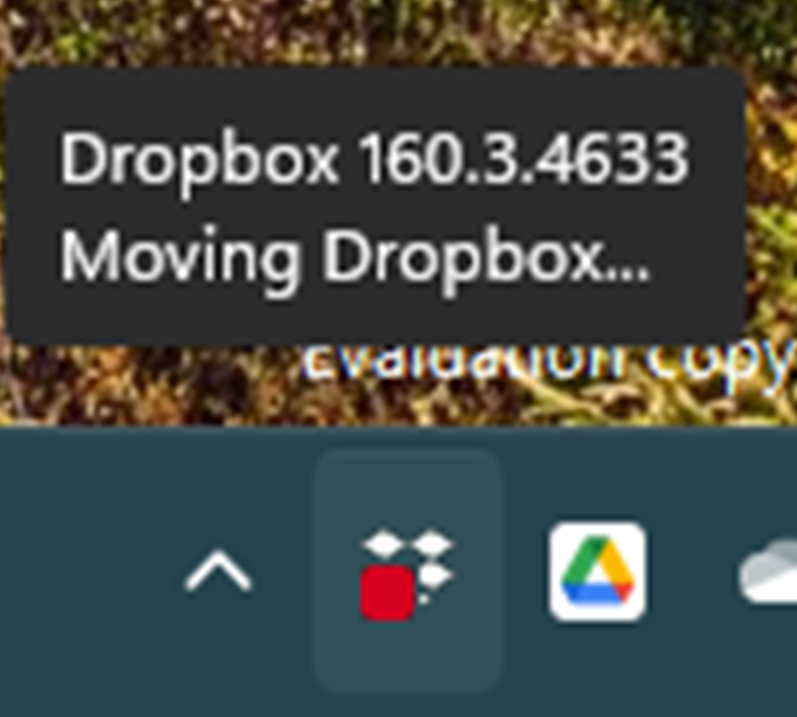
Show as below screenshot.
The problem is now fixed with Windows 11 Insider Preview (10.0.22623.1028). Thanks for your support and follow-up.
Hi @Cyber2022, sorry to hear about this.
It seems that you're running a beta version of our desktop app. Could you see if you get any different results on our latest stable version?
You can download and install it from this page. Just make sure to toggle off the 'early releases' from your account's settings online first.
Let me know how it goes.
I got the same problem after install the windows insider build 25227, i have tried the stable and beta versions of dropbox and not work.
To pause dropbox i need to kill on task manager and re-open to sync.
Hey @BrunoCarvalho, I see that in the screenshot the other user posted above, there's a "Moving Dropbox" message, when they hover over the Dropbox icon.
Are you getting the same message? If not, what do you see when you hover over it?
@Hannah when i hover into dropbox icon i can see the status, but doesnt open the menu.
Updated, syncing and sending 2 files.
Thanks for the update, Bruno.
Can you please turn off "early releases" in your account settings and reinstall the app, to go back to the stable version and let me know if you see the same status, after the installation is finished?
I am having the same issue with dropbox desktop icon on windows 11 since 25 October,
tried to reinstall in many ways, even formatted my external driver, when I restart my pc the icon still doesn't open the setting menu,
tried to delete environmental variables ,but didn't find anything related to dropbox or taskbar icons ),
I really wish this problem to be solved quickly, I am a insentive dropbox user since 2020, it is so helpful that I can't work witout it...
thanks a million
@Hannah I have deactivated beta releases and continue without open the menu. Probably is some windows change on lastest version that make the dropbox incompatible.
I have this issue that I cannot access preferences in Windows 11
I have the dropbox icon in the taskbar, and I believe the version is 159.4.5870
When I hover on the icon, I just see the word "Dropbox"
If I left-click, it opens a folder with the Dropbox synced files
If I ctrl-left-click, it opens a folder with the Dropbox synced files
Right click does not present any menu either
I read the old thread on this issue and don't see a fix there
As background, although I had uninstalled Dropbox, it was still in my path, and I wanted to fix that
I wanted to follow this: https://www.dropboxforum.com/t5/Delete-edit-and-organize/How-To-Remove-The-DropBox-from-the-path-In-C-Drive/td-p/463639
I downloaded and ran the installer, and Dropbox synced a bunch of stuff (which I didn't actually want) and once complete, I cannot get the preferences menu.
Hey @Blaine Z., thanks for letting us know about this.
We've just released a new stable version of the Dropbox app. Can you please update yours, to see if that helps?
Can both you and @Tiffanycrea confirm if nothing happens, no matter if you left-click, right-click or ctrl-click on the Dropbox icon?
Thanks Tiffany! Since there's a new version of the app out now, can you please try that and let me know if there's a difference?
hello, no difference on Dropbox 160.4.4696.
-Lj
Same issue here
Windows 11 insider 22H2
Beta and stable version icon does not work at all
Same issue here. I tried turning off beta releases with no change to the problem as well. I am running Windows Insider Beta channel version of Windows.
I am having the same problem. My laptop is running 25231.1000 dev channel and my desktop just started the same problem, it is on beta channel running 22623.875. I have also reinstalled both stable versions and beta versions of dropbox and no fix.
I am running the latest insider build of Windows 11 and Drobox version 159.4.5870. I am having the same problem. Files are syncing in the background. But neither left or right clicking the icon in the system tray will work to bring up the settings.
Hi,
I have the same problem. Whenever I open the Dropbox app it takes me to my Dropbox folder in explorer. I'm no able to access the app itself with preferences. I just installed the newest version, but no result.
HI everyone, do you happen to have any second monitors attached to your devices, or any custom resolution or DPI settings on your devices?
Hi @David M.293, as a test, could you temporarily reduce the size to 100% to see if this helps load the app?
I have a Dell desktop Inspiron 3880 on beta channel and a Dell laptop Inspiron 5502 on dev channel. I am also showing the red badge with a 1 and Dropbox version 161.3.4836.
I brought the size down to 100% and even rebooted. That did not fix it.
Today I downloaded and installed the latest version and nothing changed. I still cannot access preferences.
I have a 2nd monitor attached. It is via the HDMI port.
Is there any update from Dropbox side on this? This is a major inconvenience I would like to rectify ASAP. Thanks,
Again, no answer from devs or official support
So: If dropbox does not fix this, I will move to onedrive
same issue. can't click on the dropbox icon in the taskbar
Windows 11 insider preview last beta. 22H2 22623.875. 100 Dpi, no second screen attached. is this issue related to the insider beta, or it's happen too on Windows 11 ?
dropxbox work when using explorer from windows fortunatly.
it doesn't work in other menus, not present at all, like in my file manager software Directory Opus.







.png)






