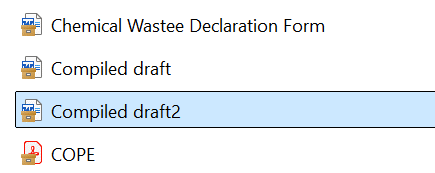
Does anyone know what these brown file box overlays are in Dropbox are supposed to mean? I can't find any official documentation about these icons. I only started seeing these recently, and now they are appearing more frequently.
Hey @V3 Admin, thanks for reaching out to us.
The brown box icons that you see on your files aren't from the Dropbox desktop app - you can find our syncing icons, here.
As such, you'll have to find the third party app that the icons in question are associated with and change the overlay permissions given from your OS.
Let me know how it goes, cheers!
Could you also send us a full page screenshot of where you're spotting the icon @Kevin-54?
Over a 4-6 week period I spent about 30 hours on the phone and sent about a dozen screen captures to a string of Dropbox support staff, each of whom escalated the problem to someone new, resulting in me having to start over explaining the problem. In the end, I was told it was a problem with an 'an extension' or OneDrive and they couldn't help - they refused to proceed further.
Hey @Kevin-54, sorry to hear about your experience.
Can you please send me your last escalated ticket, so I can take a look?
This is the last ticket # I kept (Ticket #23025473) - at this point the conversation had gone on for 3 weeks because it took each support person at least 24 and often 36 hours to respond, usually asking for yet another screenshot of something. I'd estimate that 1/2 of the support responses made it clear the person had not read what I sent as they often asked for information they already had.
Thanks for the ticket ID and your feedback on this @Kevin-54 - much appreciated.
I can see that it's closed since January. If you'd like to look into this issue with our support team again, you'll need to open a new ticket.
As for the issue at hand now, could you try creating a new OS profile on your computer and try to install and use the Dropbox desktop app there for testing purposes?
The issue at hand, is the exact same issue Dropbox support spent more than a month attempting to resolve before coming to the conclusion the problem wasn't specifically related to Dropbox but to another extension, app or program on my laptop and closing the ticket.
In the meantime, I had read this thread, assumed it was OneDrive and uninstalled it. Then I uninstalled Dropbox and reinstalled it - all to no avail. Is there ANY chance I'll get better support if I open another ticket? After all, at least 5 people were involved last time.
As to your suggestion to create a new OS profile on my laptop - I have absolutely NO idea how to go about doing that, much less how to open Dropbox using the new profile if I could figure out how to do it.
. (The whole reason I removed OneDrive).
Hope it’s OK to jump in here, @Kevin-54.
To create a new user profile on your computer, you can follow these steps.
Other than that, I can suggest checking out this suggestion to make sure the Dropbox overlay icons are prioritized and see if the other icon will disappear after following them.
The icon is not the problem, it is merely a symptom. The problem is the that nearly half of the files I have stored in Dropbox cannot be opened in the desktop app. Supposedly, OneDrive created the filebox icon, that was why I completely deleted OneDrive and uninstalled and then reinstalled Dropbox - files still can't be opened. Nearly 2 months of slow motion help from Dropbox support staff has yet to yield solution.
Hi from me too @Kevin-54!
One thing that I want to ask is if this behavior of files not opening correctly, happens with all of your files, or just some specific ones?
After following the steps Nancy provided above, you should be able to see Dropbox icons next to your files, instead of the OneDrive ones you're currently seeing.
The reason I'm asking you to do this, is to identify if the files that fail to preview sync are online-only or available offline.
Even if you can't see any icons there, can you try changing the files to available offline, and giving it a go again?
This problem just occurred on my computer. I first disabled and then uninstalled OneDrive and restarted my computer. However, this had no effect: I still have the filebox icon superimposed on the lower left of my files, and they will not open. Do you have any other suggestions?
@MarinRob wrote: I still have the filebox icon superimposed on the lower left of my files, and they will not open. Do you have any other suggestions?
I still have the filebox icon superimposed on the lower left of my files, and they will not open. Do you have any other suggestions?
As the icon comes from OneDrive/Windows 11, I'd ask on the Microsoft support forums.
Restarting my computer helps get rid of the brown box.
I know this is an old thread and there is a lot of information about this out there but here is what I know. It maybe a "OneDrive" icon but it is only connected to Dropbox. I have Dropbox setup along with OneDrive. Dropbox is located in the root of my C drive so OneDrive is NOT syncing that path. OneDrive only syncs Docs, Desktop,Photos. When I click on a file with this icon I can actively see Dropbox syncing when the file opens. From my experience, if you can not open the file with this icon, make sure Dropbox is started and or log out and back in to the Dropbox app. This has fixed this issue with several of my users.
@Jhousefavitguy wrote: It maybe a "OneDrive" icon but it is only connected to Dropbox.
It maybe a "OneDrive" icon but it is only connected to Dropbox.
That icon has nothing to do with Dropbox. It is entirely a OneDrive or Windows 11 icon.
So why does Dropbox start to sync when I click on a file that has that icon but files without that icon don't cause that? I just had a user this morning that could not open a file in their Dropbox synced files with this icon. Closed Dropbox and reopened and was able to access. That file does not sync to OneDrive either. I understand it is not a Dropbox icon by why is it there if those files are not connected to OneDrive and the fix is closing/opening Dropbox?
That is a OneDrive icon. So they almost certainly have the files stored in two locations. Once in Dropbox and once in OneDrive.
Certain Dropbox files showing on my desktop cannot be opened from Windows Explorer. These files have a little brown overlay on the file icon. Dropbox support tells me this overlay is a One Drive icon and this may be causing a conflict with Dropbox. How can I resolve this (I don't use One Drive, although it is installed on my device).
Hey @roquefort44, thanks for posting today on our forum!
From what I understand, you're seeing the brown box icon showing next to one of the OP's files here, right?
Since you're not using OneDrive, can you try to completely uninstall it from your computer and then restart your device?
Let me know if that helps.
Hi Nancy, I've uninstalled One Drive but still get the same error message when opening files from my desktop.
Hmm, I see. Did you also restart your computer in the meantime and it made no difference?
If not, I’d like a screenshot of an example file you see with this icon in your Dropbox folder, as well as the error that appears when you try to open it.
Finally, what's the current syncing status and app version of your Dropbox app?
Hi, everyone,
I am using a thinkpad T480s with Win11.
My files in dropbox bear the a 'file box' icon and cannot be open when off-line.
Some suggests it is because of ONEDRIVE. However, after quitting ONEDRIVE the issue remains.
I uninstalled DROPBOX and then re-install but no use.
I tried previous version DROPBOX but no use.
Also DROPBOX options disappeared in context menu.
pls help.
Hi @sydneyli, thanks for bringing this to our attention.
This icon would be from OneDrive, you can see more about this icon on this thread.
If you have any further queries, feel free to message back.
No, it is not simply a ONEDRIVE issue.
If you have ever read the thread yourself you will see if not merely a ONEDRIVE issue. Some do not have ONEDRIVE on their computer but still have the same issue.
Hey @sydneyli, I saw that you posted on a different thread, that you reached out to our support team; can you please give us the ticket number for that communication?
#24035276
Hey @sydneyli, sorry for jumping in. I could find your ticket in our system and I’ve left an internal note on your behalf to our team. Please check their latest reply, when you can.
Sorry to hear about the trouble you're having. Here are some steps to try and resolve the issue:
Check Smart Sync Settings:
Update Dropbox:
Reinstall Dropbox:
Clear OneDrive Integration:
Check Windows Settings:
Enable Dropbox Context Menu:
Set Folder Permissions:
Check Offline Availability:
If these steps don't resolve the issue, it may be worth contacting Dropbox Support directly for further assistance. I hope this helps!
I've uninstalled OneDrive and the briefcase icons remain. I'm also not getting any Dropbox options when I right-click a folder or file. I'm unable to request files for keeping offline, and all other context menu options are missing.
@Nickelplate wrote:I've uninstalled OneDrive and the briefcase icons remain. I'm also not getting any Dropbox options when I right-click a folder or file. I'm unable to request files for keeping offline, and all other context menu options are missing.
@Nickelplate wrote:
The icon is from OneDrive, so, if its still there its an issue with OneDrive's uninstall from the system.
In terms of context menus that USUALLY means Dropbox isn't installed OR it isn't running.
Try to redownload from www.dropbox.com/downloading
There is a small file box icon next to the PDF file. Never saw this before. None of my PDF files are opening.
The message is " the file cannot be accessed by the system". I am a real estate broker and I NEED these files. Please help!