How can I see a list of users I shared a folder with? These users have lost their access privileges for the folder or do not use dropbox anymore.
Sign-in to the Dropbox website, find the folder in your your Files list, and click the Share button to the right of it. The sharing options for that folder, along with a list of members, will open.
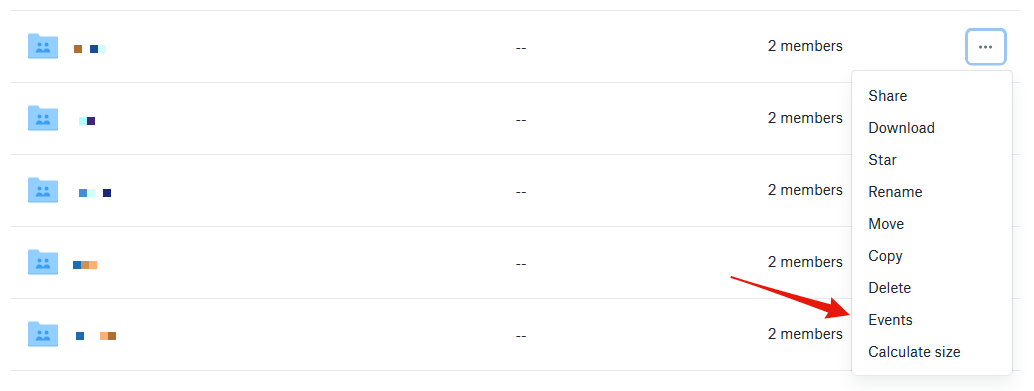
Unfortunately, there's no Events option for the folder.
What are the options you’re seeing on your end? Have you also checked how you get on with Rich's advice? What do you see when you click on the Share button?
The options list I can select from contains Share, Download, Star, Rename, Move, Copy, Delete.
If I press the Share button I'm being forwarded to an email form that enables the file/folder to be shared/linked to new users.
Yes, I'm aware of the Events options (as it is enabled for other folders that have active users linked to it) but it seems it's not available for the folder in question.
The user I shared it with is no longer using Dropbox. However, the system suggests his address when I open the Share option as it has been imported into the system before.
If I remember correctly I was the owner.
I haven't revoked the access privileges to the user.
However, if I go to Files Sharing in the menu on the left, a few files and that folder appear as they have been shared before. Is there a shared links history perhaps?
Hey @EP2, thanks for the nudge! While I can’t be entirely certain that this was the Solution for the OP since our email correspondence closed without their confirmation, it seems that the content was shared as a link, which would merely grant recipients View-Only access. If it’s not too much trouble for you, can elaborate a bit on what seems to be your current situation, in order to follow-up a bit closer on this matter? Thanks!
The solution isn't actually a solution, and doesn't help people who want to know what the process is.I would like to find out (for any given share folder) when I added people (and how I added them), and when people were removed (and how they were removed).It would be nice to have method, IP, and Time stamp, possibly application/browser would also be good.Is any of this information being stored?If so, is this information accessible?If yes, can I access it via the webpage or on my desktop or must I contact dropbox support?Thanks in advance for your concise explanation.