Dropbox
Mac Studio
Mac 15.7.4
Using app but can't find version, I think its the latest
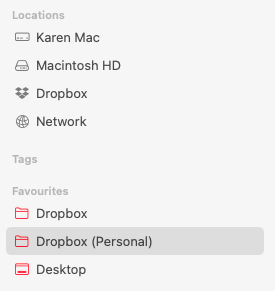
I had to sign in and out of the app on 3 March due to a syncing loop, and when I signed back in, I inadvertently forgot to opt out of File Provider. After I relogged in, I ended up with two Dropbox folders on my Mac, one in Locations, for File Provider, and one in my Users > Named folder. My original DB folder was named Dropbox (Personal), because at one time, I had a work Dropbox linked to my Mac as well. I no longer have that work account, but I didn't change the name of my personal Dropbox folder.
I only realised this had happened today. I wasn't working Weds, and not many files were updated yesterday. Although I saved some files to my shortcuts in 'favourites' from Figma, which obviously are no longer linked to the File Provider location of Dropbox. This is how I realised something was wrong. I also use an app called Eagle, which I use to collect research screenshots and URLs of websites, etc., and these are stored in local libraries, which are stored in my Dropbox (Personal) folder. All my favourites were also linked to the older Dropbox (Personal) folder. So I decided to log out of the Dropbox app and relog in using your steps:
https://help.dropbox.com/installs/dropbox-for-macos-support)
Now I have three Dropbox folders! The new one (which is still syncing) is now called 'Dropbox' and is stored in my Users > Named folder. The original one (Dropbox (Personal) is also in the Users > Named folder. I can see that the Dropbox (File Provider version), has been marked as 'this is an unlinked Dropbox', and I can delete it when I am sure the new one is syncing. However, what do I do when the new 'Dropbox' folder has finished syncing? Do I delete the older folder (Dropbox (Personal) and, of course, follow your steps to delete the File Server version? I fear that the Eagle libraries will have lost their route to their location as well as all my favourite shortcuts as Dropbox has created a third folder location, and so I will have to manually relocate them anyway! So I feel foolish and should have just stuck with the File Provider version.
Do you have any advice?
Thanks
screenshots: