Sorry, this is going to be a little long, but I want to give you all the info you might need. Thanks in advance if you can figure out the problem
I'm on a 2023 Mac Mini M2 running OS 15.7.1 (Sequoia) and have been using Dropbox without issue until fairly recently.
Not that long ago, I used to be able to drag an .mp4 file (or any file) into the Dropbox folder in my Sidebar, wait a few seconds, right click on the file and select "get Dropbox link", then paste that link into an email I could send to my partners so they could download and view it.
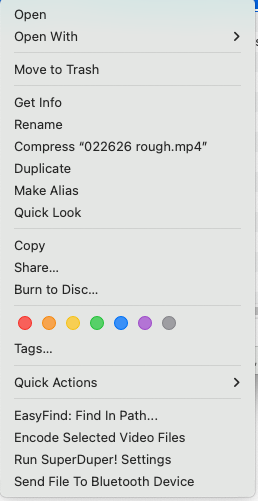
I no longer have that option (see screenshot below). Also, I used to see those green checkboxes next to files in my Dropbox folder in my Finder's sidebar, but they're no longer there. The files are all showing Zero kb until I click to open or view, but that was never the case before. I have folders in Dropbox that I don't care to have on my computer. That's what I use it for, unless I want to upload a specific file I want to share for viewing or download by a partner. After searching for solutions, I've tried all of the following.
I've confirmed Privacy and Security Settings that Dropbox is toggled on with Full Access. I've done the same in Accessibility. I've Force Quit Finder. I've rebooted, I've uninstalled, then downloaded and reinstalled the Dropbox Desktop app, I've checked extensions and Privacy Settings again as instructed by the countless suggestions available via search, and they're all still on. In fact, I've tried toggling them off, then on again, then restarted my computer again.
What's worse is that if I select Share in the pull-down menu that I do see, my only options are a list of my most recent iMessage recipients, or a selection including Airdrop, Mail, Messages, Notes, Add To Photos, Freeform, Reminders, and Dropbox Transfer (which doesn't look like anything I've ever seen before).
The only good news I guess is that if I use Dropbox on the web, my Share button allows me to copy a link that I can email as I did before. Why that isn't available at the folder on my computer is a mystery.