After about 15 years using Dropbox on my iMac (now with OS Ventura 13.7.1), for the first time it is giving me an error message right after it starts up. It immediately closes after an error.
Tried rebooting the iMac multiple times already, and did a reinstall downloading the lastest version from Dropbox website, nothing worked.
Important information: nothing changed on my MacOS install in the last few days to provoke this kind of behavior from Dropbox app. Nothing changed on my personal home network, neither on my firewall and no new routers/modem, no new network settings to create this problem. Didnt install any new app on my iMac lately that could have affected Dropbox install.
I would greatly appreciate if someone could PLEASE help me solve this. Im really lost, cause Dropbox has been working perfectly for me on both my Windows and Mac machines for over 10 years now!!
Heres the error message:
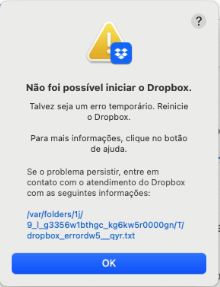
This pops up one or two seconds after the Dropbox icon appears on the top bar. After the error message appears, Dropbox freezes and I cant even access the settings option to try some solution. The app closes right after i click on "OK".
Here´s the transcription of the error log file the above message box gives me:

Any HELP, please???


