Hi, we use Windows Explorer to access Dropbox from our laptops. When opening Dropbox in Windows Explorer, I get a persistent red icon like this showing in the Dropbox root folder:
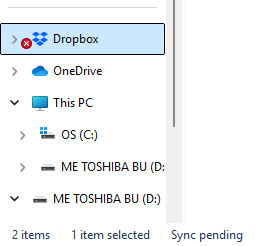
I think this hints to a sync problem. However certain folders can be accessed, but others shows the same issue:

In the status bar, Dropbox seems to be fine:

Also some of my colleagues can see newly uploaded folders and files where I cannot. Again seems to be a sync issue.
I have reinstalled the app. Restarted the laptop numerous times. To no avail.
Can someone possibly help? Thank You.




