Every morning I wake up to a ton of emails about old files I've sent to clients 6 months ago using Dropbox Transfer. I wish there was some way of disabling it because I don't need to know anything about files that old.
Hey @nvetterli, thanks for sharing your feedback about this.
Have you tried unsubscribing to those emails?
You should be able to click on the "Unsubscribe" option at the bottom of the emails you receive, to unsubscribe from that type of notification.
Let me know how it goes.
Hi @nvetterli, just checking to see if you saw our last reply. If you still need any help, feel free to reach back out to usIf your issue has been solved, let us know what worked for you!
You can't unsubscribe to these emails. See screenshot.
But you can click "Turn off these notifications"
When you do that, you reach this site and there's nothing there that allows to turn off the notification emails. See screenshot.
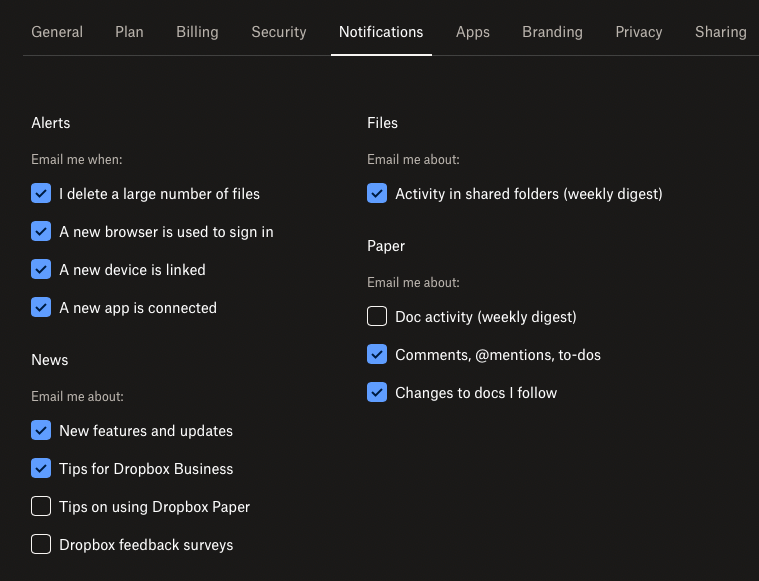
Now if I go to "Notifications" under Dropbox Settings this is all I can enable and disable
So maybe I'm missing something or maybe you can't disable it
Hi @Jay ,Please see my reply above
Thanks for the update here, @nvetterli, and happy Monday!
The notification you can manage for your transfers is the download notifications, which you can turn off/on from the option with the toggle that shows in your screenshot above.
A workaround would also be to delete your transfer.
I would also suggest going to our Ideas page and submitting an idea about this. Just make sure you check out Emma's tips for submitting an idea first.
Thanks!