I has taken me the better part of an hour just to a button that allows one to start a discussion. Not sure, but part of the problem may be I was using Firefox. Regardless, it should not be this difficult.
I have been spending hours trying to setup my account so certain dropbox folders would be visible in my PC's Dropbox folder but not stored there. I thought that is what Selective Sync did. I also looked into Dropbox Backup. This is what I found in dropbox's documentation. " Selective sync is a feature in the Dropbox desktop app that allows you to add or remove Dropbox folders from your hard drive to save space on your computer without deleting the files themselves. You can check or uncheck folders in the Dropbox desktop app to determine whether the files are saved to your hard drive or just stored in your Dropbox account." That sounds like what I want but the documentation fails to address one aspect of how it works. Are the files which are unchecked still visible on the local PC? With much searching I found this. "What's the difference between selective sync and online-only? Making your files and folders online-only also helps save hard drive space. These files and folders will still be visible from your computer, but are stored in your Dropbox account online." Notice this response does not answer the question. It describes a characteristic of online-only but to describe a difference, one has to contrast how the other option works. From experimentation, I finally deduced unchecked folders effectively ignored by dropbox. And in another slap in the face, more searching revealed "online-only is not available on linux. Arrgh. Hours an hours of searching. because the documentation sucks.
So maybe this think dropbox calls backup will help. Other cloud provides have a feature called backup that would meet my needs. And it appear to be available. "Dropbox Basic is a free plan that includes Dropbox Backup, allowing you to back up your computer and external hard drive, but limits the size of your backups to the 2 GB storage quota of the plan." This says where it is available and does not exclude Linux, so the documentation says I should have access to it.
To set up your computer to back up:
Open your Dropbox desktop app preferences.
Click the Backups tab.
Click Set up.
Note: If you’re on a Dropbox team account and you don’t see this option, your admin may have chosen not to allow you to enable it.
Check the folders you’d like to back up.
If your work and personal accounts are connected, choose which Dropbox account you’d like to back up your folders to.
Click Set up and follow the steps.
Mac users: Click OK when prompted to give Dropbox permission to access your folders.
This is what I see using the app (v223.4.4909) on Linux. 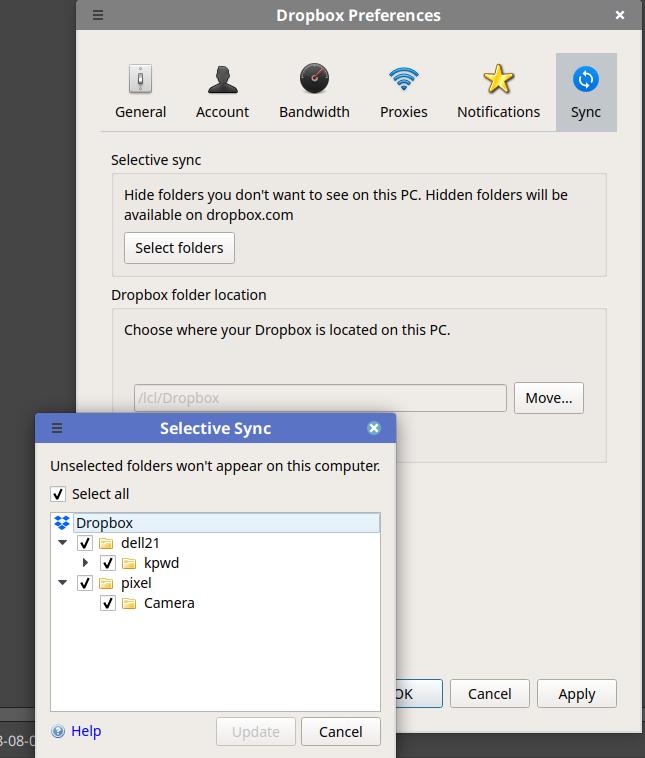 . There is no No "Backups" tab. So is the documentation wrong or am I looking in the wrong place?

