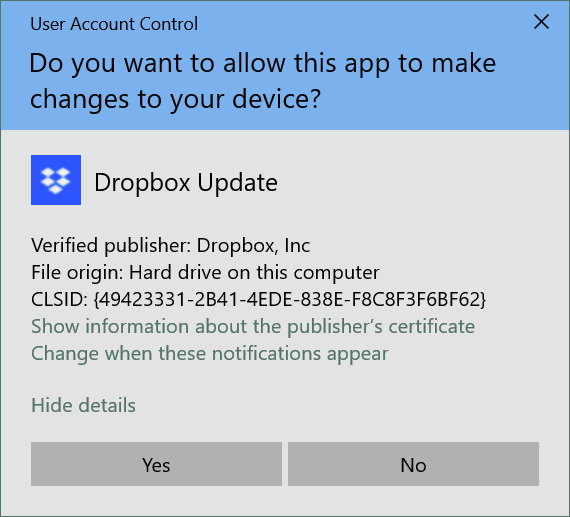
Windows (10) keeps telling me that Dropbox wants to change files on my machine. I get the Account Protection security pop-up window multiple times a day and sometimes there'll be dozens of them in the morning. What's going on?
Have you given it permission to do the changes?
As many times as it asks. Which is more than annoying.
Hi @jeffinbville - could you send us a screenshot of the notification you mentioned and clarify the Dropbox desktop app's exact status and version as shown in your system tray?
Did you install it with admin privileges on your machine in the first place?
It's been installed for years. The version is 200.3.7099 and the security thing it's looking to is: CLSID: {49423331-2B41-4EDE-838E-F8C8F3F6BF62}
Thanks, @jeffinbville.
It seems that you are using the beta version of the app (******.3.xxxx), which might not give you the most seamless experience of the app.
Can you turn off the "early releases" option here and then simply reinstall the app from this link and let me know if it helps?
Okay. All that is done. I guess if you don't hear from me again soon it's been resolved.
Thanks for your response.
Hey @jeffinbville. Have you made sure that UAC levels have been set to the default ones?
If yes, and you’re not on a free Basic account with more than 3 devices currently linked, I’d like you to uninstall and reinstall the Dropbox app as the next step.
Let me know if that fixes the issue.
This is the only program asking for permissions. Also, I reinstalled last night after two days of NOT getting these messages and now I'm getting them again.
Now, I've told Windows not to alert me when programs make changes to my computer and I'm not comfortable with that. There needs to be a better way.
Hey @jeffinbville, could you try the offline installer from this page directly and let us know how it goes?
Also, make sure to install it with admin privileges as outlined here.
I'm sorry, this isn't 1995 when uninstall/reinstall was all the rage. Besides, if you follow the thread it's been done. There's a setting in DropBox that changes something on my machine (most likely a log file or similar) that sets off an alarm that neither of my other two cloud-storage programs do. Now, it hasn't happened in 12 hours so there's hope. But if it continues on I'll need to go back to using Google Drive, and I'm okay with that, it's just not a preference to be with Google as much as I am.