Hello,
I'm on a MacBook Pro which is running the operating system, Sonoma 14.4
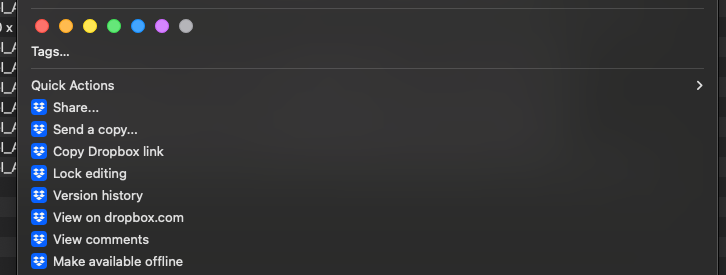
Starting a couple of weeks ago, I suddenly lost the ability to access the Dropbox desktop app "Quick Actions". I used to be able to select a file within the Dropbox app, right-click the asset(s) and have a variety of options made available. For example, here are some screen captures:
Before:
After:
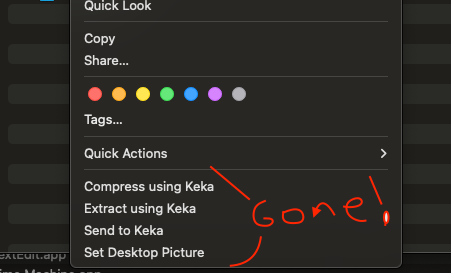
I tried uninstalling and reinstalling the app but have had no luck getting those options to appear again. I am currently on the Dropbox app version 194.4.6267
However, I am able to do a workaround and drag the file(s) to my actual desktop, thus forcing the sync. Then when I'm finished with the asset, I put it back into the Dropbox app and use the Dropbox icon available on the taskbar at the top of my screen to "manage hard drive space" and make the assets "online only" again.
Is this a compatibility issue between Dropbox and Sonoma? Colleagues of mine still on Ventura are not experiencing this issue and still have the quick actions available to them within the app.
Please let me know your thoughts - thank you!
















