I am having a weird pdf file name issue that is reproducible on both of my iPad devices. This is not a problem on my Android phone, or on my windows pc. It only affects a small number of pdfs which I have had no trouble downloading, opening, importing, resaving, attaching to emails for weeks. This issue appeared suddenly and with no apparent cause.
I can preview the files in the Dropbox iOS app, but when I try to attach one of the affected pdfs to an email in outlook, or if I try to download it from the iOS Files app, I get an error message:
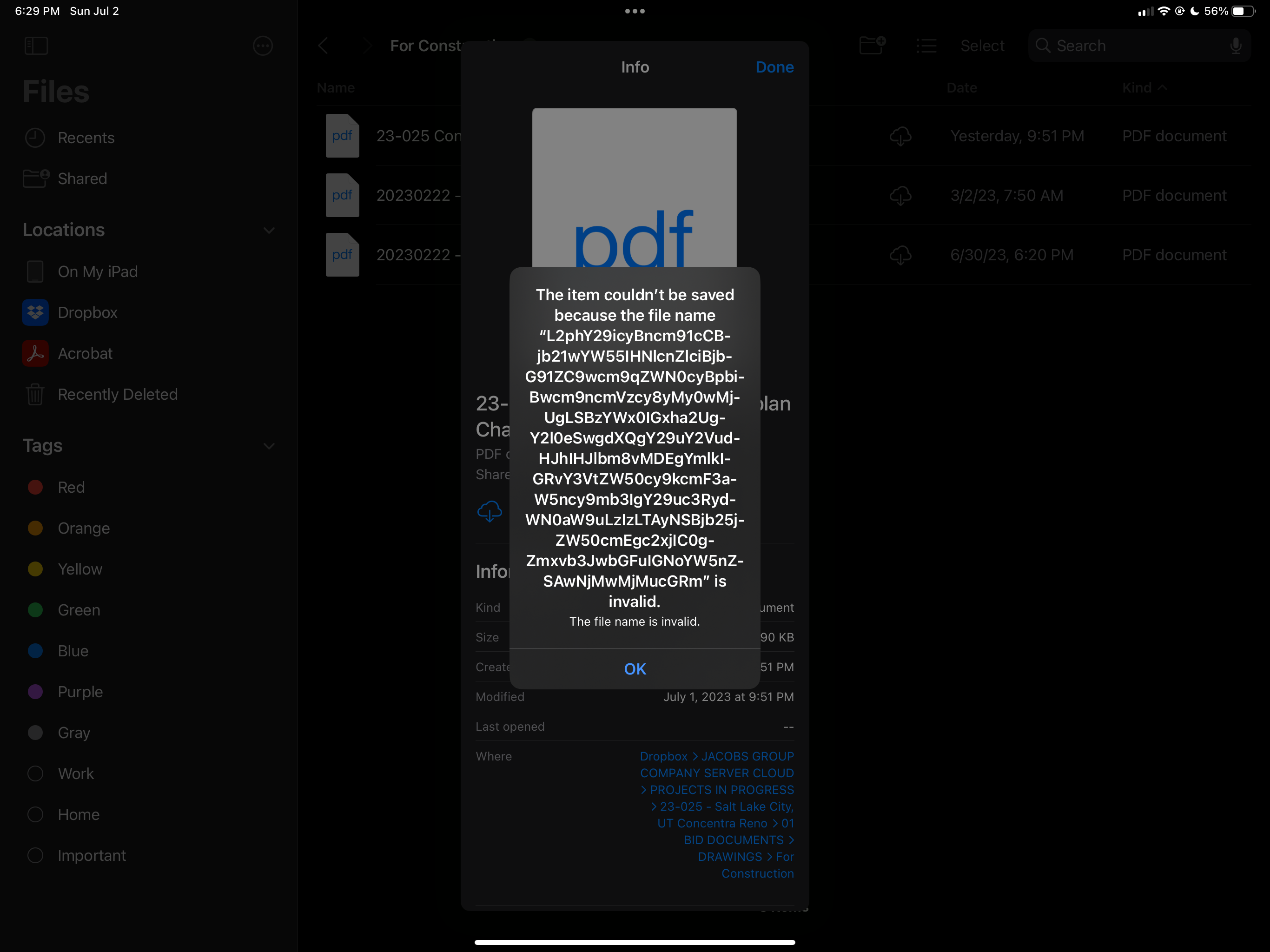
This is obviously not the actual file name. Each affected file has a unique erroneous file name, and it is the same for each file respectively between both of my iPads.
I have tried:
- Deleting and reinstalling the Dropbox app
- Deleting and reinstalling the Files app
- Removing Dropbox from the file locations in the Files app, and then adding it back
- Renaming the file(s)
- I actually can save the files to my iPad device front the Dropbox app and they become usable, but when I save them back to the Dropbox folder, even with a different name, the same thing happens
- Duplicating them in the Dropbox folder on my pc
It seems there is something about these files that has messed up the way iOS is reading the file names. No idea what to look at next. Really hoping I can figure this out soon. If not the cause then at least a way to resolve it. These files are essential to projects I am currently managing and I use my iPads to work with them a lot.

