Hi folks. I have no idea what happened but some time recently Dropbox started behaving INSANELY for a few days. I kind of ignored what was going on to get work projects out the door and now I am trying to discern what is happening.
Basically, my Finder (MacOS Ventura 13.4.1 (22F82)) randomly hangs/crashes (SBBOD) whenever I try to do some basic stuff like open a file, or open a file within a programme, or send something to the bin.
I have used Dropbox for years and have happily worked with my Documents Folder being with my Dropbox folder and it all has worked perfectly.
Last year, there was some sort of kerfuffle with a message offering to back up my whole computer (and virtual PC) which I may have accidentally clicked but things went awry and I think I switched back off.
That was about a year ago.
Today, I found out Ventura has shifted all Cloud Storage folders to a folder within the Library.
From the screenshot I can see that Dropbox appears as a folder within CloudStorage, as it probably should be.
However, my computer Documents folder is where it should be, on my Mac, but THAT is also in the Dropbox folder within CloudStorage.
What is going on? How does this work?
Might this explain why I am having permission issues opening folders and files? And may this confusion have something to do with my Finder not knowing where stuff really is?
Any help greatly appreciated.
 Edited by moderator
 Edited by moderator
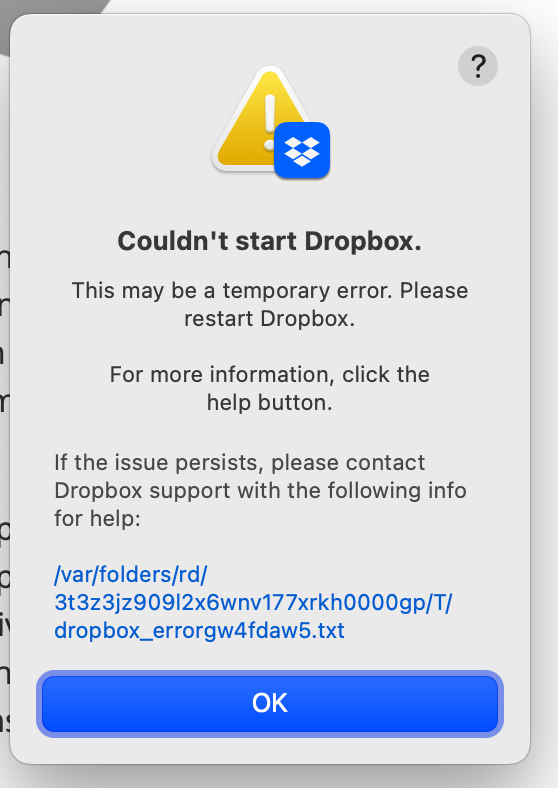
I also have been getting this error message a few times when Rebooting over the last few weeks. Maybe it's connected? I dunno...



