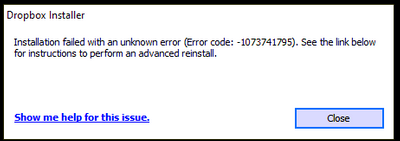
I keep getting the same error over and over again.
I have tried every suggested resolution and nothing has worked. Anyone?
Our engineers have put out a new Beta Build: 150.3.4929, which fixes the 'Installation failure: Error code 1073741795'. You can find details about the fix, and how to install it, here.
Hey @mwochoa, thanks for the nudge and sorry to hear you're having issues with this.
If you haven't reached out to our Support team yet, may I reach out via email to have a further look into this matter with account and device specific information?
I was asked by the dev-team to run a command line install and send back the stack-trace to them, and so I did. Let's pray this contains helpful information for them to debug 🙂
Thanks for the update @yho123456 - let us know if you need anything else!
Nothing yet. So far they're asking me to send error logs for an app that won't install.
Hey @AppoCaly, thanks for the nudge on this.
I just wanted to let you know that the team is still working on this and we'll let you know once we have an update to share.
In the meantime, you can try older builds of our desktop app from this page, but note that they'd automatically update to the latest version eventually.
Cheers!
Thanks Walter. The point being raised by several of us now is that Dropbox has deliberately disabled the protocol used in older versions, which is why everyone who cannot upgrade also cannot sync for almost two months now. Reverting this would at least give us the possibility to sync our data. This is why this has been requested multiple times but has yet not been responded to from a technical point of view.
Adding that there are several replies in this thread where users advised that they'd already tried installing previous versions but were unable to log in as it asks for the most recent version. Has something changed on dropbox's end in the meantime?
I'm not sure why this issue is marked "resolved" when it is not. In every other forum I participate in, "resolved" means a solution has been found and implemented.
Dropbox's handling of this has been atrocious. This is a critical productivity app. . .one where your entire data security is based on the ability to sync. That it has been months with no resolution is stunning. I need to find another data option. This is ridiculous.
Last night I received an e-mail on my ticket that the dev-team may have resolved this issue. The patch is a beta-build, so only for those dare devils among us.
https://www.dropboxforum.com/t5/Dropbox-desktop-client-builds/Beta-Build-150-3-4929/td-p/599328
For me the issue has been resolved. Thank you so much dev-team.
And please be fair and consider to extend our paid plan by two months..
Also received same email, but not being a daredevil, I look forward to seeing this fix incorporated into the next stable version.
The beta build worked for me!! https://www.dropboxforum.com/t5/Dropbox-desktop-client-builds/Beta-Build-150-3-4929/td-p/599328
Tested the build out one of our laptops that was having the issue and it seemed to install fine. Thank you so much Dropbox Team for getting this issue resolved!
That new beta version worked for me as well. Thank you!!
Glad to see all the happy users. 😍
Dropbox Support emailed me that the next stable release (150.******) which includes this fix should be available mid-next week.
Hi all,
I cannot confirm it, same error code appears when I try to install dropbox: 1073741795.
I have a German dropbox version here.
Hey @jackbau, sorry to jump in, but did you try the latest beta build of our desktop app found on this page?
Hi Walter,
yes I tried both the offline version 150.3.4929 and the standart installer from this link. Also tried to install when I just started the pc.
I still get the same error message 1073741795
Regards
Jack
Sorry to hear this persists @jackbau
Can you confirm that you've enabled the 'early releases' through your account's settings online?
If you did that before trying to install the latest beta version of the desktop app, could you try removing any traces of the app completely from the affected computer using the steps outlined here?
Once you're done with uninstalling the app, you can try the latest beta version from this page directly.
Let me know how it goes, Jack.
Installation finally working on my computer again! v.150.3.4987!
Thanks to the dev and support teams!
What was the issue related to? New writing writes on windows?
I can now also join the crowd with a happy dance! Stable version 150.4.5000 for Windows desktop did it for me. Thank you DB for the efforts made.
There are still a few odd issues with deleted folders suddenly showing up, but I'm working directly with support to understand what happened.
@AppoCaly already said, Dropbox, please don't do this again!
Didn't work, error code persists.
Hi, I've tried everything it was said in the forum and had no results. Still having the same error.
Any additional help? Thanks!
Hi Everyone,
I'm currently running an old Win7 desktop with 4 GB ram and 1 TB drive, which doesn't get used that much these days, but occasionally I fire it up for a particular app. Dropbox has been installed for years without issue but on attempting to log-in it informed me that the current version was out of date.
I have successfully downloaded versions 150.3.4929, 155.4.5495, 157.4.4801 and 158.4.4564 but can only install v.150.3.4929. Attempting to install the other versions produces an error code 1073741795, which gave an unhelpful link. On searching through the community pages it does appear that this has been an ongoing problem for some time but doesn't appear to have been fully resolved, as far as I can gather. Is there anyone at Dropbox who might be able to shed some light on this rather vexing problem ? I have tried all the suggested remedies to no avail, so I am now wondering if it might be an issue with Win7 as it is not mentioned in the DB Windows drop-down list of operating systems.
Any help in this matter would be appreciated.
Ian
Hollo, I've tried this soltion and no success. Is there any other option? I would like to continue using Dropbox.
Thanks!
Hi @hlussiatti, welcome to our Community!
Have you tried all the troubleshooting steps mentioned throughout this thread, including the offline installer? If so, do you still get the same message?
Let me know more, and we'll take it from there!
Hi @Megan. Thanks a lot for your reply.Yes, I've tried every solution proposed in the the forum. I've tried using Beta Build: 150.3.4929, the newest version and several old versions. I also have tried on line and off line installer, deleting all files in the registre and still having same error.
Hey @Idelone, thanks for your report.
It's true that Dropbox no longer supports Windows 7. The minimum requirement is now Windows 8 or higher. That said, your results when trying to install the desktop app may vary, exactly as you noticed.
I know it's not much, but I hope this helps to some extent, Ian.
As for you now @hlussiatti, could you try a clean, advanced reinstall and let us know how it goes?
Just make sure to toggle off the early releases from your account's online settings to avoid reinstalling a beta version and download and install the desktop app from this page directly.