Dropbox just tried to UPLOAD over 400GB of data I had on an external USB drive I attached to my laptop through its External Drives Backups "Feature".
This is NOT good. This should NOT be default behavior. HOW do I stop this default behavior once and for all? For the past hour I've looked into different Settings:
- There doesn't appear to be an option for this in the Dropbox app settings. The only option I see on the Backups tab pertaining to this External Drives Backups "Feature" is to "Show setup notifications when new external drives drives are plugged in" which doesn't sound like disabling the "Feature" PERMANENTLY.
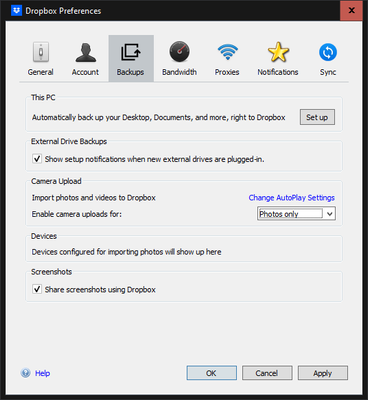
- "External Drives Backups" doesn't appear to be a folder under the "Sync" tab when configuring "Selective Sync" which I utilize on my various laptop and desktop PC's.
- On the "Automations" tab on my Dropbox.Com Settings there is nothing pertaining to "External Drives Backups" either.
It is ridiculous to think that any software would want to, BY DEFAULT, automatically transfer the entire contents of an external hard drive to the cloud. Thank goodness I didn't attach my 14TB external hard drive to my laptop!

