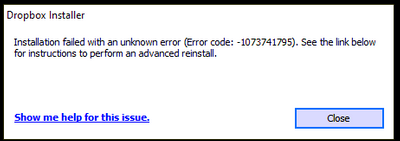
I keep getting the same error over and over again.
I have tried every suggested resolution and nothing has worked. Anyone?
Our engineers have put out a new Beta Build: 150.3.4929, which fixes the 'Installation failure: Error code 1073741795'. You can find details about the fix, and how to install it, here.
Our engineers are aware of the 'Installation failure: Error code 1073741795'. We apologize for this inconvenience and are working to find resolution.
Thanks @Megan, I probably wouldn't have found that link just on myself. I have reported the issue and mentioned that I am willing to help test things if this is helpful to the dev team.
I can't believe there is no resolution to this issue. . .I'm seriously contemplating using a different service. I need to have access to my data on all my devices. This is nuts.
Awesome job there, @yho123456! Thank you for taking the time to mention it here, and also for helping out the team with this! 😊
Also, @mtesta, please bear with us. I know this isn't ideal, but our team is working hard in order to get this resolved. I'll definitely make sure to update you when I hear back from them.
If you need anything else, let me know.
I did the full reinstallation https://help.dropbox.com/fr-fr/installs-integrations/desktop/advanced-reinstall and still the same !
What a big s. !
Any news from the dev team?
Seriously, this needs to be addressed. It's been weeks.
It looks like DB support rolled the other threads into one https://www.dropboxforum.com/t5/Dropbox-installs-integrations/Installation-Failed-Error-Code-1073741795/td-p/563661 and it's been marked "solved" because the engineers are aware of the issue and working on finding a resolution, we're sorry for the inconvenience.
@Megan I trust DB support will update everyone whose posted to this thread or the other threads that were rolled into it. Thanks
Hi Hannah, that is one of the details exacerbating the issue. I can never get past step 2 as every uninstall attempt is met with this every time:
I cannot uninstall the app to begin with in order to perform a re-install.
Thanks for the nudge here, @Kyle mcGill.
If you're not able to uninstall Dropbox, please follow these steps:
Once this is done, try to uninstall once again, to see if it works.
Hmm, the only process I see in the list from Dropbox is when I attempt an uninstall:
Clicking "end process/task" gets me this:
Launching the troublshooter retries the uninstall only to get the same result- an uninstall failure.
Hey @Kyle mcGill, hope you don’t mind if I jump in.
Since the same issue persists, I can open a ticket for you and send it over to your Community email address.
Let me know if that’s alright.
Sure Nancy, thank you.I'll keep an eye out for it.
I just opened a ticket for you!
When you’ve got some time, please reply back to me, and we’ll further check this.
Cheers.
Is there ANY update on the original purpose of this thread??? This is absolutely ridiculous. I'm about to just wipe my whole system and start all over again. How does a program that is working perfectly just stop after an update. And why doesn't it happen on my laptop or other devices. Please get us an answer to this ASAP.
Is someone actually working on this??? It’s been weeks with zero answers. How can that possibly be???
Indeed, first line support and requesting us to open and report tickets in detail went well, using dropbox-snapshot, which did install flawlessly, also worked well. Paying my dropbox subscription also went perfectly. Getting any second (line?) response to the reported issue takes at least a month (if any?). Please Dropbox, I built my private and work environment around cloud accessibility and paid for this. Is there any idea where this error can originate from so that I can resolve it myself? Installers of any other type of software, including dropbox snapshot, work perfectly. Please, even if you do not aim to further fix this, update us so we can cancel our subscription and move on with an alternative, because this affects in particular my professional life seriously.
@Nancy @Megan @Emmet (this issue has not been resolved actually) @Jay @Hannah
Hi everyone, I hope you're all doing well!
As @JenTo correctly mentioned, we will update this (and any other related threads) once we hear back from our Team about the issue. Trust to know we won't leave you hanging!
In the meantime, feel free to share your ticket number here, so I can locate it on our system. If you don't have one, you should be able to open it, by visiting this page from an incognito tab on your browser if you're using a Basic account.
A normal tab if you are using a paid plan. If you have any issues doing so, let me know and I can help you out.
Thank you for your time guys!
Thank you for the ticket number, @mastamack!
I can see that the agent that worked on your case, asked for a screenshot in order to continue troubleshooting. However the ticket seems to have been closed due to inactivity because you didn't respond back.
Can you try submitting a new one?
Thanks!
Can you check my ticket as well. There has been no movement on this at all.
#16096099
16212401
Hey guys, thank you all for sending me your ticket numbers!
I've located all of them, and passed your comments to the agents working on your case.
I appreciate your patience, while our Team is looking into this. If you have any other questions, I am always one post away.
At the beginning of May I downloaded and attempted to install the full Windows offline installer 147.4.4800 which ended in the same error as before.
Following the failure, I contacted Support to ask if there was any progress and was told that this version (147.4.4800) should have fixed the issue, however, it didn't for me.
Hi @JenTo, happy Wednesday. How are you today?
Have you responded back on said ticket number, to let our Team know that the problem remains for you?
I'd be happy to locate your ticket number if you wish to share it with me too.
Thanks a bunch!
Yes, I did let them know.
Is there an update to this issue? It it starting to cause an issue with our business continuity as many of our users are not accustomed to having to switch between the web or the S mode.